Your gym routine falls apart when you travel?
A trip rarely breaks a gym habit by itself. What breaks it is treating the trip as a pause: no gym, so no training, so no log, and the routine has to restart from zero when you get home. Plan a smaller travel version, log whatever you do on the road, and the habit keeps running through the trip.
Why travel knocks the habit over
At home your training leans on fixed cues: the same gym, the same time, the bag by the door. A trip removes all of them at once. Add early flights, long days and different meal times, and the default becomes doing nothing.
The bigger damage usually comes after. A week with no sessions turns into "I'll restart properly next Monday", and the first week home is spent catching up on everything else. Keeping even a thin thread of training through the trip makes the return much smaller.
Plan a travel version before you leave
Decide on the road version while you are still at home, where planning is easy:
- Fewer sessions, same days if possible. Two short sessions on a five-day trip is a good result.
- Shorter sessions. 20 to 30 minutes in a hotel room or a park is enough to keep the habit. This is maintenance, not progress.
- No equipment needed. Pick a bodyweight circuit you already know, so there is nothing to look up in a hotel room at 22:00.
- Check the hotel. If there is a gym, note the opening hours. If not, a run or a long walk counts as a session too.
- Pack for it. Shoes and one set of training clothes go in the bag first.
And write down the day you restart your normal plan at home, ideally the first or second day back.
Log every session on the road
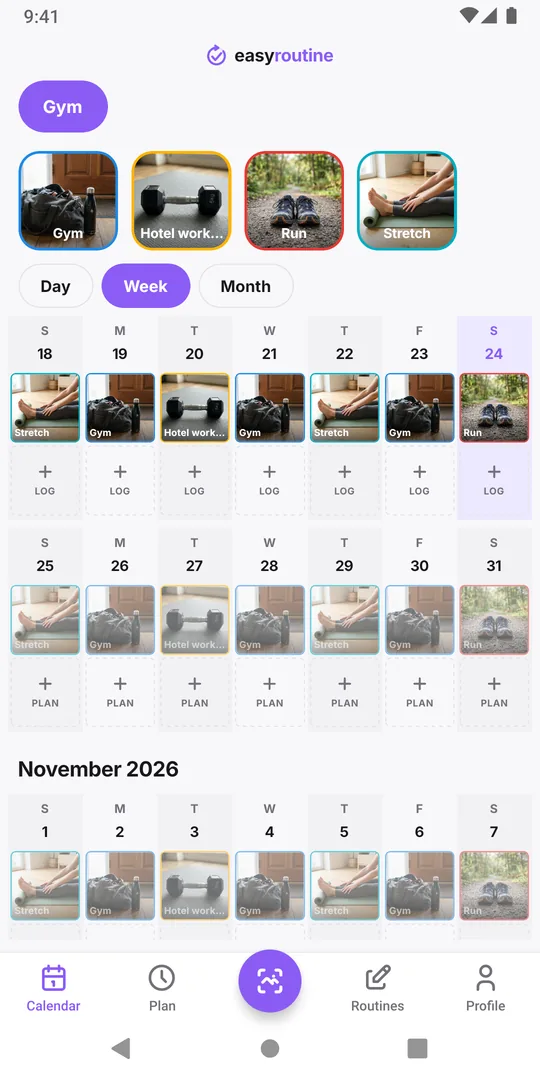
Logging matters more on a trip than at home, because nothing else marks that you trained. In EasyRoutine, add a Hotel workout activity to your Gym routine next to the usual sessions, or simply log your normal activity and add a note like "hotel room, 20 min bodyweight" or "run along the river, 5 km". Tap Log on today and pick the session; you do not need a photo or equipment to log. If you lifted in a hotel gym, write the weights in the Comment too, for example "squat 5x5 at 60 kg": the next time you log that activity, the log sheet shows your last comments under Previous comments, right above the Comment field, so you see what you lifted last time.
Two practical points for travel:
- The app needs a connection. EasyRoutine has no offline mode. On a flight or without roaming data, log the session once you are back on Wi-Fi, on the day it happened, and set the time.
- Late logs are fine. A session logged the next morning counts on its own day in the calendar and the Day streak.
Keep the streak and the history going
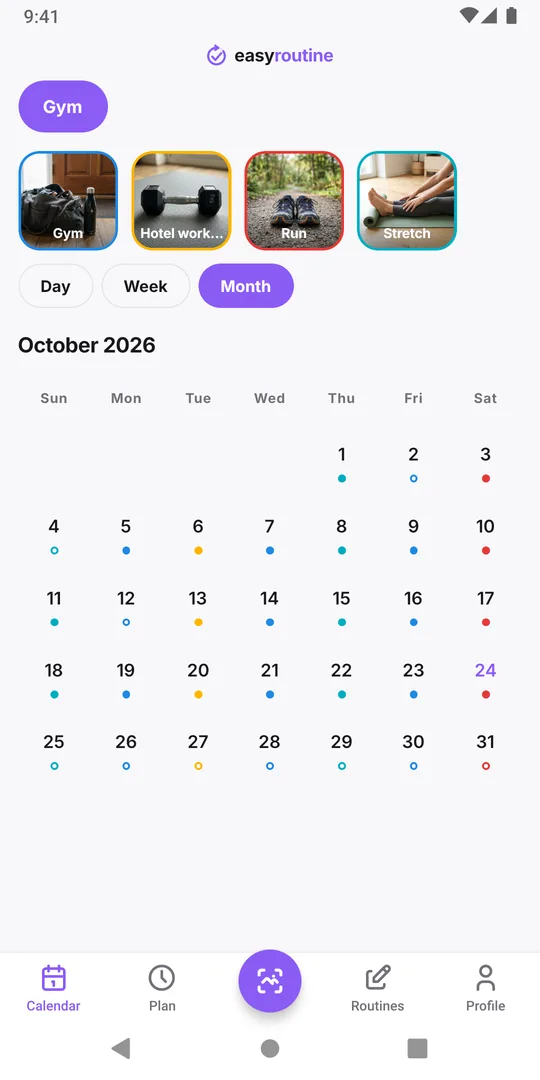
Every session logged on the trip stays in your calendar next to the ones at home. Back home, the month view shows the trip as a thinner stretch rather than an empty gap, and that is a more accurate picture of what happened. If you track a streak, the Day streak counts days with any log in any routine, so a hotel workout, a run or anything else you logged keeps it alive through the trip. Does a rest day break your workout streak explains the counting in detail.
With a schedule: what to do about planned sessions (Premium)
If your gym days are scheduled in the Plan tab, planned sessions you do not log during the trip show as faded entries. That is honest and usually fine for a short trip. For a longer one, you can end the usual slot with an Until date the day before you leave and add it again From your first day back, with a smaller travel slot in between. Pausing a schedule and the workout log page cover the details.
Common questions
Can I log a workout without internet while travelling?
No. EasyRoutine needs a connection to log. Log the session later, on the day it happened, and set the time; it counts on that day.
Should I log a hotel room workout the same as a gym session?
Either works. A separate Hotel workout activity lets you see travel sessions apart from gym ones; logging the usual activity with a note keeps the setup simpler.
Will my reminders still fire in another time zone?
Reminders are local notifications on your phone, so they keep working while travelling. Check that the times still make sense for where you are.
Does a trip with no workouts reset everything?
Only the Day streak, if nothing at all was logged on a day. Your past logs, the calendar and your total of completed logs stay as they were.
Keep reading
- Simple workout log app or full tracker: which one is best for you?Gym tracker app or simple workout log? What a full set and rep tracker does well, when logging that you trained is enough, and how to keep it useful.
- Weekly workout split template: three splits to copy and logCopy a 3, 4 or 5 day weekly workout split template with weekdays and times, see who each one suits, and check which sessions you actually did each week.
- Track a new gym routine when you are just starting outJust joined a gym? A first-month plan that starts small, fixed gym days, and a simple tracker that shows whether you went. No sets or reps to fill in.
- Does a rest day break your workout streak?A planned rest day only breaks the Day streak if nothing at all is logged that day. How the streak counts, what keeps it going, and a better measure.
- Always quit a new gym routine after a few weeks?Strong start, then the gym fades out by week four? Why it happens, how to restart smaller, and a log so light you keep using it after the first rush.
- Forget which exercises you did last session?Can't recall what you did at the gym last time? Write one line per session, like the key lifts and weights, and read it back before the next one.
- Losing motivation because you can't see your workout streak?Need to see your gym streak to keep going? Make consistency visible with a running streak, a total of sessions and a month of logged workouts.
- Not training legs enough compared to your other days?Think you skip leg day more than the rest of your split? Log each split day separately and count a month of push, pull and legs sessions side by side.
- Which days did you actually train this month?Reviewing a training block or deciding whether to keep a plan? See every session you logged this month at a glance and read what the pattern says.
Free on iPhone and Android. Sign in with Apple, Google or your email to start.