Track a new gym routine when you are just starting out
Did I actually go three times this week? When the gym is new, that is the question that matters, not how much you lifted. EasyRoutine logs that a session happened in a few taps and shows your gym days on a calendar, so the habit is easy to see while it forms. Logging is free; with Premium you can also plan your gym days and get a reminder before each one.
Set up your gym routine in two minutes
Create a routine called Gym and add an activity for each kind of session you do. For a beginner that could be:
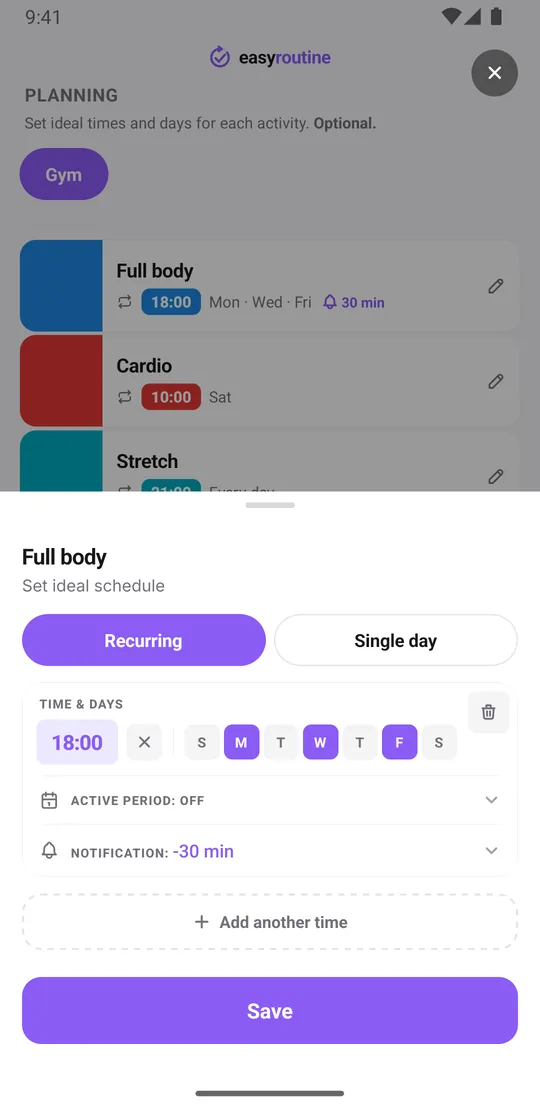
- Full body on Monday, Wednesday and Friday
- Cardio on Saturday morning
- Stretch every evening, ten minutes at home
If you follow a program with different days, like push, pull and legs, make each one its own activity so you can see which you did. The weekly workout split template shows a few common setups. Give each activity a color so the calendar reads at a glance, and a photo if you want to log it with the camera later.
Log a session in a few taps
Logging is free. After the workout, tap Log in today's day view, pick the activity and tap OK: it is logged with the current time. With a Premium schedule you can instead tap the faded planned session and save the Log Entry sheet. If you want to remember something, tap the logged entry and add a short note, like "first time on the rowing machine" or "legs, felt strong", and a green, amber or red flag for how it went.
If the activity has a photo, such as your gym bag or the card you scan at the door, you can also log it from the Scan tab by pointing the camera at it. The scan only matches your own activities that have a photo. Forgot to log? Add it to the right day afterwards.
Plan your gym days and get reminded
With Premium, the Plan tab lets you put each activity on its weekdays, with a time: full body on Monday, Wednesday and Friday at 18:00. Planned sessions show as faded entries on the calendar until you log them, so a skipped Wednesday stays visible. Following a beginner program for eight or twelve weeks? Give the slot a From and Until date and it stops on its own when the program ends. An activity can hold up to four recurring times.
Add a reminder to the slot, on time or 5, 10, 15 or 30 minutes before. Thirty minutes before is a good moment to grab the bag and leave. You only get reminded on gym days. Scheduling and reminders are part of Premium; logging and the calendar are free. More about scheduling and reminders.
See your consistency on the calendar
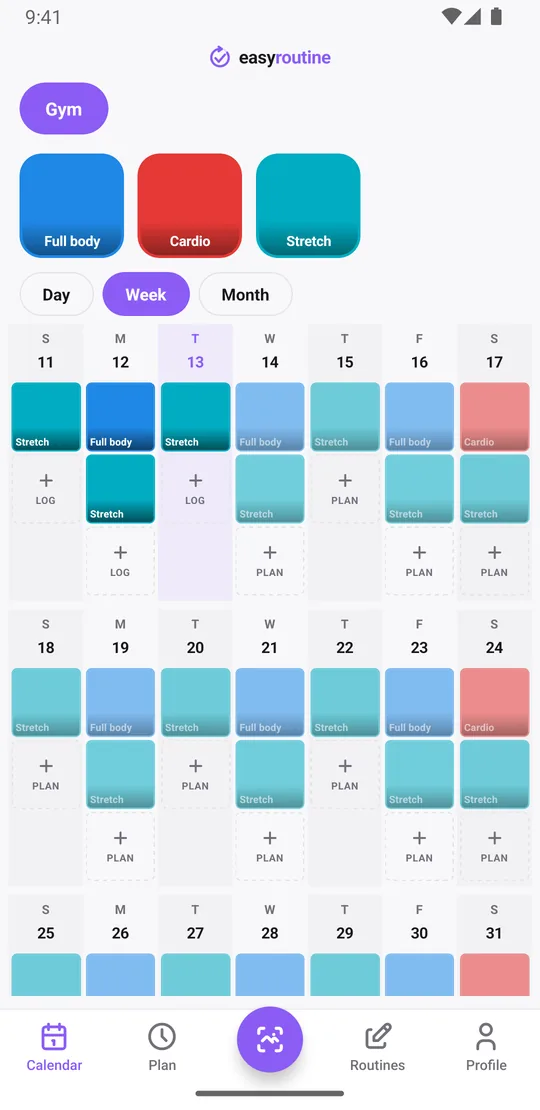
The week view answers "did I go three times?" in one look: each day shows a tile for every session you logged and faded entries for planned ones you missed. The month view shows the bigger picture, which matters most in the first few months, when the goal is simply to keep turning up. Notes stay with each log: tap a logged session to open its Log Entry sheet, which also lists your last few comments for that activity, handy for remembering when you started a new exercise.
To answer "when did I last do cardio?", tap the Cardio tile at the top of the calendar: the calendar then shows only that activity, so the last tile is your last cardio session.
How the streak works with rest days
The Day streak on your profile counts days in a row on which you logged at least one activity, of any kind. It is not tied to the gym or to your schedule, and there is no grace day: a day with nothing logged resets it.
That matters for a gym habit, because rest days are part of the plan. If the gym is the only thing you log, the streak will reset on every rest day. Two ways to handle it:
- Add a small daily activity, like the evening stretch, so rest days still count.
- Or ignore the streak and judge yourself by the week view: three sessions in a week is a good week, whatever the streak says.
A lighter log than a fitness app
EasyRoutine records that a session happened, and when. It does not track sets, reps, weights or distances, build training plans, or connect to a watch or Apple Health. If you want to follow progressive overload in detail, a dedicated workout app is the better choice; EasyRoutine vs a workout app compares the two honestly.
What a lighter log does well is stay out of the way. A few taps after each session are as easy to keep up in month three as in week one. And if your gym start is a New Year's resolution, the other seasonal guides help with the rest. The workout log.
Common questions
How do I track whether I went to the gym each day?
Add the gym as an activity in EasyRoutine and log it after each session with the Log button on the day, or by tapping its faded planned entry if you have a Premium schedule. The week and month views then show every day you went.
Is there a simple app to log workouts without counting sets and reps?
Yes. EasyRoutine records that a workout happened and when, with an optional note and flag. There are no sets, reps or weights to fill in.
How do I build a gym streak?
The Day streak counts consecutive days with at least one log of any activity. Because rest days would reset it, add a small daily activity like stretching, or judge your consistency by the number of sessions in the week view.
If I miss a day, does the streak reset to zero?
Only if you logged nothing at all that day. There is no grace day, but any activity counts, not just the gym.
Keep reading
Free on iPhone and Android. Sign in with Apple, Google or your email to start.