I forgot to feed my sourdough starter: a simple feeding tracker
Forgetting to feed a sourdough starter usually means one of two things: nothing reminded you, or you could not remember whether you already fed it. A feeding log answers the second in a glance, and a reminder at your usual feeding time (Premium in EasyRoutine) handles the first.
First, look at your starter, then at your plan
Whether a starter that missed a feed can simply be fed again, or needs a few feeds to get going, depends on the starter, the flour and the room it lives in. Go by your recipe, or by whoever gave you the starter, rather than a rule from an app. This page is about the other half of the problem: not losing track next time.
Write your feeding plan down in one line, in your own words, because "feed it regularly" is easy to forget and hard to check:
- Where it lives. On the counter or in the fridge. The two are fed on different rhythms, so note which one your recipe gives you.
- When you feed it. Clock times or days, such as "08:00 and 20:00" or "Sunday morning".
- What a feed is. The ratio of starter, flour and water you use, so anyone in the house can do it the same way.
- What happens before a bake. If your recipe builds a levain or calls for an extra feed the evening before baking, put that in the plan with its day.
Why feeds get missed
A feed takes two minutes and leaves no trace you can read later. The jar looks much the same an hour after feeding as it did before, so "did I feed it this morning?" has no good answer by lunchtime. Common gaps:
- Weekend mornings start later, and the morning feed slides into the afternoon or disappears.
- Two people in the kitchen. One feeds it, the other does not know and feeds it again, or each assumes the other did.
- Between bakes. When there is no bread planned, the starter falls out of mind.
- Moving it to the fridge and back. The rhythm changes, and the old habit no longer fits.
The low-tech fix is a strip of tape on the jar with the date and time of the last feed, or a rubber band at the level after feeding. Both work until someone forgets to update them, which is where a log helps.
Log every feed in EasyRoutine
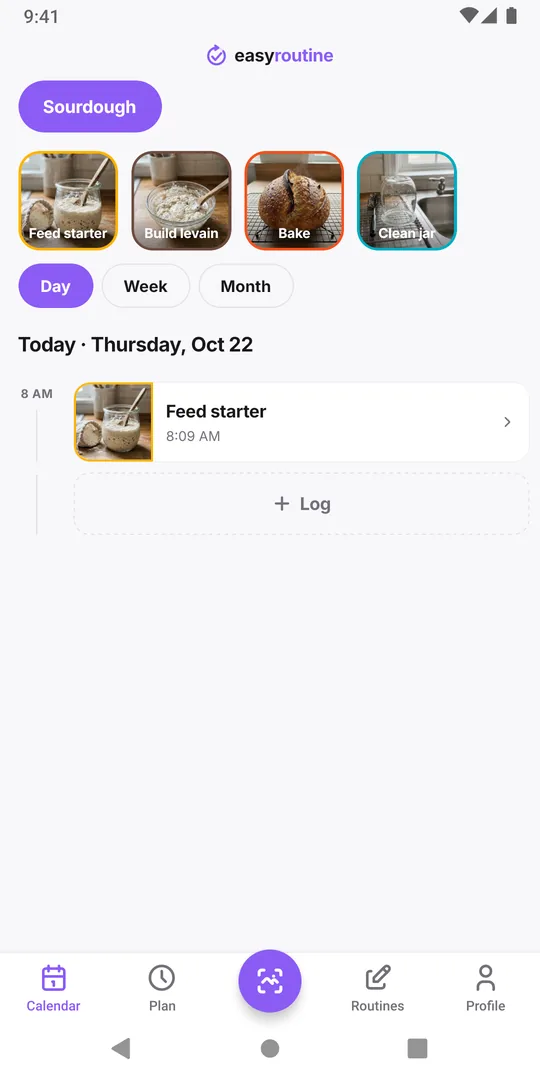
Create a routine called Sourdough and add an activity Feed starter. Add Build levain and Bake if you want the whole bake on one calendar, and Clean jar for the occasional fresh jar.
After each feed, tap + Log on today, pick Feed starter and save. It is logged with the current time. Fed it earlier and forgot to log? Add the log afterwards and set the time to when you fed it.
The log can hold a note and a red, amber or green flag, which is handy for the things you would otherwise forget: "doubled by 13:00", "new rye flour", "sluggish, warm spot tomorrow". Over a few weeks those notes show you how your starter behaves, which no general rule can.
To answer "did I feed it today?", open today in the Day view. A solid Feed starter entry with a time means yes. For a fridge starter fed once a week, switch to the Week or Month view to find the last feed.
A reminder at feeding time (Premium)
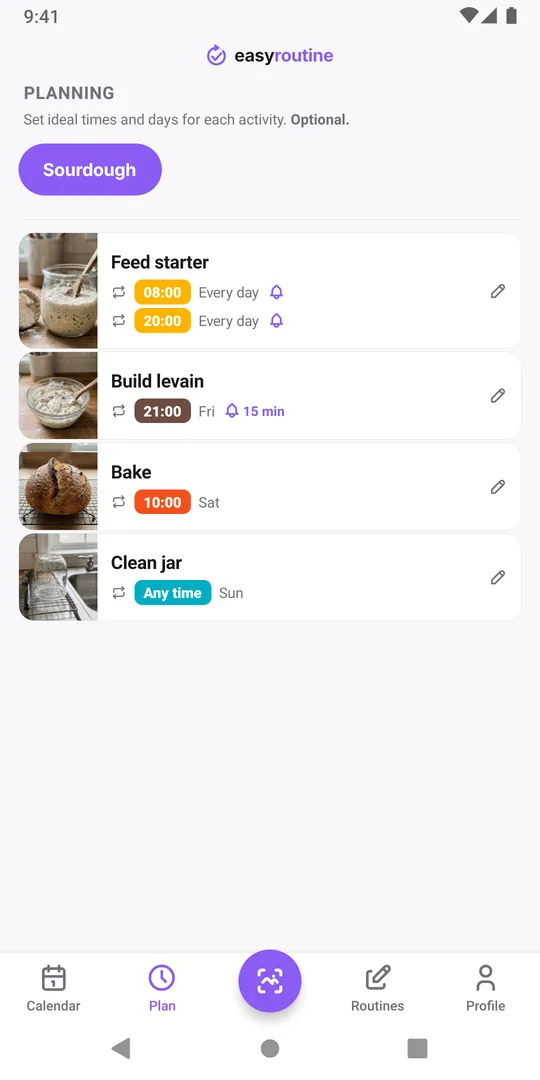
With Premium, open the Plan tab and give Feed starter a Recurring time on the days you feed it, for example every day at 08:00 and again at 20:00. One activity holds up to four times a day. Turn on the reminder, On time or a few minutes before, and the phone will tell you when a feed is due. Until you log it, the planned feed stays faded in the Week and Day views (a hollow ring in the Month view), so a missed one stands out.
Schedules repeat on chosen weekdays; there is no "every N days" rule. For a fridge starter fed weekly, pick the weekday. For something on an irregular rhythm, add Single day plans for the dates, such as the evening before a planned bake for Build levain. More on scheduling and reminders.
Sharing the starter with your household
If two people feed the starter, the simplest setup is one EasyRoutine account signed in on both phones with the same email address: both see the same feeds, and a note like "Sam" says who did it. Everyone signed in can also edit or delete everything in that account, so only share it with people you trust. Giving a piece of your starter to a friend? You can send them your routine by link so they get the same activities, though your logs and schedules are never part of it. See how sharing works.
Common questions
Is there a free sourdough starter feeding tracker in EasyRoutine?
Yes. Logging feeds, notes, flags and the calendar are free. Planned feeding times and reminders need Premium.
Can it remind me every few days instead of on fixed weekdays?
Not with a repeating rule. Schedules repeat on chosen weekdays. For an irregular rhythm, add single-day plans for the dates you want, with Premium.
How often should I feed my starter?
That depends on your starter, your flour and where you keep it, so follow your recipe or the person who gave you the starter. The app records when you fed it; it does not set the rhythm for you.
Can I note how the starter looked after a feed?
Yes. Each log can have a note and a red, amber or green flag, so you can record things like how much it rose and when.
Keep reading
Free on iPhone and Android. Sign in with Apple, Google or your email to start.