Meal prep app: see whether you actually prepped every week
Did I prep last Sunday, or did we end up ordering in all week? EasyRoutine works as a simple meal prep app: it logs each prep session in a few taps, with a note on what you cooked, and keeps it on a calendar. Logging and notes are free; turning it into a meal prep calendar with planned days and reminders is Premium.
Set up EasyRoutine as your meal prep app
Create a routine called Meal prep. The simplest version has one activity, Batch cook, that you log every time you cook for the week. Most people get more out of splitting the steps that tend to fall apart:
- Plan menu: deciding what to cook
- Groceries: the shopping trip
- Batch cook: the main session
- Midweek prep: the top-up when the boxes run out on Wednesday
Separate activities show you where the routine breaks. If the groceries get logged every Saturday but the batch cook keeps going missing, you know the problem is Sunday afternoon, not the shopping.
Each activity gets its own color, and you can give it a photo (your stack of containers, for example) so the tile is easy to recognize. EasyRoutine can suggest a name from that photo. If you also prep breakfasts or a separate batch for the kids, give that its own activity rather than squeezing it into Batch cook.
When did you last cook a batch?
When the boxes are in the fridge, log Batch cook: tap + Log on the day, pick the activity, and it lands on the calendar. Forgot to log on Sunday? Add it to Sunday afterwards and set the time you actually cooked.
To answer "when did I last cook?", tap the Batch cook tile at the top of the calendar. The calendar then shows only that activity, so the most recent entry is your last batch, and in the month view you can see how far apart your sessions really are. Tap Midweek prep instead and you see whether the Wednesday top-up ever happens. All of this is on the free plan.
Write down what you cooked, and how many portions
Every log has room for a comment and a green, amber or red flag. That turns the calendar into a cooking diary. Things worth writing on a Batch cook log:
- What you made: "chili and rice" or "chicken traybake and roast veg"
- Portions and where they went: "6 boxes, 2 in the freezer"
- How it lasted: "ran out Thursday" or "too much, binned 1 box"
- What to change: "double the rice next time", "less chili for the kids"
The flag gives you the verdict at a glance: green for a week that went to plan, amber for a batch that was fine but too small, red for the one nobody wanted to eat.
When you open the log sheet for Batch cook, it shows your last few comments for that activity. That is the quickest way to pick something when you are stuck for ideas, to avoid cooking the same curry three weeks running, or to repeat a batch that worked. Comments do not appear on the calendar itself; open a log to read its note.
The log's date doubles as a freezer label. If Sunday's note says "2 boxes of chili in the freezer", you know exactly how old they are without writing on the lid.
Find the step that keeps slipping
After a month or two the record answers questions you would otherwise guess at:
- Which step breaks first? Filter by each activity in turn. A solid row of Groceries with gaps in Batch cook points to Sunday afternoon; gaps in Plan menu usually come first and drag the rest down.
- Which dishes repeat? Scroll the recent comments on the log sheet to see what you actually cook, not what you meant to cook.
- What size batch works? Notes like "ran out Wednesday" next to red or amber flags show when you need more portions or a midweek session.
- Did skipping prep cost you? If you also log takeaway nights as an activity, the month view shows whether they cluster in the weeks without a batch cook.
Plan your prep days with Premium
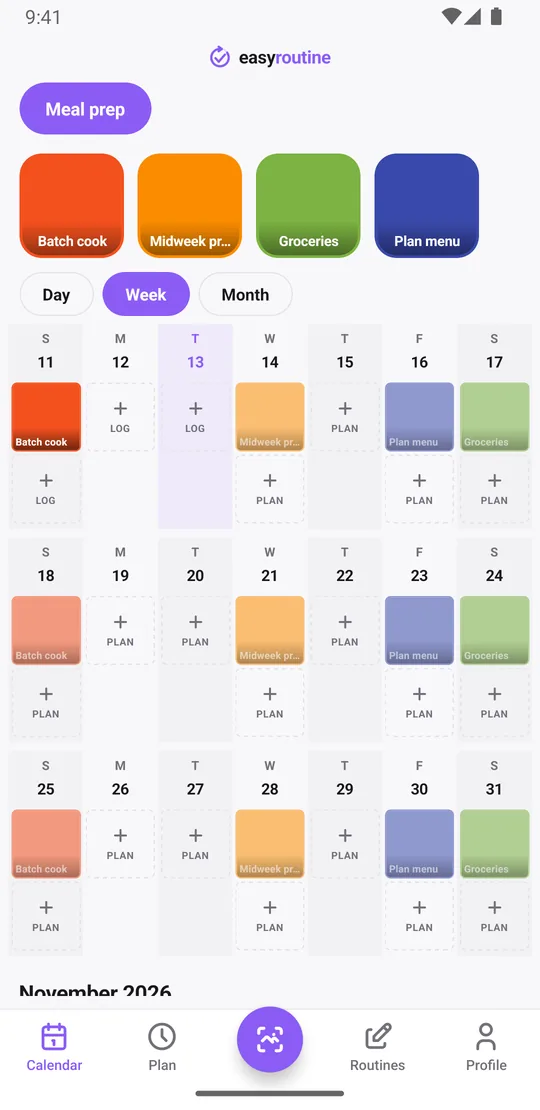
With Premium, open the Plan tab and give each step its day and time: Plan menu on Friday at 8:00 pm, Groceries on Saturday at 10:00 am, Batch cook on Sunday at 3:00 pm. Planned sessions show as faded entries on the calendar until you log them, so on Saturday you can see what this week still needs. Tap a faded entry to log it and the log sheet opens with the planned time.
A few ways to fit the plan to real life:
- Twice a week: give Batch cook a second slot on Wednesday evening, up to four recurring slots per activity.
- A one-off big batch: add a single-day plan, for example a Saturday freezer cook before a busy month.
- A season of prepping: set a start and end date on the slot, such as the weeks of a training block or school term, so the plan stops by itself.
Add a reminder to any timed slot, on time or 5, 10, 15 or 30 minutes before, and your phone nudges you on Sunday afternoon instead of letting the time slide. More about scheduling.
A meal prep calendar with Premium
Partly. The free AI photo scan can log your meal prep from the camera, but it works by matching against your own activities, not by recognizing food. If Batch cook has a photo, pointing the camera at your prepped containers in the Scan tab should match it and log it at the current time. If the scan cannot decide, you pick the activity yourself.
The scan does not keep the picture, and logs do not have photo attachments, so EasyRoutine is not a gallery of past batches. Use the comment to record what you cooked.
See how consistent your meal prep really is
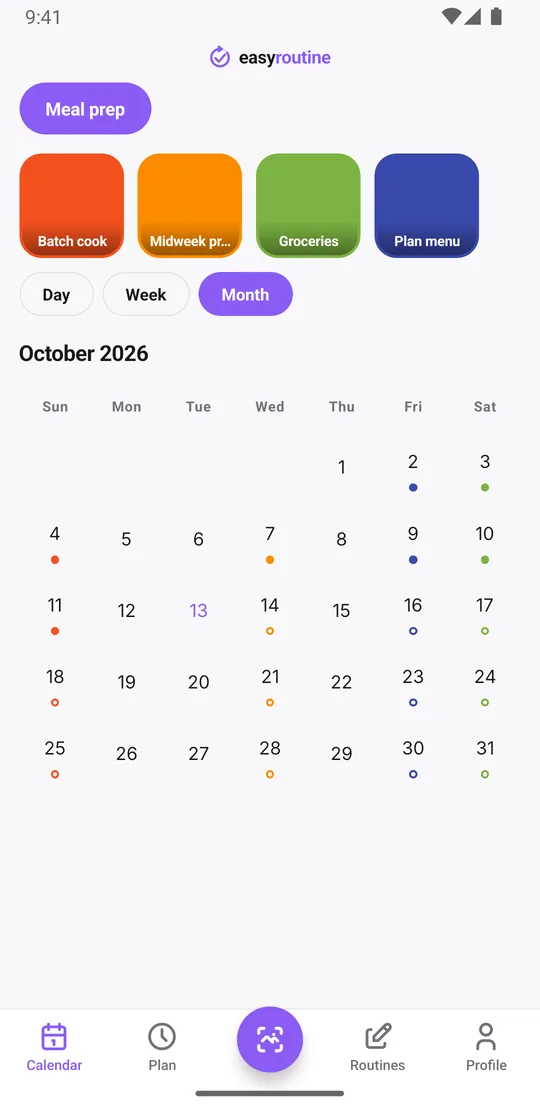
The month view is the honest answer to "have I kept this up?". Every logged session leaves a dot in its color on that day. Four orange Sundays in a row means four weeks of prepped lunches. A gap is a week that did not happen, and you see it without having to remember.
The Profile tab shows a Day streak and your total completed logs. The streak counts days in a row on which you logged any activity, so it is not a meal prep streak in itself. For a once-a-week habit like this one, the month view is the better measure.
Common questions
Is this a meal prep app with recipes and macros?
No. EasyRoutine records that and when you prepped, with an optional note and flag, and with Premium plans your prep days with reminders. It has no recipes, nutrition data or shopping lists, so pair it with a recipe app if you need one.
How do I see when I last did meal prep?
Tap the Batch cook tile at the top of the calendar. The calendar then shows only that activity, so the latest entry is your last session. This works on the free plan.
Can I record what I cooked and how many portions?
Yes, in the log comment, for example "chili and rice, 6 boxes, 2 in the freezer". The log sheet shows your last few comments for the activity. EasyRoutine does not count portions or track ingredients itself; the note is free text.
Can I log my meal prep session with a photo of what I made?
You can log it with the photo scan if the activity has a photo, but the scan picture is not saved and logs have no photo attachments. Write what you made in the log comment instead.
Can I get reminded on my usual prep day?
Yes, with Premium. Schedule the prep activity on its weekday and time in the Plan tab and add a reminder on time or up to 30 minutes before. You can also plan a single date for a one-off batch.
Keep reading
Free on iPhone and Android. Sign in with Apple, Google or your email to start.