I forgot which method I used to sign in
In EasyRoutine the method matters less than you think: an account is its email address, so Apple, Google and an email code all open the same account when they bring the same address. What you need to remember is the address, and there are a few quick ways to find it.
Why the method is not the key
Many apps keep a separate account for each sign-in button, so picking Google when you once used Apple leaves you in an empty account. EasyRoutine works differently. The first time you use a new method with an address it already knows, it links that method to the existing account. So:
- Signed in with Google at first? An email code sent to your Gmail address opens the same account.
- Used an email code? Google with that same address works too.
- Used Sign in with Apple and shared your real address? Google or an email code with that address reaches it.
The one exception is Apple's Hide My Email. Then the account's address is a random Apple relay address, and only Sign in with Apple with the same Apple Account reliably reaches it. On an iPhone, try Apple first if you might have hidden your email.
Find the address in a minute
- Old phone still around? Open EasyRoutine on it. The Profile tab shows the account's address at the top.
- Search your inboxes for an EasyRoutine sign-in code. The address that received it is an account address.
- Check your Apple Account. On an iPhone, your Apple Account settings list the apps you use Sign in with Apple with (Apple's steps).
- Think about your Google accounts. If you have more than one, the Google picker may have offered a work or old account first.
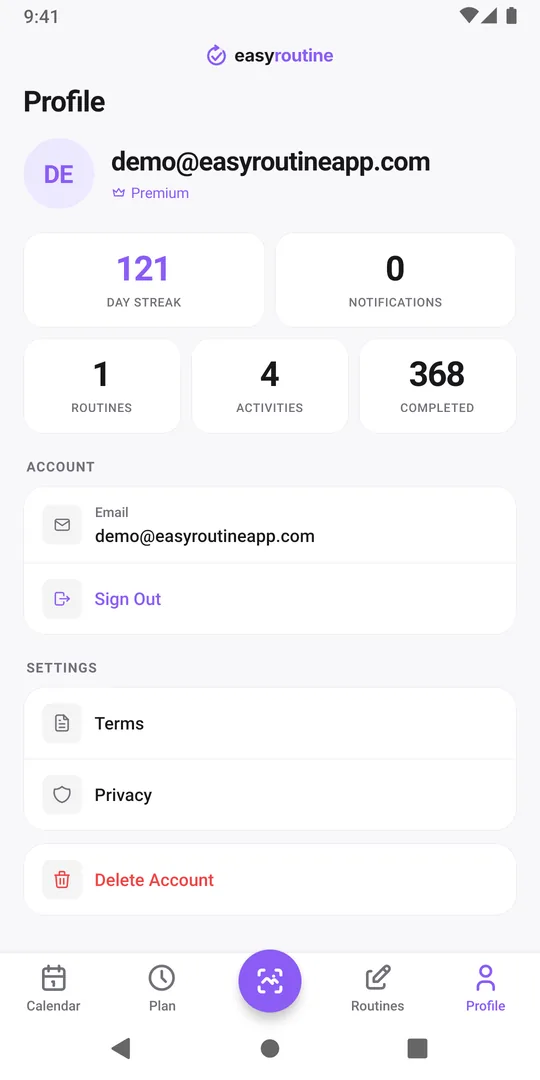
Then sign in and check
Sign in with any method that brings that address. The email code works on iPhone and Android: tap Continue with Email, type the address, and enter the 6-digit code within 10 minutes. Then open the Profile tab. If the Routines, Activities and Completed counts show your history, you are in.
All zeros means the address was not the one, and you have just opened a new, empty account. That does no harm. Sign out on the Profile tab and try the next address. The empty account can be deleted later, or simply left alone. Signed in and everything is empty?
If Google sign-in says This email is already linked to a different Google account., the address does have an account, opened with another Google login. Use an email code to that address instead.
So it does not happen again
- Note the address shown on the Profile tab somewhere you keep passwords or important notes.
- Pick one address and sign in with it everywhere. The method can change; the address should not.
- Moving to Android from an iPhone with Hide My Email? Contact support at info@easyroutineapp.com before you switch. Hide My Email and Android.
The new phone checklist covers the rest of a phone switch.
Common questions
Do I have to use the same method as last time?
No. Any method that brings the same email address opens the same account. The exception is an account created with Apple's Hide My Email, which uses a relay address.
Can trying the wrong method delete or mix up my data?
No. A wrong address only opens a separate, empty account. Your original data stays where it is, and accounts never mix.
Can support tell me which address I used?
Write to info@easyroutineapp.com with the addresses you think you might have used. Support can look into those, but cannot search for an address you do not mention.
Is Sign in with Apple available on Android?
No. EasyRoutine offers Sign in with Apple on iPhone only. On Android, use Google or an email code.
Keep reading
- How to move your habit tracker data to a new phone and keep your streakSwitching phones, even iPhone to Android? A step-by-step checklist to move habit tracker data, logs and your streak, and to check that everything arrived.
- I signed in on my new phone and my routines are emptyYour EasyRoutine routines are not lost. An empty app after sign-in almost always means a different email address opened a new account. How to check and fix it.
- I used Hide My Email and now I'm switching to AndroidSigned in with Apple's Hide My Email and moving to Android? Your account email is a relay address. What that means and what to do before you switch phones.
- I get the same reminder twice on two phonesSame reminder on your old and new phone? Each signed-in phone rings for your account. Why it happens, and how to stop the duplicate without losing anything.
- I don't want to create a password for a habit trackerNo new password needed: EasyRoutine signs you in with Apple, Google or a one-time code sent to your email. How passwordless sign-in works and what to watch for.
- I don't want to stay signed in on a shared phoneUsing a family or borrowed phone? How to keep your habit log private: sign out after use, what signing out clears, and what to avoid on a shared device.
- No internet and I can't open my routinesEasyRoutine shows No Internet Connection and won't open your routines offline. Why it needs a connection, what still works, and how to log what you did later.
- I'm under 16. Can I use EasyRoutine?EasyRoutine's minimum age is 16. Why an account is needed from the start, what that means for teens and parents, and what to do if a younger child signed up.
- I'm worried about giving an app my emailHesitant to give a habit tracker your email? What EasyRoutine keeps from your sign-in, what your address is used for, where it is stored, and Hide My Email.
Free on iPhone and Android. Sign in with Apple, Google or your email to start.