I'm under 16. Can I use EasyRoutine?
No. You need to be at least 16 to use EasyRoutine. The app only works with an account, and the terms and privacy policy set 16 as the minimum age to create one.
Why there is an age limit
EasyRoutine has no guest mode. Before your first log, you sign in with Google, Apple on iPhone, or a code sent to your email, and everything you add is saved to that account on the server. Creating an account means the service processes personal data about you, starting with your email address.
The privacy policy says the app is not directed to children under 16 and that you must be at least 16 to create an account, and the terms say the same. The app does not ask for your birthday, so this is a rule you agree to when you sign in, not a check the app makes.
If you are under 16
Do not create an account. You do not need an app to build a routine anyway:
- A paper checklist on the fridge or inside a school planner works well: one row per habit, one column per day, a tick when it is done.
- Your phone's built-in alarms or calendar can remind you of fixed times, like practice at 17:00 or reading before bed.
- Ask a parent or guardian to help you choose an app that is meant for your age.
Once you turn 16, you are welcome to sign up.
For parents
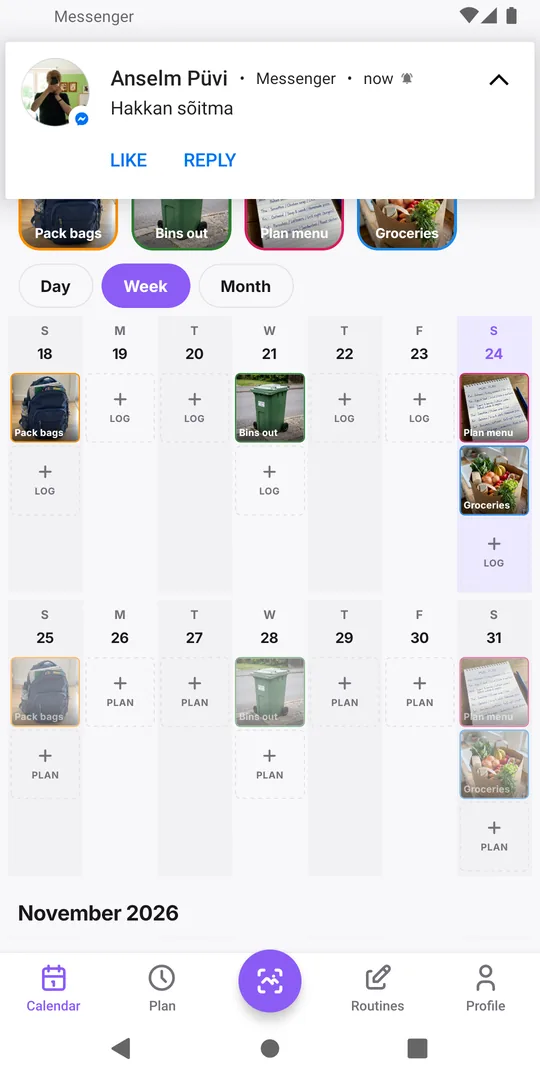
A parent or guardian aged 16 or over can use EasyRoutine on their own phone, in their own account, for routines they look after. That can include family tasks, such as packing school bags on Sunday evening or the weekly bin day. Keep it to things you do or check yourself, and keep personal details out of activity names and notes. Is my data safe? explains what the app stores.
Do not set up an account in your child's name or hand them a phone signed in to yours. Logs, notes and the streak are one person's, and the account is meant for someone 16 or older.
If a younger child already signed up
Delete the account from inside the app: Profile tab, Delete Account, then confirm. It removes the account, routines, logs and photos at once, and backup copies expire within 30 days. If you no longer have the phone, use the delete-account page to ask by email. You can also write to info@easyroutineapp.com and say the account belongs to a child under 16.
If the account had Premium, cancel it in the App Store or Google Play as well, because deleting the account does not stop the subscription.
Common questions
What is the minimum age for EasyRoutine?
16. The terms and the privacy policy both require users to be at least 16 to create an account.
Does the app ask for my age?
No. By signing in you agree to the terms, which set the minimum age at 16.
Can I use it without an account instead?
No. EasyRoutine has no guest mode; everything is saved to an account from the first log.
Can a parent track a child's routine in their own account?
A parent can use their own account for family tasks they look after. Keep personal details about the child out of names and notes, and do not give the child access to the account.
Keep reading
- How to move your habit tracker data to a new phone and keep your streakSwitching phones, even iPhone to Android? A step-by-step checklist to move habit tracker data, logs and your streak, and to check that everything arrived.
- I signed in on my new phone and my routines are emptyYour EasyRoutine routines are not lost. An empty app after sign-in almost always means a different email address opened a new account. How to check and fix it.
- I used Hide My Email and now I'm switching to AndroidSigned in with Apple's Hide My Email and moving to Android? Your account email is a relay address. What that means and what to do before you switch phones.
- I get the same reminder twice on two phonesSame reminder on your old and new phone? Each signed-in phone rings for your account. Why it happens, and how to stop the duplicate without losing anything.
- I don't want to create a password for a habit trackerNo new password needed: EasyRoutine signs you in with Apple, Google or a one-time code sent to your email. How passwordless sign-in works and what to watch for.
- I don't want to stay signed in on a shared phoneUsing a family or borrowed phone? How to keep your habit log private: sign out after use, what signing out clears, and what to avoid on a shared device.
- I forgot which method I used to sign inCan't remember if you signed in with Apple, Google or an email code? In EasyRoutine the method matters less than the email address. How to find the right one.
- No internet and I can't open my routinesEasyRoutine shows No Internet Connection and won't open your routines offline. Why it needs a connection, what still works, and how to log what you did later.
- I'm worried about giving an app my emailHesitant to give a habit tracker your email? What EasyRoutine keeps from your sign-in, what your address is used for, where it is stored, and Hide My Email.
Free on iPhone and Android. Sign in with Apple, Google or your email to start.