Supplement reminder app: one reminder per bottle, at the time you take it
A good supplement reminder names the bottle, rings when you can actually take it, and lets you mark the dose as taken, so a dismissed alert is never your only proof. In EasyRoutine each supplement can have its own reminder times with Premium, while logging and the photo scan stay free.
What a supplement reminder should do
Whatever app you use, check it against this list before you rely on it:
- One reminder per supplement. "Take vitamins" at 8:00 hides the one you always forget. "Vitamin D" and "Magnesium" as separate reminders do not.
- Separate morning and evening times. Something you take twice a day needs two reminders, not one you have to remember to repeat.
- Only on the days you take it. A supplement you take on weekdays should not ring on Saturday, or you learn to ignore it.
- A way to mark it taken. Swiping a notification away is not the same as swallowing the capsule. You want a record you can check an hour later.
- Reminders that work without opening the app. A reminder that only fires if you opened the app today is not much of a reminder.
Pick reminder times you can act on
The most common reason a supplement reminder fails is not the app: it rings at a moment when the bottle is out of reach. A few habits help:
- Tie the time to something you already do. Breakfast, dinner or brushing your teeth at night are better anchors than a round number like 9:00. If the label says to take it with food, put the reminder at your mealtime. For questions about timing or amount, follow the label or ask your pharmacist.
- Keep the bottle where the reminder finds you. Next to the coffee machine for a breakfast reminder, on the nightstand for an evening one.
- Remind a little early if you need to get to it. If you take your evening dose after the dishes, a reminder 15 minutes before gives you time to finish.
Avoid setting reminders for times you are often away, like your commute. A reminder you cannot act on trains you to dismiss it.
Set up a reminder per bottle in EasyRoutine (Premium)
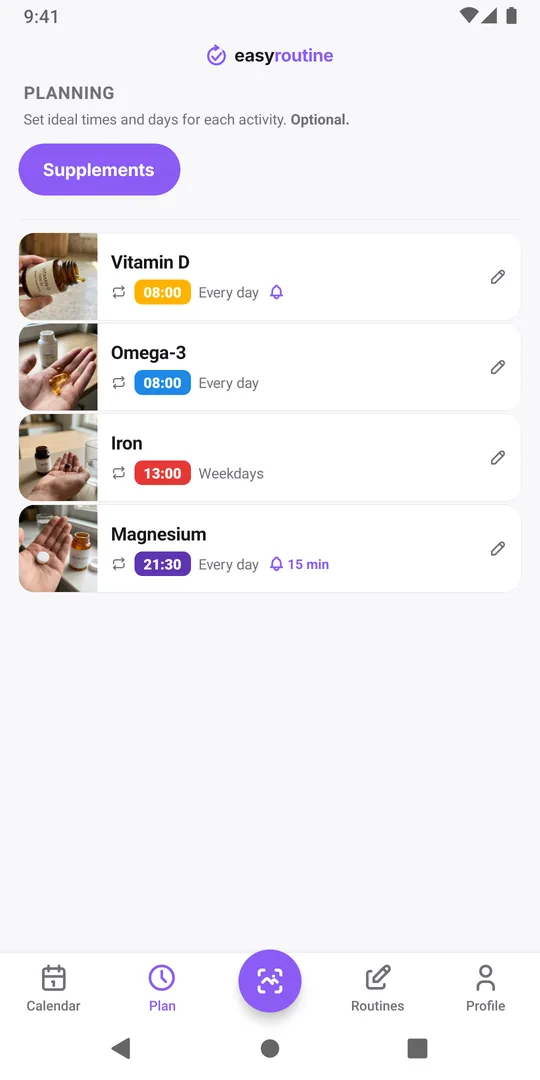
Add a Supplements routine with one activity per bottle, for example Vitamin D, Omega-3, Iron and Magnesium. Then open the Plan tab, tap a supplement and add a Recurring time: pick the weekdays, set the time, and choose its Notification: on time, or 5, 10, 15 or 30 minutes before. The reminder reads: Activity "Vitamin D" is coming up in "Supplements". Tapping it opens the routine.
Taking something morning and evening? Use Add another time for a second recurring time with its own notification. One supplement can have up to four recurring times. The phone schedules repeating reminders itself, so they keep firing even on days you never open the app. More about reminders.
Several bottles at the same time: one reminder is enough
Each supplement with a reminder sends its own notification. Four bottles at breakfast with four reminders means four alerts at 8:00. Instead, turn the notification on for one of them, say Vitamin D, and leave it off for Omega-3. Both still show as planned on the calendar, and the Log button on the day lets you tick both and log them together.
This also keeps you under the phone's limit. EasyRoutine keeps at most 60 upcoming reminders on a phone, and every weekday of every reminder time counts. Five supplements twice a day, every day, would already need 70. If you go over, the app warns you with Too many reminders after you save, and the later ones may not fire.
Mark it taken, then trust the calendar
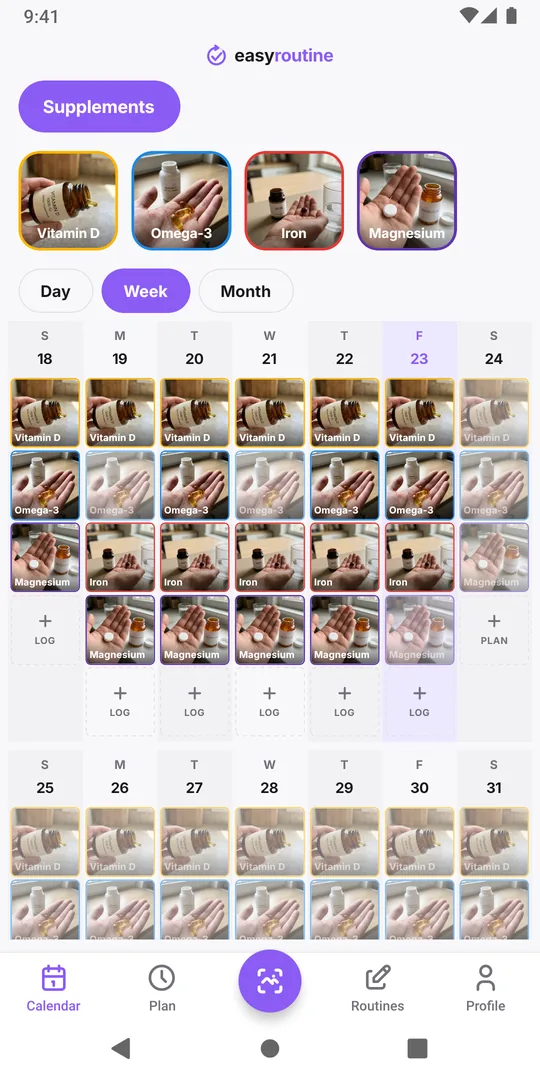
A reminder arrives whether or not you already took the supplement, so the reminder itself cannot tell you if you did. The calendar can: planned doses you have not logged yet appear faded, and tapping one logs it with the current time.
When you are unsure whether you took the evening magnesium, open today on the calendar before taking another. The avoid a double dose guide explains how to make that check a habit.
What is free, and what the app does not do
Schedules and reminders are part of Premium, a monthly subscription (pricing).
EasyRoutine records that and when you took a supplement, with an optional note like "2 capsules". It does not track amounts or stock, warn when a bottle runs low, or give advice on what to take. If you need those, a supplement-only app may suit you better: see the comparison with a supplement app. For grouping bottles into time slots, use the supplement timing schedule template.
Common questions
Can I get a morning and an evening reminder for the same supplement?
Yes, with Premium. Give the supplement two recurring times, for example 8:00 and 21:00, and turn on the notification for each. One supplement can have up to four recurring times.
Does the reminder stop if I already logged the supplement?
No. Reminders fire at their set time whether or not you logged the dose. Check today on the calendar: a logged dose shows in full color, one still to take is faded.
Can it remind me when a bottle is running low?
No, the app does not count capsules or stock. If you know roughly when a bottle will run out, you can add a single-day plan with a reminder on that date, for example a "Reorder magnesium" activity.
Are supplement reminders free?
No. Reminders are set inside a schedule, and schedules are part of Premium. Logging is free.
Do reminders work without an internet connection?
Yes. Reminders are scheduled on your phone, so ones already set still arrive offline. Changing them, and the rest of the app, needs a connection.
Keep reading
Free on iPhone and Android. Sign in with Apple, Google or your email to start.