EasyRoutine vs a calendar app: why not just use your calendar?
A calendar app tells you what you planned to do. EasyRoutine tells you what you actually did. If your question is "did I take my vitamin D today?" rather than "what is on at 3 pm?", that difference is the whole point.
A calendar event is a plan, a log is a record
Put "Vitamin D, 8:00, every day" in a calendar and it shows up every morning, forever, whether you took it or not. Monday looks exactly like Thursday, even if Thursday was the day you forgot. The event is a promise about the future. It has no idea what happened.
In EasyRoutine you log the moment you do something. Logging Vitamin D records that it was done and when. A day with a tile is a day you did it, and a day without one is a day you did not. Logs are always about the past: you cannot log something that has not happened yet, so the record stays honest.
So is logging a routine the same as a calendar event? No. You could try to fake it in a calendar by editing each event after the fact, renaming it "done" or changing its color, but that is several taps per entry and nothing in the calendar is built to read it back.
Log in a few taps instead of typing an event
Recording something in a calendar means creating or editing an event: pick a day, type a title, set a time, save. In EasyRoutine the activity already exists. With a Premium schedule, you tap its faded planned entry and save the Log Entry sheet, already filled in with the planned time. Without a schedule, you tap + Log on the day and pick the activity. Tap the logged entry to add a comment, a red, amber or green flag, or change the time if you are logging it later.
A few more things that a calendar does not do for this job:
- Log several at once: the log button on a day lets you tick your morning supplements, flossing and stretching in one go.
- Back-date: forgot to log yesterday's run? Add it to yesterday with the right time.
- Log with a photo: if an activity has a photo, the Scan tab can match the camera picture to it and log it. It only knows your own activities that have a photo. How the photo scan works.
- See your last notes: the log sheet shows your previous comments for that activity, like "knee felt better" or "new bottle".
Built around routines, activities and logs
A calendar has one kind of thing: events. EasyRoutine has three. A routine groups related things, like Daily, Supplements or Gym. Each routine holds activities, the things you repeat, each with its own color and an optional photo. Every time you do one, you add a log.
That structure is what makes review easy. You can open one routine and see only that, instead of scrolling past meetings and birthdays to find your workouts. How it works.
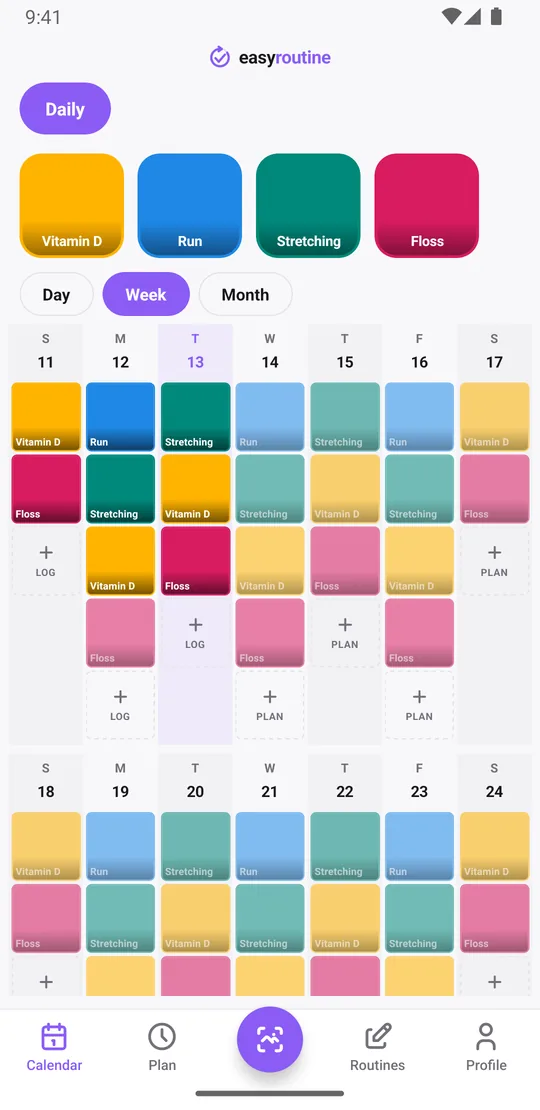
A calendar view made for habits
EasyRoutine still shows everything on a calendar, with Day, Week and Month views. The difference is what is on it. Each tile is something you did. If you have a schedule, planned entries you have not logged yet appear faded next to them, so a faded entry in the past is a plan you missed. The month view shows the longer pattern: which weeks you kept it up and where it slipped.
It also answers the question a calendar app cannot: "when did I last do it?" Tap an activity's tile at the top, say Floss, and the calendar shows only that activity. The last tile is the last time you did it. Searching a calendar for a repeating event only finds the plan, never the day it actually happened.
The Profile tab adds a Day streak (consecutive days with at least one log) and a count of everything you have completed. There are no charts or percentages, just the record. More about the calendar.
Schedules and reminders for repeating things
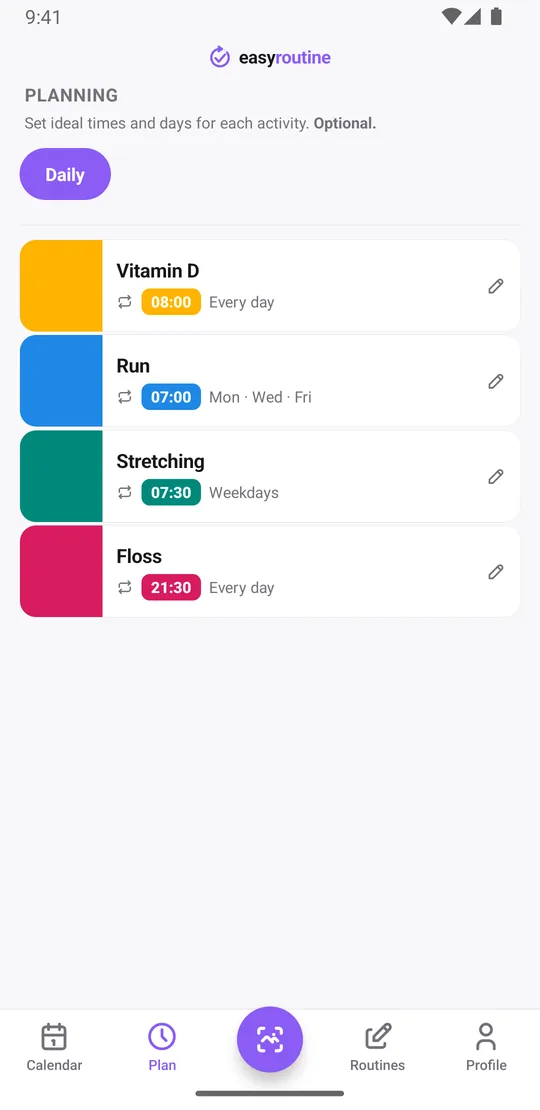
Calendars are built for events: a dentist appointment, a flight, a meeting. EasyRoutine's schedules are built for things you repeat. With Premium, the Plan tab lets you give each activity its own weekdays and time, like flossing every day at 21:30 or a run on Monday, Wednesday and Friday at 7:00. An activity can have up to four repeating times, single dates for tasks on longer cycles, and an optional active period with a start and end date.
Each timed slot can carry a reminder, on time or 5, 10, 15 or 30 minutes before. Scheduling and reminders are Premium; logging, the calendar and the scan are free. Scheduling and reminders.
What a calendar app does better
To be fair, a calendar is the better tool for a lot of things:
- Appointments and one-off events with a place, a time and other people.
- Sharing: invites, shared family calendars and seeing someone else's availability. EasyRoutine has no sharing at all.
- Everything in one place: work, school and personal plans side by side. EasyRoutine does not connect to your calendar app.
- Working offline: your phone's calendar works without a connection. EasyRoutine needs the internet and an account.
- No new app: it is already on your phone.
If all you need is a nudge at 8:00 and you never want to look back at what you did, a repeating calendar event is fine.
Who should choose which
Keep using your calendar for appointments, meetings and anything you share with others. Use EasyRoutine when you keep asking yourself "did I already do it?": supplements, skincare, workouts, flossing, watering plants. Many people use both, the calendar for what is coming up and EasyRoutine for what got done.
Common questions
Why not just use my calendar app?
A calendar shows what you planned, and a repeating event looks the same whether you did it or not. EasyRoutine records each time you actually do something and shows that history on a calendar.
What does EasyRoutine do that a calendar can't?
Quick logging from the calendar, showing when you last did one activity, logging several activities at once, back-dating, comments and flags on each log, logging with a photo of an activity, a day streak, and a calendar that shows done and planned side by side.
Isn't logging a routine the same as a calendar event?
No. An event is a plan for a time, and it stays there whether it happened or not. A log is a record that something was done at a moment in the past.
Does EasyRoutine sync with my calendar app?
No. EasyRoutine has its own calendar and does not connect to other calendar apps. Your routines sync between your own phones through your EasyRoutine account.
Is scheduling free?
Logging, the calendar and the photo scan are free. Scheduling and reminders are part of Premium.
Keep reading
Free on iPhone and Android. Sign in with Apple, Google or your email to start.