Is a habit tracker app safe to use with your data?
It can be, if you can answer five questions before you sign up: what the app stores, where, who else receives it, how it makes money and how you leave. EasyRoutine's answers: your routines and logs are stored in the EU, they are not sold, photos go to an AI model in the US only for the photo features, and you can delete everything from the app.
What a habit log says about you
A habit tracker looks harmless, but a few months of logs say a lot: which tablets you take and when, when you get up and go to bed, when you are at the gym and not at home, how often a skin treatment or a physio exercise slipped. Activity names and notes are written by you, so they can include a medicine's name or how you felt.
Treat a routine app like a diary. The question is not only whether the company is honest, but how much it collects, how many other companies touch it, and whether you can take it back.
Five checks before you trust any routine app
These work for any tracker, whichever one you pick. The answers are usually in the privacy policy and the app's settings.
- What does it collect? Look for a plain list: account details, your entries, photos, device data. Check which permissions it asks for, such as location, contacts or health data, and whether the feature you want really needs them. The FTC suggests turning off unnecessary permissions or deleting apps that ask for a lot.
- Where is it stored? Only on your phone, or in an account on the company's servers, and in which country. Data held in the EU falls under the GDPR, which gives you the right to access, erase and move your data.
- Who else gets it? Analytics tools, ad networks, AI services and email providers are common. The policy should name each one and say what it receives.
- How does it make money? A subscription, ads, or selling data. Look for a clear "we do not sell your personal data".
- How do you leave? A delete button inside the app is better than an email address. Note how long backups are kept and whether you can get a copy of your data first.
EasyRoutine's answers
What it collects
Your email address, your routines and activities, your logs (the time, plus an optional note and a red, amber or green flag), the activity photos you add, and your subscription status. The app does not measure amounts or health data. It asks for the camera and your photo library for photos, and for notifications only when you set a reminder. On iPhone, the free plan also shows Apple's tracking prompt for its ads. It never asks for your location, contacts or health data. There are no analytics or crash-reporting tools in the app.
Where it is stored
On Hetzner servers in Helsinki, Finland, and Hetzner object storage in the EU for photos. The company behind the app is Query OÜ in Estonia. Everything sits in your account, which is why you need one: why EasyRoutine asks you to sign in.
Who else gets it
- Google's Gemma AI model, through OpenRouter in the US, for the photo features; not used for training. Photo details.
- Google AdMob for the banner ads on the free plan; your routines, logs and photos never reach advertisers. Ads on the free plan.
- Apple and Google if you sign in or pay through them, and an email provider that sends the sign-in codes.
How it makes money
Premium, a monthly subscription, and the banner ads on the free plan. EasyRoutine does not sell personal data.
How you leave
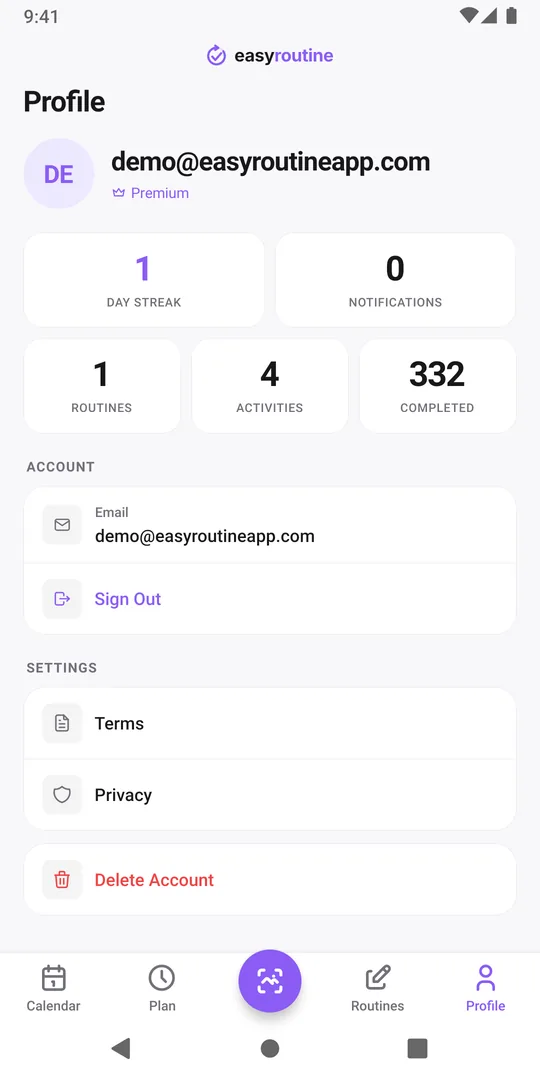
On the Profile tab, Delete Account removes your account, routines, logs and photos immediately; backup copies expire within 30 days. You can also ask by email. There is no export button: for a copy of your data, email a request as described in the privacy policy.
What safe does not mean
No service can promise that nothing will ever go wrong, and a privacy policy that claims perfect security should make you more careful, not less. EasyRoutine encrypts data on its way between your phone and the server and limits who can access it, and its policy says plainly that no system is completely secure.
Keep the sensitive part in your head, not in the app
Whatever app you choose, you control how much each entry reveals:
- Name activities neutrally. "Morning tablet" tells you enough; the medicine's name does not have to be there.
- Photograph the object, not the paperwork. A photo of the box works for the scan; a prescription label with your name is not needed.
- Keep notes short. A flag already says how it went.
- Check before you share. A routine shared by link shows its name and its activities' names, colors and photos, never logs, notes or flags. Rename or swap photos first if they say too much.
Common questions
Does EasyRoutine sell my data?
No. It does not sell personal data. It is paid for by the Premium subscription and banner ads on the free plan, and your routines, logs and photos are never shared with advertisers.
Can other people see my routines and logs?
No. There are no public profiles. Only a routine you share by link is visible to people with that link, and it shows names, colors and photos, never your logs, notes, flags, streak or reminders.
Is my data used to train AI?
No. Photos and activity names sent for the photo features are used only to return a description or a match, and scan photos are not stored.
What happens to my data if I just stop using the app?
It stays in your account until you delete it. Uninstalling the app does not delete the account, so use Delete Account on the Profile tab if you want it gone.
Can I download a copy of my data?
Not from the app. Email info@easyroutineapp.com to ask for a copy, as described in the privacy policy.
Keep reading
Free on iPhone and Android. Sign in with Apple, Google or your email to start.