How do I get Premium back on a new phone?
Sign in to EasyRoutine on the new phone with the same email address you used before, and Premium is there: it is stored on your EasyRoutine account, not on the phone, so you do not buy it again. If Profile still says Free plan, open the Premium screen and tap Restore purchases.
Before you switch: two things to note on the old phone
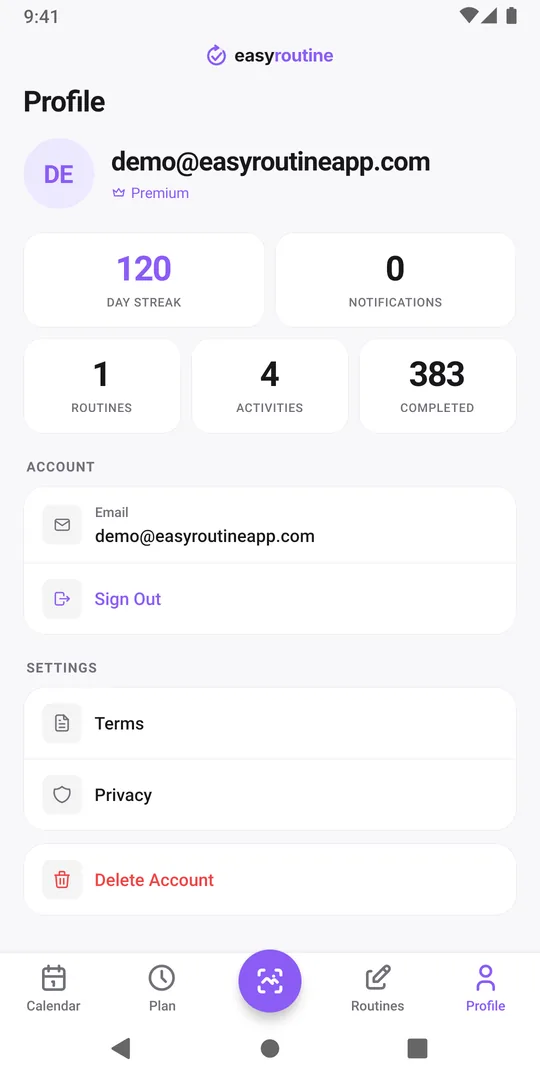
- Your account email. Open the Profile tab and note the email shown at the top. Your EasyRoutine account is that address, and Premium belongs to it.
- Which store account pays. Note the Apple ID or Google account that bills the subscription. You need it only if you have to restore.
Used Sign in with Apple with Hide My Email and moving to Android, where Apple sign-in is not available? Read the Hide My Email note before you switch.
Your routines and logs move with the same account; switching phones covers that part.
Premium follows your account
When you subscribe, the App Store or Google Play bills you and EasyRoutine records Premium on your account. Every phone signed in to that account gets it, on iPhone and Android alike: a subscription bought on one platform covers you on the other. You keep managing the subscription in the store where you bought it.
On the new phone:
- Install EasyRoutine.
- Sign in with the same email address. Email code, Google and Apple (iPhone only) all open the same account when the address matches, so the method does not matter.
- Open Profile. It should say Premium.
If you see empty routines, you are signed in with a different email address. Premium is still safe on the right account: sign out and sign in again with the email you noted.
Still on the Free plan? Tap Restore purchases
If you are on the right account and Profile still shows Free plan:
- Make sure the phone is signed in to the Apple ID or Google account that pays for the subscription.
- On Profile, tap Upgrade to open the Premium screen.
- Tap Restore purchases at the bottom.
You then see one of these messages:
- Subscription restored! Premium is active again.
- No previous subscription found. This store account has no EasyRoutine subscription. It may be under another Apple ID or Google account, or on the other platform; then signing in to the EasyRoutine account that has Premium is enough.
- No active subscription found. The subscription has ended. Check its status in your store settings.
- This purchase belongs to another account. The subscription is linked to a different EasyRoutine account. Sign out and sign in with that account.
Do not subscribe twice
If you subscribe again with a different Apple ID or Google account, or on the other platform, that is a second subscription, billed separately. Restore first. If you did end up with two, cancel the one you do not need in the store settings: how to cancel. Still stuck? Email info@easyroutineapp.com with your account email.
Common questions
Do I need my old phone to restore Premium?
No. Premium lives on your EasyRoutine account, so you only need to sign in to that account. The old phone just helps you look up the email if you have forgotten it.
I reset or lost my phone. Is my Premium gone?
No. Sign in to the same account on any phone and Premium and your data come back, as long as the subscription is still active in the store.
Does a family member get Premium if they install the app?
Only if they sign in to your account, which also shows them all your routines and logs. Premium belongs to one EasyRoutine account.
Why does Restore purchases say the purchase belongs to another account?
The subscription is already linked to a different EasyRoutine account. Sign out and sign in with the account you subscribed with.
Keep reading
Free on iPhone and Android. Sign in with Apple, Google or your email to start.