Supplement tracker app with a photo log: EasyRoutine vs a supplement reminder app
Did I take the magnesium already, or am I thinking of yesterday? If you take several supplements at different times, that question comes up daily. EasyRoutine answers it with a log you fill in a few taps or by pointing the camera at the bottle. Here is how that compares to an app built only for supplements.
What a supplement-only app is built around
Apps made only for pills and supplements are built around the products. If you want an app that records an amount with every dose, knows about supplements and what is in them, or keeps track of how much is left in a bottle, look for one built for that. EasyRoutine does none of these things.
EasyRoutine is built around the moment of taking: did I take it, and when? Each log records that you took a supplement and the time, with an optional note and a green, amber or red flag. If you want to remember an amount, write it in the note, for example "2 capsules". The app keeps the note as text and does not calculate with it.
More than one supplement a day
Add each bottle as its own activity in a Supplements routine:
- Vitamin D and Omega-3 at breakfast
- Probiotic before breakfast
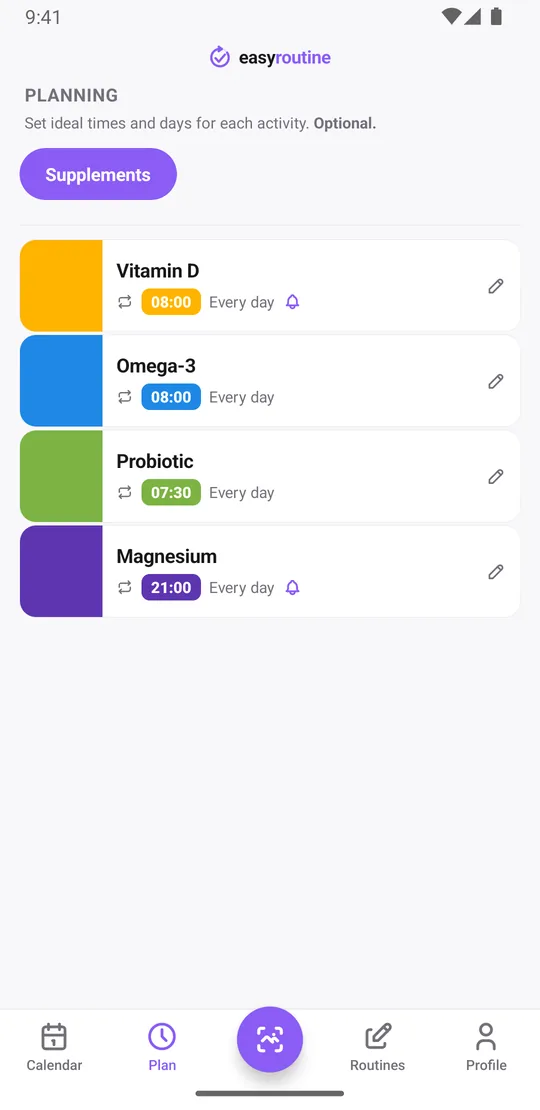
- Magnesium in the evening
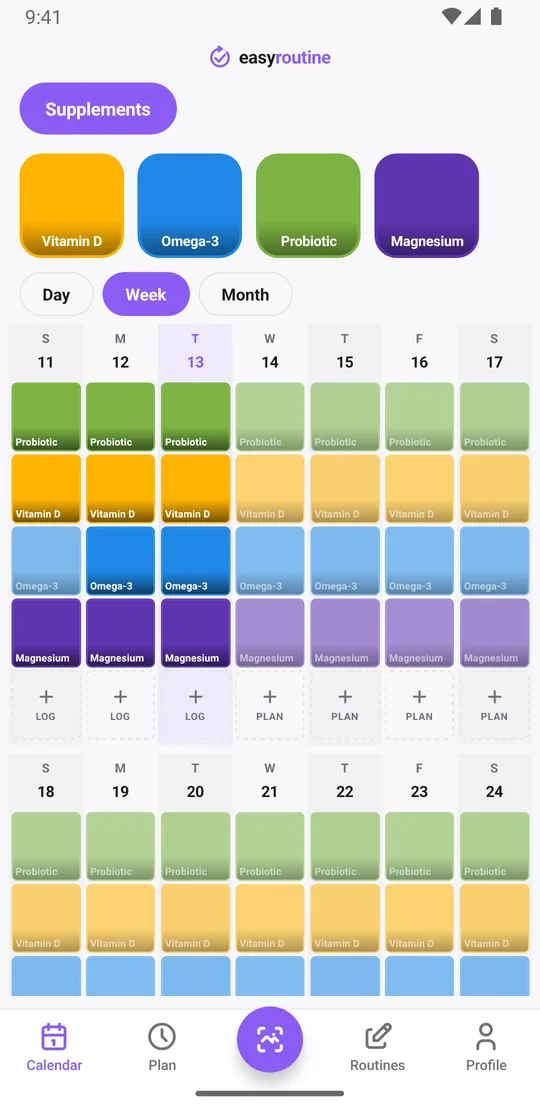
Each one gets its own color, so the calendar shows exactly which ones you took, not just "supplements done". Taking four at breakfast? The log button on the day lets you tick several and log them in one go. There is no limit on how many supplements you add, on the free plan or with Premium. If you prefer, split them into a Morning supplements and an Evening supplements routine instead.
Log from the calendar or with a photo
When you add a supplement, take a photo of the bottle, and EasyRoutine can suggest the name from it. After you take a capsule, open the Scan tab and point the camera at the bottle: the scan compares it with your own supplements that have a photo and logs the match straight away, with the current time. It works for any brand, because it only has to recognize your own bottles. How the photo scan works.
The scan is not a general product recognizer. It does not read the label for dosing, and two bottles from the same brand that look almost identical are easier to log from the calendar. If the scan finds no match, you pick the supplement yourself. The scan is free and needs an internet connection.
Does a photo log help avoid double-dosing?
It helps in a simple way: logging takes a few seconds, so it happens at the moment you take the capsule, and the record stays complete. Before you take Vitamin D, look at today on the calendar. If it is already logged at 8:10, you took it.
To be clear about the limits: the app does not warn you or block a second log, and it does not know what a safe amount is. It shows you what you logged. How much of a supplement to take is a question for the label or for your doctor or pharmacist.
Reminders per supplement, at their own times
With Premium, each supplement gets its own schedule: chosen weekdays and a time. One supplement can have up to four recurring times, so something you take twice a day, morning and evening, gets two slots, each with its own reminder on time or 5, 10, 15 or 30 minutes before. Vitamin D can remind you at 8:00 while magnesium waits until 21:00. Planned doses you have not logged yet appear faded on the calendar, so a missed one stands out.
Scheduling and reminders are Premium. Logging, the photo scan, notes, flags and the calendar are free. Supplement timing schedule template.
Calendar to confirm doses taken
The week view is the quick check: a tile on today means it is done. The month view shows the bigger picture, for example whether the new magnesium routine actually stuck after a few weeks, or which days the evening dose slipped. Add a note like "with food" or flag a day amber if something felt off, and the log sheet shows your last few notes for that supplement next time. Starting a new routine in January? See the New Year supplement tracker.
For a supplement you do not take every day, such as a weekly vitamin B12, tap its tile at the top of the calendar: the calendar then shows only that supplement, so the last tile is the last time you took it.
Supplements next to your other routines
A supplement-only app tracks supplements. EasyRoutine tracks any routine, each in its own list: skincare, medication, the gym, plants or chores. If your vitamins sit next to your moisturizer, both can live in one app with one calendar, instead of two apps with two sets of reminders.
Who should pick which
Choose a supplement-only app if you want amounts recorded per dose, information about the supplements themselves, or help keeping track of stock.
Choose EasyRoutine if you mainly want to know whether you took each supplement today, like logging in a few taps or with a photo of the bottle, want reminders per supplement, and would like your other routines in the same app. EasyRoutine is not a medical device and gives no advice on what or how much to take. More on the supplement tracker.
Common questions
Can I log more than one supplement a day?
Yes. Add each supplement as its own activity and log them with the Log button on the day, one at a time or several at once, or with a photo of the bottle. There is no limit on how many you add.
Does a photo log help avoid double-dosing?
It makes logging quick enough to do every time, so the calendar shows whether you already took it today. The app does not warn about doses or amounts; follow the label or ask your doctor or pharmacist.
Can I set reminders per supplement?
Yes, with Premium. Each supplement gets its own weekdays and times, up to four recurring times each, and each time can have a reminder.
Can it also track other routines, not just supplements?
Yes. You can track skincare, medication, workouts, plants or chores in their own routines in the same app.
Keep reading
Free on iPhone and Android. Sign in with Apple, Google or your email to start.