Daily checklist app or routine tracker: which one do you need?
If you only need to tick today's items off, any daily checklist app will do. If you repeat the same list every day and want to know later what you actually did, pick a tracker that saves each tick with a date, such as EasyRoutine.
What daily checklist apps do
"Daily checklist app" covers a few different kinds of tool:
- To-do apps with repeating tasks: a task comes back every day; ticking it usually moves it to the next date, and the history is a completed list at best.
- Checklist and template apps: you save a list once and start a fresh copy each morning. Good for procedures like opening a shop or packing a gym bag.
- Shared list apps: one live list that a household edits together, like groceries or chores.
- Habit trackers: a grid of days per habit, often with streaks and charts (what a habit tracker app adds).
The first three are built around today. Once a box is ticked, the question "when did I last do this?" is hard to answer.
How to build a daily checklist that sticks
Whatever tool you use, the list matters more than the app:
- Keep it short. Three to five items per list is a practical size, things you really do every day. With a morning and an evening list that is still under ten in total. One-off tasks belong on a to-do list, not on the daily checklist.
- Split it by time of day. A morning list and an evening list are easier to finish than one long list you look at once.
- Write actions, not goals. "Stretch 5 minutes" can be ticked; "be more flexible" cannot.
- Order it the way you move. Bathroom items together, kitchen items together, so you tick in one pass.
- Tick right away. A list ticked at night from memory is a guess.
- Review once a week. Drop items you skipped all week, or move them to fewer days.
A common mistake is adding everything on day one. Start with the items you already do most days and add one more when they feel automatic.
The same five-item list, one week later
Take a morning list: water, vitamins, stretch, make the bed, plan the day.
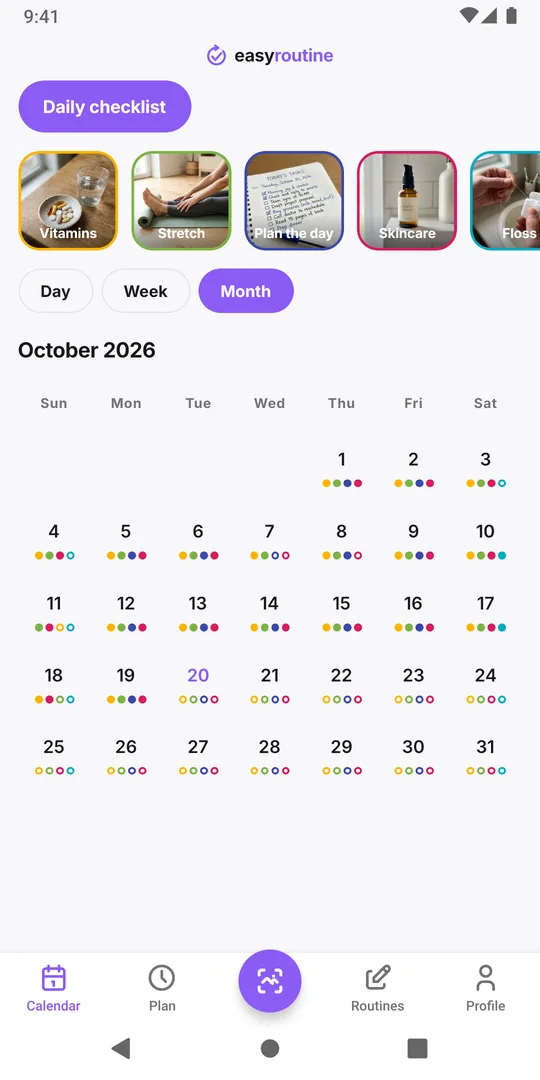
In a checklist app that resets each morning, Monday's ticks are gone on Tuesday. A week later you know roughly that the week went well, but not that you stretched only twice or which days you skipped the vitamins.
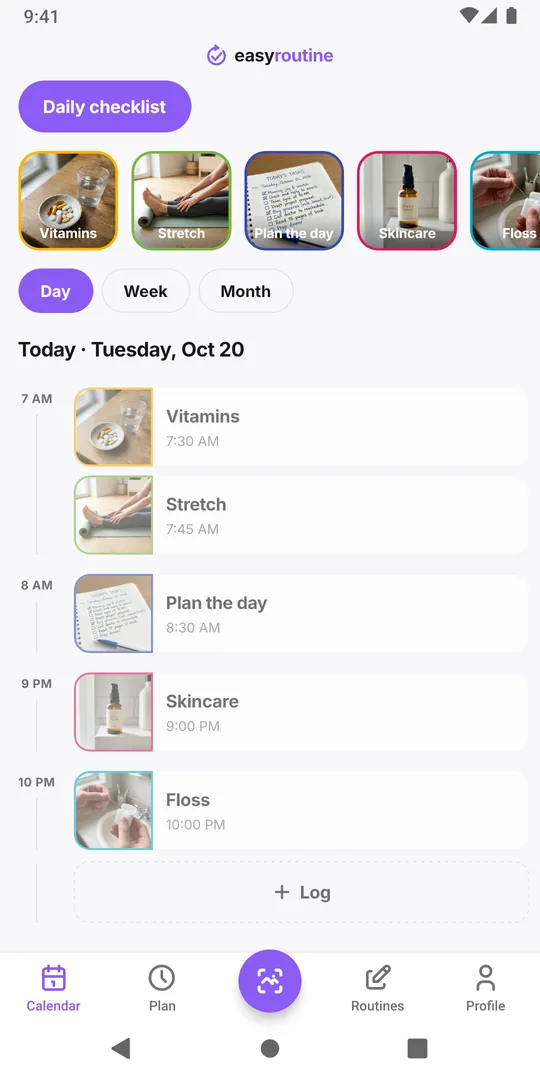
In EasyRoutine each item is an activity in a routine, and every tick is saved as a log with the date and time. A week later the week view shows each item on the days you did it, so the two days without Stretch are obvious. You can add a note to a log, such as "sore back", and see it again next time.
Using EasyRoutine as a daily checklist
Put your list in a routine, one activity per line. To tick items off, open the day in the Calendar tab, tap Log, pick everything you have done so far and save them together; if you forgot this morning, log it now and set the time back. With Premium you can also schedule items on chosen weekdays, so each day shows its checklist as faded planned entries until you log them (scheduling). How it works.
What a plain checklist app does better
To be fair, a simple checklist app wins in several cases:
- One-off lists: packing, shopping, moving house. EasyRoutine is built for things you repeat.
- Sub-items and long free text: some checklist apps nest steps. EasyRoutine has routines and activities, nothing deeper.
- No account, offline: some checklist apps work without signing in or a connection. EasyRoutine needs an account and the internet.
- Live shared lists: a family can tick items on the same list. EasyRoutine has no live shared lists; you can send a routine by link, and the other person gets their own copy of its activities, while your logs, notes and schedules stay private.
- No ads for free: EasyRoutine's free plan shows a banner, and schedules and reminders are Premium (pricing).
Who should pick which
Pick a plain checklist app for one-off lists, shared household lists and quick to-dos. Pick EasyRoutine when you tick the same things off every day and want to look back later: which days you skipped, when you last did something, and what you noted at the time. If what you need is a plan for when things happen rather than a list to tick, look at routine planner apps instead.
Common questions
Does the checklist reset every day?
There is nothing to reset. Your activities stay in the routine and every day gets new logs, so yesterday's ticks remain visible on the calendar.
Can I keep a morning and an evening checklist?
Yes. Make two routines, or one routine with all items. The calendar shows one routine at a time, and you switch between them with the routine pills above it.
Can my partner tick items on my list?
No. Each account logs its own items. You can share a routine by link so your partner adds a copy of the same activities to their own account, but ticks are not shared between you.
Can I undo a tick I added by mistake?
Yes. Open the log and delete it, or change its date and time if you logged it on the wrong day.
Keep reading
Free on iPhone and Android. Sign in with Apple, Google or your email to start.