Habit tracker app vs paper tracker: is it worth switching?
A paper habit tracker is simple, free and works anywhere. An app like EasyRoutine is worth it when the sheet is not where you are, when you track more than a handful of habits, or when you want your history to survive a coffee spill.
What a paper habit tracker does well
Let us start with the honest part. Paper has real strengths, and for some people it is the better choice:
- No account, no internet: a printed sheet works anywhere and asks for nothing. EasyRoutine needs an account and an internet connection to log.
- No ads and no cost: a sheet of paper never shows a banner. EasyRoutine's free plan does.
- Total freedom: draw your own grid, doodle, use stickers, write in the margin.
- The pleasure of crossing off: some people simply stick with a habit better when they write it by hand.
- No screen: if you are trying to spend less time on your phone, a sheet on the fridge helps.
If that describes you, keep the paper. The rest of this page is for the moments when the sheet starts to get in the way.
Where paper gets in the way
A paper tracker only works where it is. You take your vitamins at the office, go to the gym after work, floss before bed, and the sheet hangs on the kitchen wall. So you fill it in later from memory, or not at all. Each new month means a new sheet, the old ones end up in a drawer, and one wet glass can wipe out a month of crosses.
It also gets crowded. Five habits fit on a page. Supplements, skincare, workouts and chores together do not, at least not with room for notes.
Log in a few taps instead of writing it down
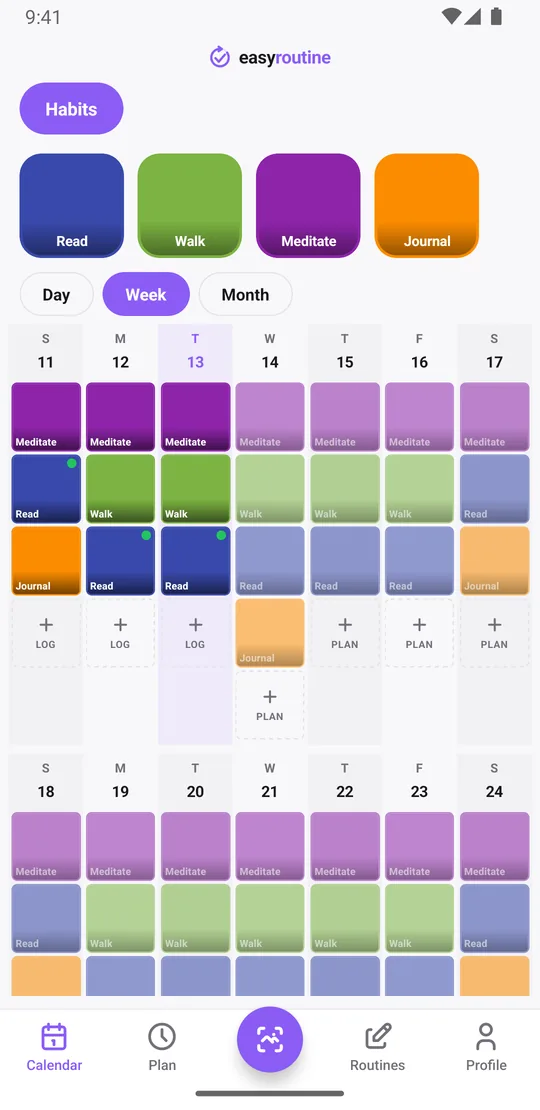
EasyRoutine follows the same idea as your sheet, just split into three parts. A routine is like a page (Habits, Supplements, Gym). Each routine holds activities, the rows on your sheet, each with its own color and an optional photo. Each time you do one, you add a log: the cross in the box. How it works.
Logging takes a few taps in the calendar, wherever you are, because your phone is already with you. Tap + Log on the day and pick what you did: one activity or several at once. With a Premium schedule, you can instead tap the faded planned entry and save it. If an activity has a photo, you can also point the camera at it in the Scan tab and it logs the matching activity. How the photo scan works.
Can I still add notes like on paper?
Yes. Every log can carry a comment of up to 2,000 characters, like "only 10 minutes" or "read in the park", and a red, amber or green flag for a day that went well or badly. When you log, the sheet shows your previous comments for that activity, so you can see what you wrote last time without flipping back through pages.
Photos work a little differently than you might expect. A photo belongs to the activity, not to each log: it makes the tile easy to recognize and lets the scan find it. You cannot attach a separate photo to every entry. And you cannot doodle in the margin.
What happens if I miss a day?
Nothing is lost. Your history stays as it is, and a day without a log simply stays empty, just like an empty box on paper. If you did the habit but forgot to log it, you can add it later for any earlier day and time.
The one thing that resets is the Day streak on the Profile tab, which counts consecutive days with at least one log of anything. It is a nudge, not a judgment, and it does not delete anything.
Review by day, week or month
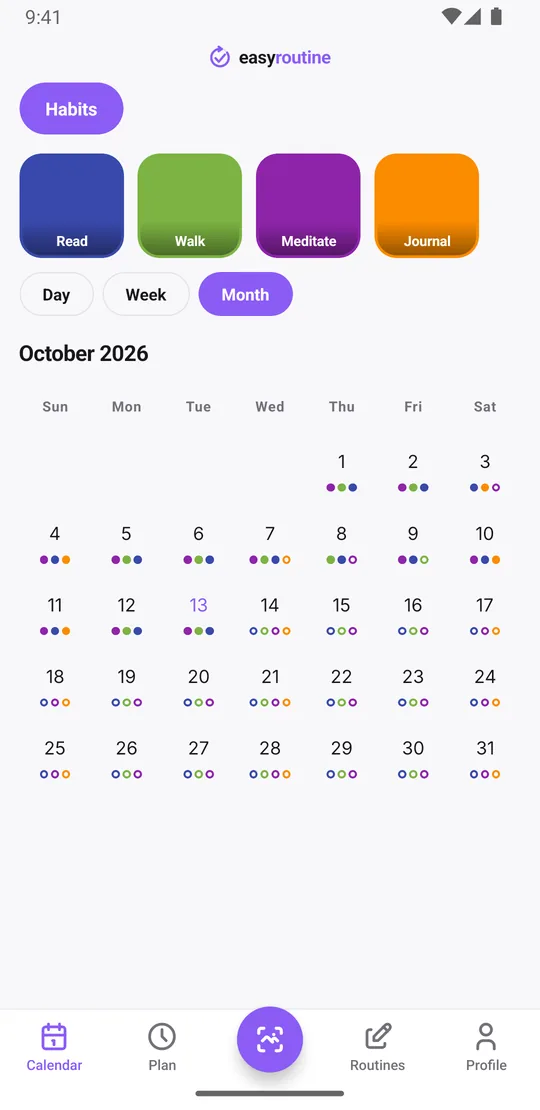
The Calendar tab shows everything in Day, Week or Month view. The month view looks a lot like your paper grid, only filled in for you: you can see at a glance which weeks you kept it up and where it slipped. The calendar shows one routine at a time, and switching to another takes a tap. There are no charts or percentages, just what you did. More about the calendar.
Looking up the last time on paper means flipping back through old sheets. In the app, tap an activity's tile at the top of the calendar and the calendar shows only that activity, so the last tile is the last time you did it, whether that was yesterday or three months ago. Tap the tile again to see everything.
Your history lives in your account
A sheet of paper can be lost, thrown away or ruined. Your EasyRoutine history is stored in your account, not only on your phone, so it is still there when you sign in on a new phone. You sign in with a one-time code sent to your email, with Google, or with Apple on iPhone. Sign-in and sync.
The trade-off: the app needs an internet connection to open and log. Without one it shows a "No Internet Connection" screen until you are back online. Paper never does that.
The ads on the free plan
Logging, notes, flags, the photo scan and the calendar are free. The free plan shows a banner ad at the bottom of the Calendar and Profile tabs. Premium removes the ads and adds schedules and reminders. Pricing.
Who should switch
Stay with paper if you track a few habits at home, enjoy writing them down and want no account or screen. Switch to EasyRoutine if you often forget to fill in the sheet, track habits in several places during the day, keep more than a page's worth, or want months of history in one place.
Common questions
Is an app really better than my paper habit tracker?
Not for everyone. Paper works offline, needs no account and has no ads. An app helps when you are often away from the sheet, track many habits, or want your history safe and reviewable by week or month.
Can I still add notes like I do on paper?
Yes. Each log can have a comment and a red, amber or green flag, and the log sheet shows your previous comments for that activity. Photos belong to activities, not to individual logs.
What happens if I miss a day? Do I lose my history?
No. Your history stays. A missed day is just empty, and you can add a log for an earlier day if you did it but forgot to log it. Only the day streak resets.
Do I need to carry anything with me to log?
Just your phone, with an internet connection. EasyRoutine has no offline mode.
Keep reading
Free on iPhone and Android. Sign in with Apple, Google or your email to start.