A reminder app for recurring routines vs a routine tracker
A repeating reminder on your phone rings at 8:00 and is gone once you swipe it away. Did you actually take the vitamin, or just dismiss the alert? EasyRoutine pairs each reminder with a log, so later you can see what you really did.
Reminding is not the same as doing
Your phone's reminders app is good at one thing: telling you at the right moment. After that it forgets. A repeating reminder that you tick off is marked done for today and reappears tomorrow, but there is no easy way to look back and see which days you did it and which days you swiped it away on the bus.
EasyRoutine separates the two jobs:
- The reminder says it is time. It belongs to an activity's schedule.
- The log records that you did it, with the time, and optionally a comment and a red, amber or green flag.
The reminder alone does not know whether you did the task. Your log does, and the calendar shows it.
Each reminder belongs to an activity
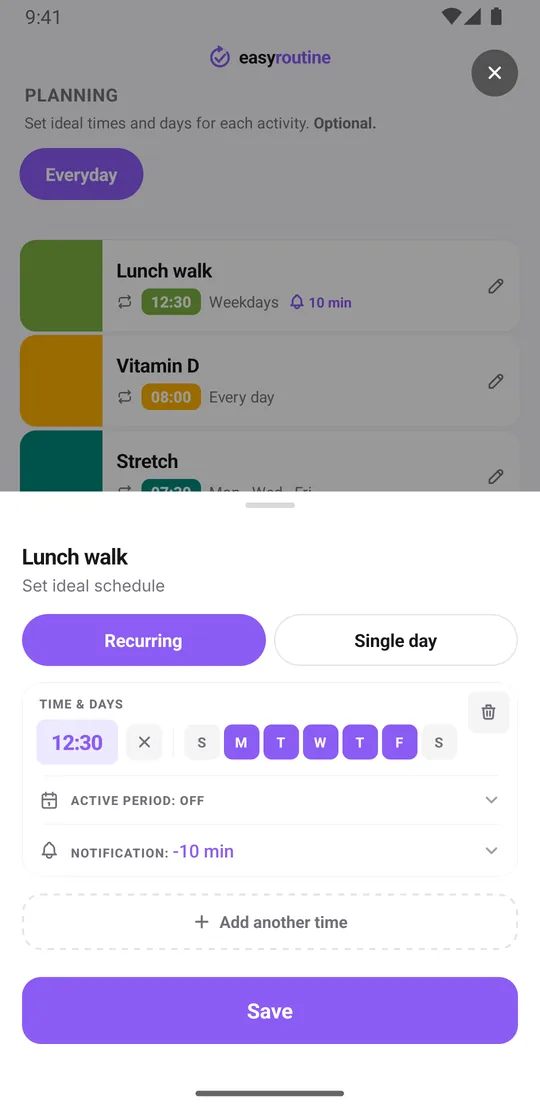
In EasyRoutine you do not create loose alarms. You create activities (Vitamin D, Lunch walk, Floss) inside a routine, and give each activity its own schedule in the Plan tab. Every timed slot in that schedule can carry a reminder, on time or 5, 10, 15 or 30 minutes before. The notification names the activity, and tapping it opens that routine, so you can log it right away. How reminders work.
That also means no nagging on the wrong days. A reminder only fires where the activity is scheduled.
Schedules for real routines
Can reminders follow a custom schedule like weekdays only? Yes. Each activity can have:
- Chosen weekdays: every day, Monday to Friday, weekends, or any mix, like Tuesday and Thursday.
- Up to four times a day: say 8:00 and 20:00 for something you do twice a day, each with its own reminder.
- Single dates: up to 20 planned dates, for things on longer cycles like changing a filter.
- An active period: a start and end date, for a two-week trial or a course with an end.
One honest limit: schedules repeat on weekdays, not on intervals like "every three days" or "every second week". For those, use single dates. A time is optional too; an "Any time" slot shows at the top of the day but cannot carry a reminder. More about scheduling.
A calendar of what you actually did
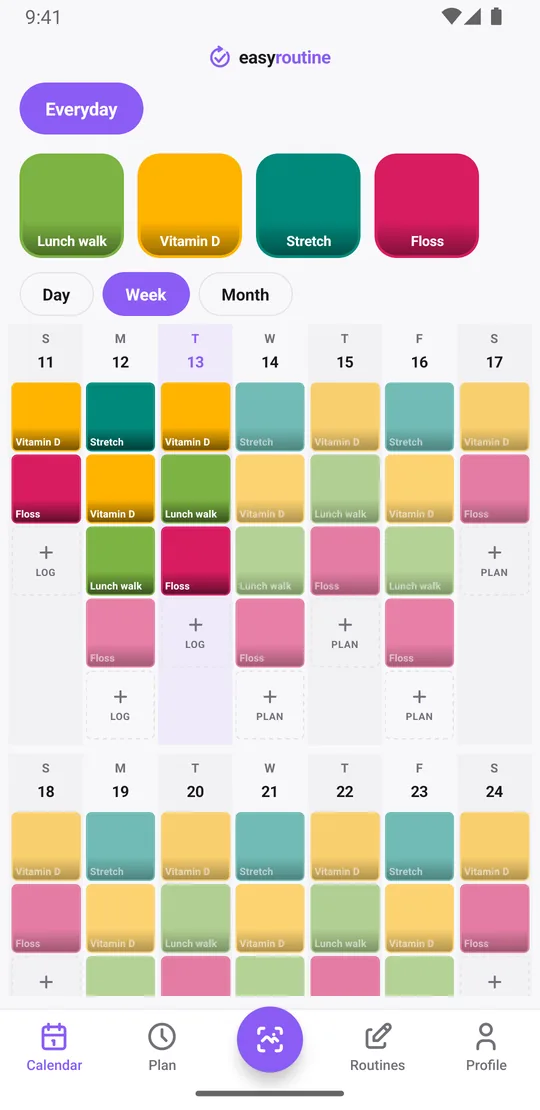
This is the part a reminders app does not have. The Calendar tab shows Day, Week and Month views of everything you logged, as colored tiles. Planned entries you have not logged yet show faded next to them. A faded entry from last Tuesday means you were reminded but did not log it. A tile means you did. More about the calendar.
To check one task, tap its activity tile at the top of the calendar. The calendar then shows only that activity, so "when did I last take it?" is answered by the last tile, not by your memory of a swiped alert.
Is this a to-do list or a tracker?
A tracker. On a to-do list, you tick an item and it disappears. In EasyRoutine, activities stay, and each time you do one you add a log to its history. That is why it suits things you repeat, like supplements, skincare, workouts or flossing, and not one-off errands or a shopping list.
What a reminders app does better
To be fair, the built-in reminders app wins in several ways:
- It is free. In EasyRoutine, scheduling and reminders are part of Premium. Logging, the calendar and the photo scan are free.
- One-off tasks and lists: errands, shopping lists, "call the plumber".
- Flexible repeats: many reminders apps can repeat every few days, every other week or monthly.
- Sharing: shared lists with family. EasyRoutine has no sharing.
- No account or connection: EasyRoutine needs an account and the internet to use the app. Reminders that are already scheduled do still fire offline, since they live on your phone.
If all you need is a ping and you never look back, a repeating reminder is enough.
Who should choose which
Use your phone's reminders for one-off tasks and lists. Choose EasyRoutine when the question you keep asking is "did I actually do it?" and you want each nudge tied to a record you can check.
Common questions
How is this different from just setting a repeating reminder on my phone?
A repeating reminder only tells you when. In EasyRoutine each reminder belongs to an activity that you log, so the calendar shows which days you actually did it.
Does it know if I actually did the task, not just that I was reminded?
It knows what you log. Logging is a tap on the faded planned entry and Save, and planned entries you have not logged stay faded on the calendar, so missed days are easy to spot.
Can reminders follow a custom schedule like weekdays only?
Yes. Choose any weekdays, up to four times a day, single dates and an optional start and end date. Intervals like every three days are not supported; use single dates for those. Reminders are part of Premium.
Is this a to-do list or a tracker?
A tracker. Activities stay in place and each time you do one, a log is added to its history. It is built for repeating routines, not one-off tasks.
Keep reading
Free on iPhone and Android. Sign in with Apple, Google or your email to start.