An app to remind you to pray at the times you choose
Looking for an app to remind you to pray? EasyRoutine lets you set each prayer time yourself, get a reminder when it comes around (Premium), and log the prayers you actually keep, with a note for your intentions if you like.
What can a prayer reminder app do?
Good intentions about prayer often get lost in ordinary routines: the morning starts in a rush, the evening ends on the sofa, and the moment passes without anyone noticing. A prayer reminder brings that moment back to mind. It cannot make the prayer for you, and it should not try to.
Be clear about what EasyRoutine offers before you set it up. It holds no prayer texts, no readings and no calendar of feast days, and it does not calculate prayer times from your location or show a direction. You enter the times yourself and change them when they change. If your prayer times follow the sun, use a dedicated prayer-time app or your community's printed timetable to find them. EasyRoutine is for reminders and keeping a record.
How to choose your prayer times
Start with the rhythm your tradition or personal practice already has, then write it down as times of day. Here are some examples:
- A morning and an evening prayer. Two fixed moments, such as 7:00 after waking and 22:00 before sleep.
- The Angelus. Traditionally said in the morning, at noon and in the evening, so three times a day.
- The Liturgy of the Hours. If you pray some of the hours, such as Morning Prayer, Evening Prayer and Night Prayer, give each one its own time.
- Daily salah. Five prayers whose times follow the sun, so they move through the year and need adjusting.
- Grace at meals, or a quiet minute at the start of the working day.
Pick times you can actually keep. A prayer tied to something that already happens, like the first coffee, the walk home or switching off the light, is easier to remember than one floating in the middle of the afternoon.
How to set up a prayer routine (free)
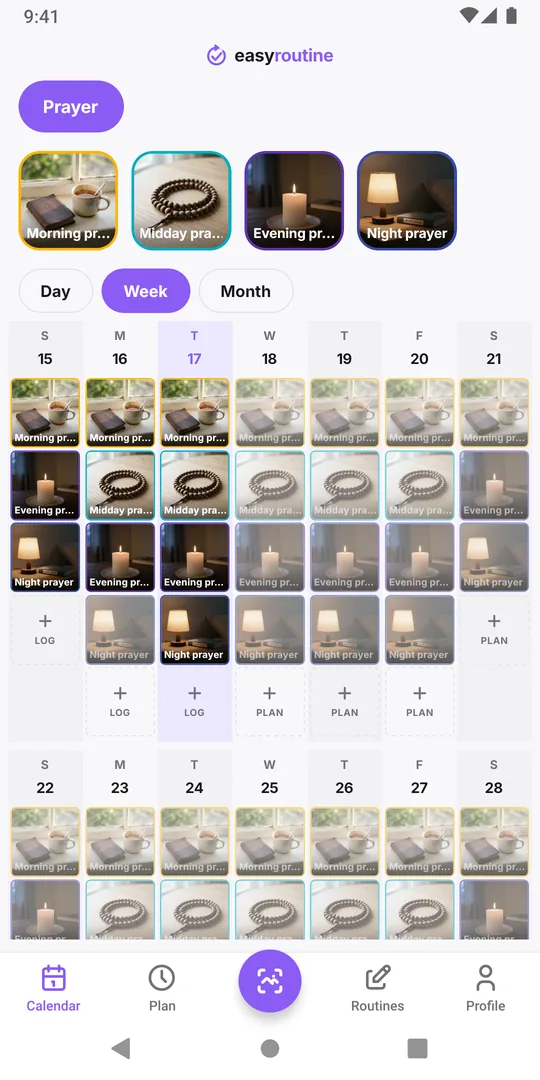
In EasyRoutine, create a routine called Prayer and add one activity for each prayer you want to keep: Morning prayer, Midday prayer, Evening prayer, Night prayer, or the names your tradition uses. Each gets its own tile and color, so the week view shows which prayers you logged on which days.
One activity can hold up to four recurring times. That suits a prayer said several times a day in the same form: an Angelus activity can have 6:00, 12:00 and 18:00. For the five daily prayers, use five activities: Fajr, Dhuhr, Asr, Maghrib and Isha. Each gets its own time and reminder, and the log shows exactly which prayers you recorded.
After praying, tap + Log on the day, select the prayer and save. Logging, notes and the calendar are free.
How to get a reminder at each prayer time (Premium)
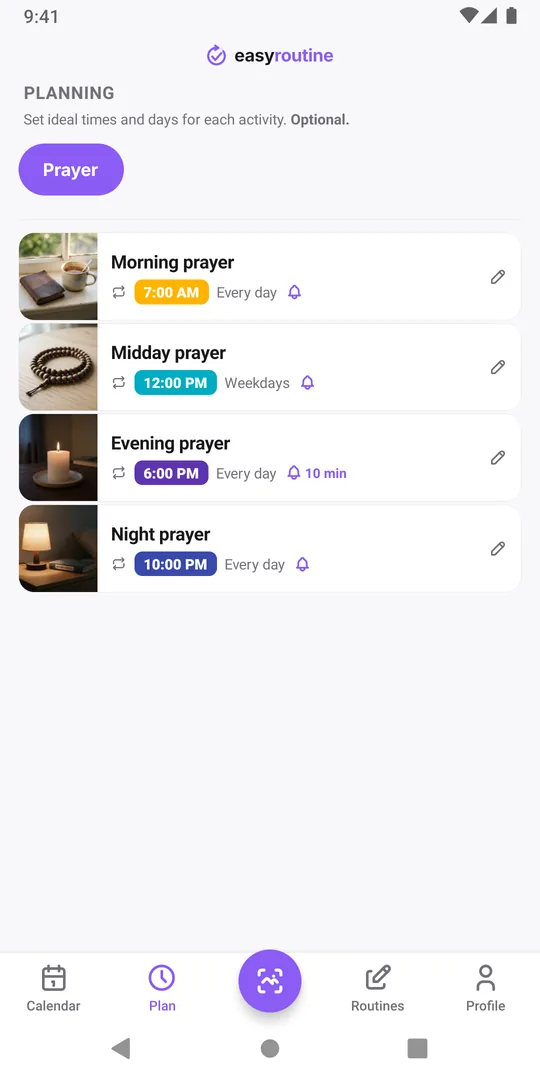
Scheduling and reminders require Premium. Open the Plan tab, tap a prayer, add a Recurring time for the days it applies and turn on its reminder. Choose a reminder on time for a prayer you can start wherever you are, or 10 or 15 minutes before if you need time to get to a quiet place or finish what you are doing. The reminder names the prayer, so you know which one is due.
For prayer times that move through the year, you have two options:
- Adjust as you go. Every week or two, check your timetable and change the time in the Plan tab.
- Plan the next periods in advance. A recurring time can have a start date and an end date. Give a prayer up to four recurring time slots, each with its own time and dates, so the time changes automatically between periods.
The same start and end dates work for a season, such as an extra daily prayer during Lent or Ramadan that stops on its own. Five prayers every day add up to 35 reminders a week, within EasyRoutine's limit of 60 pending reminders. If you have many other reminders too, see too many reminders.
How to keep prayer intentions in your notes
Each log can carry a short note. If you pray for particular intentions, the note is a private place to keep them: "for a friend's exam", "thanks for good news", "for Grandad in hospital". When you log the same prayer again, the log sheet shows your recent notes for it, so an intention you wrote on Monday is still in front of you on Thursday.
Notes stay in your account. If you share a routine with a prayer group so they can copy your setup, they see the routine's name and its activities' names, colors and photos, never your logs, notes or times (how sharing works).
What should you do when you miss a prayer?
Log only the prayers you actually kept. A faded planned entry on a past day is an honest record of a missed prayer. Over a few weeks, the gaps show which time does not fit your day. Maybe midday never happens on workdays, and a prayer on the way to work would fit better. Whether and how to make up a missed prayer is a question for your tradition, not for an app.
Common questions
Does EasyRoutine calculate prayer times from my location?
No. You set each prayer time yourself and change it when it moves. For times calculated from the sun and your location, use a dedicated prayer-time app or your community's timetable, then enter those times in EasyRoutine.
Can an app remind me to pray five times a day?
Yes. EasyRoutine supports five daily prayer reminders with Premium. Create one activity per prayer, each with its own time and reminder. One activity holds up to four recurring times, so five separate activities are the clearer setup.
Is EasyRoutine a prayer reminder app for one religion?
No. It reminds you at the times you choose and records the prayers you log, so it works for any religious tradition or personal practice. It contains no prayers or religious texts.
Can anyone see my prayers or prayer intentions?
No. Your logs and notes stay in your account. Sharing a routine shows only its name and its activities' names, colors and photos. Prayer times and reminders are not shared.
Keep reading
Free on iPhone and Android. Sign in with Apple, Google or your email to start.