Meditation tracker app: a simple record of the days you meditate
When did I last actually sit down to meditate? EasyRoutine is a meditation tracker that logs each session in a few taps, with a note for how long you sat and how it went, so the calendar shows whether the practice is holding.
A tracker, not a meditation app
Be clear on what this is before you install it. EasyRoutine has no timer, no bell, no guided audio, no breathing exercises and no courses. It does not measure how long you sat or connect to a watch. It records that you meditated and when, plus an optional note and a colored flag.
That makes it a good partner for whatever you already use to meditate: a timer on your phone, a guided app, a class, or just sitting quietly. Meditate there, then log it here. If you want guidance or a timer, keep your meditation app; if what you are missing is an honest view of how often you actually practise, that is the part EasyRoutine covers.
Set up your practice
Create a routine called Meditation and add an activity for each kind of practice you want to keep up:
- Morning sit: the main daily session
- Breathing break: a short pause on workdays
- Body scan: in the evening, a few times a week
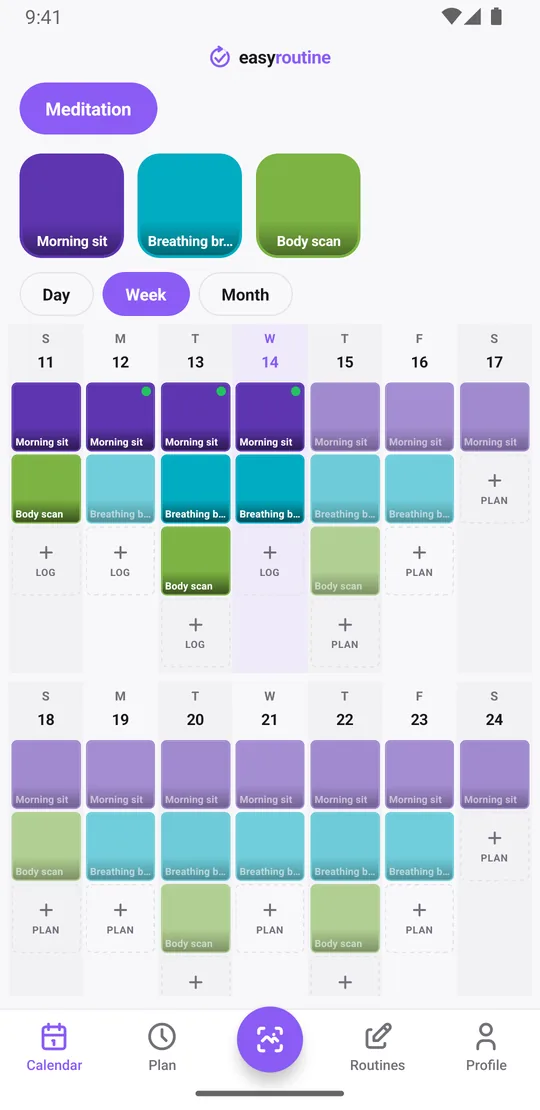
If you only have one practice, a single activity is enough. Give each one its own color so the calendar shows at a glance which practice happened on which day.
Log each sit, with a note on length and feel
When your timer ends, tap + Log on today in the Day view, pick Morning sit and confirm with OK. Done: the log is saved with the current time. Tap the entry to open the log sheet and add a short comment, since the app does not record duration for you:
- "20 min, calm, mind wandered at the end"
- "10 min, restless after a bad night"
- "Guided, sleep track"
Flags make a quick mood marker: green for a settled session, amber for a scattered one, red for a sit you cut short. The log sheet shows your last few comments for that activity, so before you write today's line you see how the last few sessions went. Forgot to log yesterday's sit? Use + Log on yesterday and set the time you sat.
Logging, comments, flags and the calendar are free.
When did you last meditate, and which days slip?
Tap the Morning sit tile at the top of the calendar and the calendar shows only that activity, so the last entry is the last time you sat. The month view, with up to four dots per day, shows the longer pattern: perhaps weekdays hold and weekends fall away, or the evening body scan only survives quiet weeks.
The Profile tab shows a Day streak: consecutive days with at least one log of any activity. If meditation is all you track, that is your meditation streak. If you track other habits too, the filtered month view is the honest record. Your notes are not shown on the calendar, but reading back through the logs tells you what changed when sessions got longer or felt easier.
A daily reminder at your meditation time (Premium)
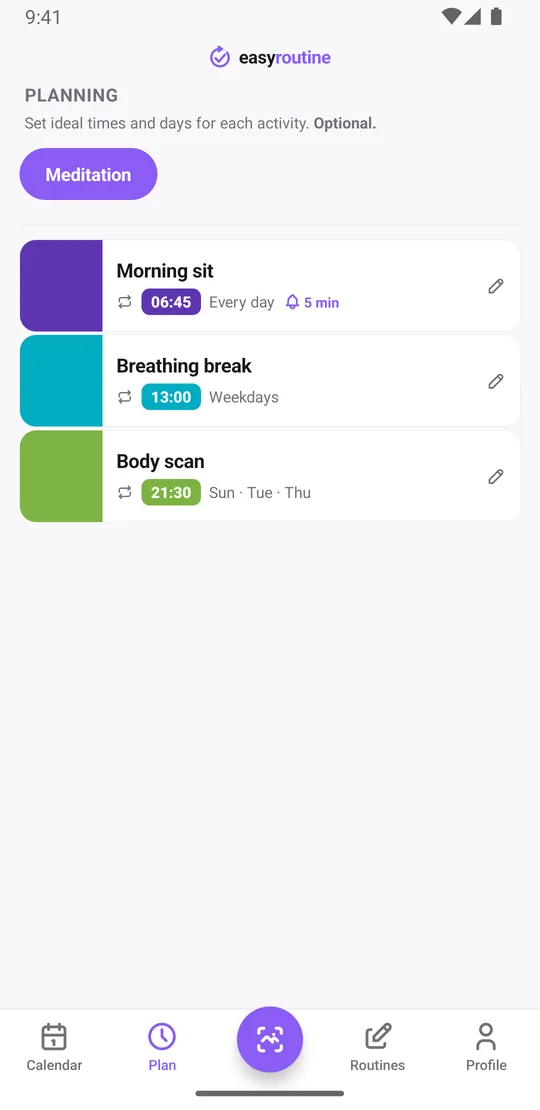
Scheduling and reminders are Premium. In the Plan tab, give Morning sit a time, for example every day at 6:45 am, and turn on a reminder on time or 5, 10, 15 or 30 minutes before. A workday Breathing break can be scheduled Monday to Friday at 1:00 pm, and an evening body scan on Tuesday, Thursday and Sunday. Up to four recurring time slots per activity let one activity cover both a morning and an evening sit.
Trying a 30-day meditation challenge or an eight-week course? Give the slot a start and end date so it stops by itself, and add a retreat day as a single date. Planned sessions show faded on the calendar until you log them, so a missed morning is easy to spot. How reminders work.
On the free plan you log, note and see every session; you just remember the time yourself.
Common questions
Does EasyRoutine have a meditation timer or guided sessions?
No. There is no timer, bell or audio. Meditate with whatever you already use and log the session in EasyRoutine afterwards.
Can I track how long I meditated?
Not automatically. Write the length in the log's comment, for example 20 min. The log sheet shows your last few comments for that activity.
How do I see my meditation streak?
The Profile tab shows a day streak of consecutive days with at least one log of any activity. If you track more than meditation, filter the month view by your meditation activity instead.
Can I get a reminder to meditate every morning?
Yes, with Premium. Schedule the activity every day at your time in the Plan tab and turn on a reminder on time or up to 30 minutes before.
Is this meditation tracker free?
Logging, comments, flags, the calendar and the streak are free. A set meditation time and reminders need Premium.
Keep reading
Free on iPhone and Android. Sign in with Apple, Google or your email to start.