A Bible reading plan tracker that keeps your place
A reading plan stays on track when you know two things each morning: where you stopped, and how many days you are behind. Log each reading with the passage in a short note, and the calendar answers both. EasyRoutine works with whatever plan you follow; it does not include the plans or the text.
How to choose a Bible reading plan
Bible reading plans differ in more than length. Before you start, think about which kind suits this season of your life:
- Through the whole Bible in a year. Several chapters a day, often from different books. Satisfying, but the hardest to catch up on once you fall behind.
- One book at a time. A chapter a day through a Gospel or a letter. Short readings and an easy place to resume.
- Chronological plans that follow events in the order they happened.
- A plan from your church or group, so you read the same passage as others and can talk about it.
If you have tried a year-long plan before and stopped in February, a shorter one you finish is worth more than a long one you abandon. You can always start the next one afterward.
Choose a daily Bible reading time and place
Daily reading holds best when it is tied to a moment that already happens: the first coffee, the train to work, the lunch break, or the last thing before the light goes off. Keep the Bible, or the app you read in, where that moment happens, so you do not have to go looking for it.
Decide what counts as done. A full day's portion is the goal, but on a bad day reading just one chapter and writing down where you stopped keeps the habit alive. Write that rule down once, so you do not argue with yourself every evening.
How to track Bible reading and record each passage (free)
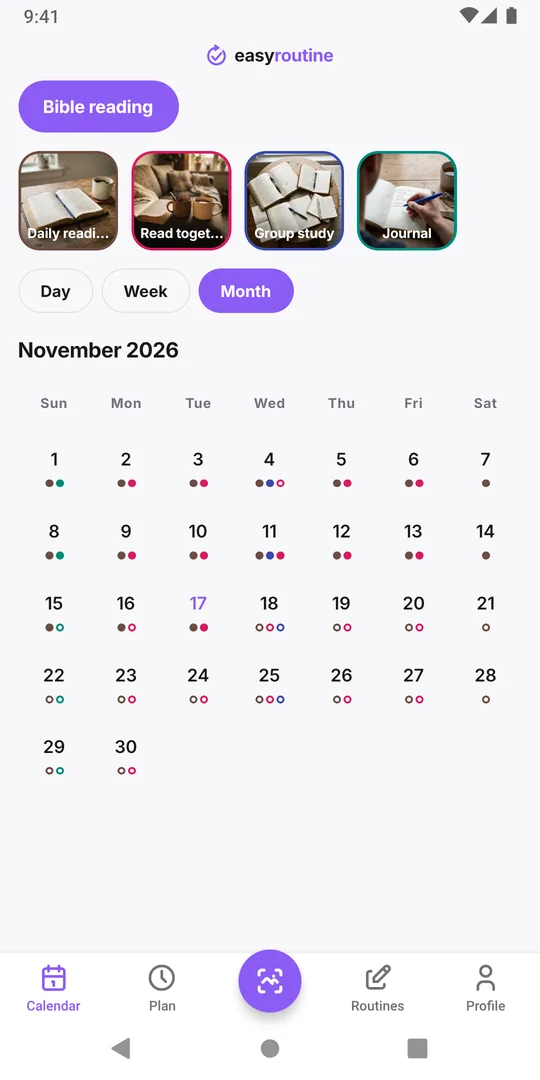
In EasyRoutine, create a routine called Bible reading and add an activity Daily reading. After reading, tap + Log on the day, tick it and add a note with the passage: "Genesis 12", "Day 43: Exodus 1 to 3", or "Mark 4, stopped at the parable". A thought or a question for your group can go in the same note.
The next time you log, the log sheet shows your recent notes for that activity, so the passage you reached last time is right there. Logging, notes and the calendar are free. For more ideas on tracking reading sessions, see the reading habit tracker.
How to catch up on a Bible reading plan after missed days
Every plan meets a week of illness, travel or plain tiredness. When you come back, there are three honest ways to continue, and it helps to choose one before you open the book:
- Read a bit extra each day until you are back on the plan's dates. Good when you missed two or three days.
- Skip ahead to today's date and come back to the missed readings later, or not at all. Good when the plan is tied to a group.
- Treat the plan as a list, not a calendar. Carry on from where you stopped and finish later than planned. Good when you read alone.
Whichever you pick, log readings on the day you actually read them, and put the plan's day in the note ("Day 43 and 44"). Do not back-fill the missed days. The gaps on the calendar are useful: they show whether you slip on weekends, on travel days or after late nights, which tells you where the time or place needs to change. If you read yesterday and forgot to log it, adding it to yesterday is fine; see forgot to log.
How to track Bible reading with your spouse or group
Reading together needs its own record, because it happens on different days and at different times from reading alone:
- Read together: an activity for the evenings you read with your spouse or family.
- Group study: a weekly activity for your Bible study group, with the week's passage in the note.
- Journal: if you write down what you read, log that too, so you can see how often reflection follows reading.
If you and your spouse want one shared record, sign in on both phones with the same email address; both of you then see and can edit every log. If you each want your own record, share the routine by link instead: the other person gets a copy of the activities, names and photos, without your logs or notes (add a shared routine).
Set a daily Bible reading reminder (Premium)
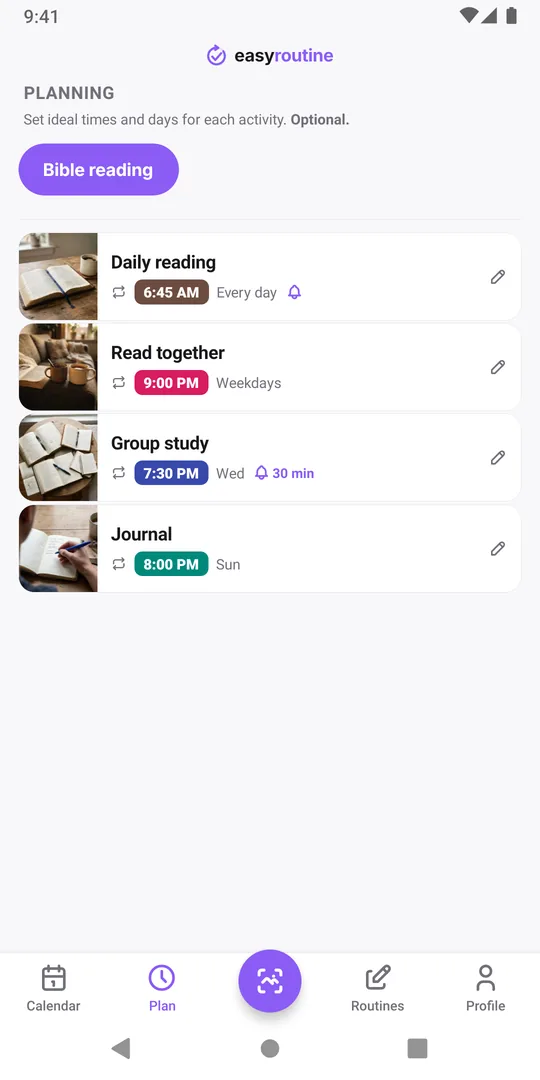
Scheduling and reminders are Premium. In the Plan tab, give Daily reading a time, for example every day at 6:45, and turn on the reminder. A plan that runs for a set span, like a year or the weeks of Lent, can get a start and an end date, so the reminder stops when the plan does. Group study can sit on Wednesday at 19:30. Until you log it, a planned reading stays faded on the calendar, so a missed day is easy to see. If you also want reminders for prayer, the prayer reminder page shows how to set up prayer times.
Common questions
Does EasyRoutine include Bible reading plans or the Bible text?
No. EasyRoutine is a tracker and reminder app, not a Bible or reading plan library. Follow a plan from your church, a printed plan or a Bible app, and log each reading with the passage in the note.
How do I catch up after missing days in a Bible reading plan?
Choose one approach: read extra each day until you are back on schedule, skip to today's reading, or carry on from where you stopped and finish later. Log readings on the days you actually read them, with the plan's day in the note.
Can my spouse and I track our Bible reading together?
Yes. Sign in on both phones with the same email for one shared record, or share the routine by link so each of you gets your own copy of the activities. Shared links never include logs or notes.
Is the Bible reading tracker free?
Logging readings, notes and the calendar are free. Setting a daily reading time and receiving reminders requires Premium.
Can I track a Bible reading plan without a fixed daily schedule?
Yes. Create a Bible reading routine and log each passage whenever you read. Add the book, chapter and plan day to the note so you can pick up where you stopped. Scheduling and reminders are optional Premium features.
Keep reading
Free on iPhone and Android. Sign in with Apple, Google or your email to start.