Reading tracker app: see when you last read, and where you stopped
When did I last actually pick up a book? EasyRoutine is a reading habit tracker that logs each reading session in a few taps, with a note for the page or chapter you reached, so the calendar shows the days you read and the last note tells you where you stopped.
What this reading tracker does, and what it does not
EasyRoutine records that you read and when, plus an optional note and a colored flag. It is not a book app: there is no book database, no barcode lookup, no page counter, no reading timer and no shelf of covers. It does not count pages or minutes for you. If you want those numbers, you write them in the note.
What you get instead is a plain, honest record of the reading habit itself: which days you read, which book, and a line about how far you got. For many readers that is the part that actually keeps the habit alive.
One activity per book, or one Read activity
Create a routine called Reading and choose how to split it:
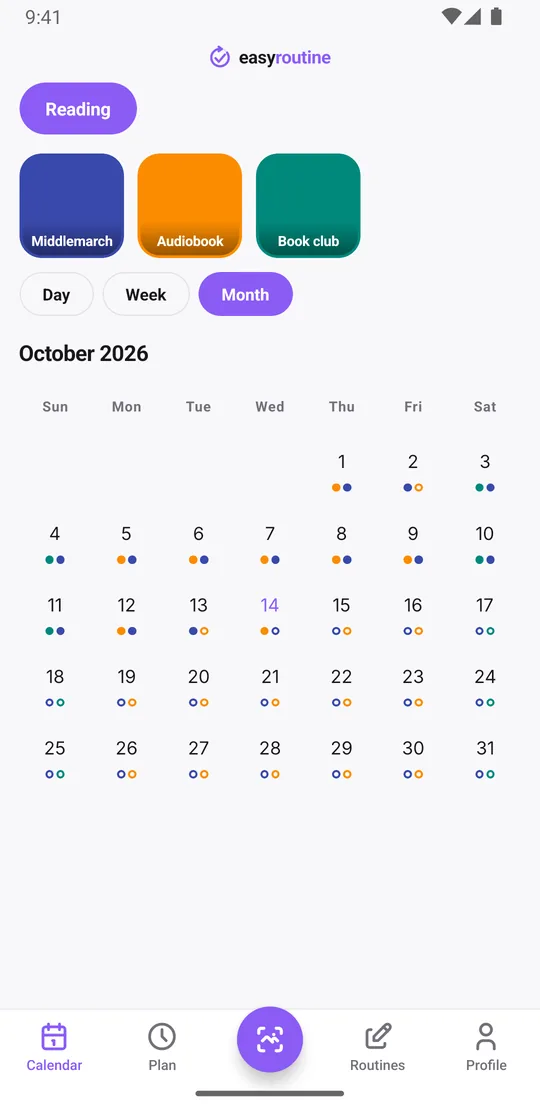
- One activity per book: "Middlemarch", "The Overstory", "Audiobook". Each book gets its own color, so the calendar shows which one you were on. Add the cover as the activity photo so the tile is easy to spot.
- One Read activity: a single "Read" activity for everything, with the book title in the note. Simpler if you read many short books.
You can mix both: a Read activity for daily reading and a separate activity for a book club title or a language-learning reader. Pin the book you are reading now so it shows first. When you finish a book, archive its activity: it disappears from your routine, but the days you read it stay on the calendar.
Log a session and note where you stopped
After reading, tap + Log on today in the Day view, pick the book and confirm with OK. That is a complete log, saved with the current time. Then tap the entry to open the log sheet and add a comment, for example:
- "p. 212, end of chapter 14"
- "Chapter 3, read on the train"
- "Finished! Loved the ending"
The log sheet shows your last few comments for that activity, so the next time you open it you see the page or chapter you reached last time. Use the flags as you like: green for a good session, amber when you only managed a few pages, red when you gave up on a book. Forgot to log last night? Use + Log on yesterday and set the time you read.
Logging, comments, flags and the calendar are free.
When did you last read that book?
Tap a book's tile at the top of the calendar and the calendar shows only that activity, so the last entry is the last time you read it. Switch to the month view, which shows up to four dots per day, and the pattern appears: maybe you read every evening until the weekend breaks the chain, or the audiobook only happens on commute days.
Comments are not shown on the calendar itself; they live on each log. That keeps the calendar clean and the notes useful: open the most recent log of a book and you know where to pick it up again. With one activity per book, filter by it before you archive it and the first and last log show how long the book took you.
Log by photo
If a book activity has the cover as its photo, you can log a session with the AI photo scan: open the Scan tab, point the camera at the book, and it logs the matching activity at the current time. The scan only matches your own activities that have a photo; it does not recognize books in general. The scan is free.
A set reading time with a reminder (Premium)
Scheduling and reminders are Premium. In the Plan tab, give your reading activity a time, for example every day at 9:30 pm before bed, and turn on a reminder on time or 5, 10, 15 or 30 minutes before. Read on your lunch break on weekdays? Schedule Monday to Friday at 12:30 instead. An activity can hold up to four recurring time slots, so a weekday lunch slot and a weekend morning slot can share one activity.
For a reading challenge or a book club deadline, give the slot a start and end date so it stops on its own, and plan the club meeting itself as a single date. Planned sessions show faded on the calendar until you log them. How reminders work.
On the free plan you still log, note your page and see every day you read; you just choose your own moment to open the book.
Common questions
Does the app count pages or reading time?
No. EasyRoutine records that and when you read, with an optional note. Write the page, chapter or minutes in the note if you want to keep them.
Should I make one activity per book?
Either works. One activity per book shows each book in its own color and lets you archive it when you finish. One Read activity with the title in the note is simpler if you read many books.
What happens to a finished book's history?
Archive the activity. It is hidden from your routine and skipped by reminders, but its logs stay on the calendar, and you can unarchive it later.
Can I get a daily reminder to read?
Yes, with Premium. Schedule the activity at your reading time in the Plan tab and turn on a reminder on time or up to 30 minutes before.
Is this reading tracker free?
Logging, notes, flags, the photo scan and the calendar are free. A set reading time and reminders need Premium.
Keep reading
Free on iPhone and Android. Sign in with Apple, Google or your email to start.