Habit tracker for an irregular work schedule: routines that fit your shifts
Did I work out this week, or did the night shifts eat it? Most habit apps assume a day job: same alarm, same evening, every day. EasyRoutine lets each habit run on its own days and times, so your routine can follow your roster instead of fighting it.
Why one daily reminder does not work on shifts
A daily reminder at 7:00 is fine if you wake at 6:30 every day. On early shifts it fires while you are already at work, on nights it wakes you up, and on days off it nags about something you planned for later. After a week you start ignoring it, and the habit goes with it.
In EasyRoutine every habit is a separate activity with its own schedule. Your gym session, your stretching and your vitamins do not have to share a time, or even a day.
Start free: a log of what you actually did
Before you plan anything, log. Tap + Log on the day, pick the habit, and it lands on the calendar with the time you did it. Logging is free and never depends on a schedule.
Logs use the time you actually did something, and you can add them later for any earlier day and time. A stretch at 2:00 after a late finish lands on the day it happened, and the record stays honest about when.
On a rotating roster the real question is often "when did I last work out?" Tap the Workout tile at the top of the calendar and the calendar shows only that habit: the most recent entry is your last session. If your vitamins have a photo, you can also log them by pointing the camera at the bottle in the Scan tab; the scan only matches your own activities that have a photo. About the photo scan.
Notes and flags that explain the gaps
Each log can carry a note and a green, amber or red flag, also on the free plan. On shifts, write down what the calendar cannot show: "after night 3, 20 minutes only", "day off, full session", "stretched in the break room". Flag a cut-short workout amber and a skipped one you made up later red.
When you log, the Log Entry sheet shows your last few notes for that habit, so you see how the last sessions went before you save this one. Notes stay on the log rather than on the calendar, while flags show on the entries in the day and week views.
Schedule a habit on certain days only
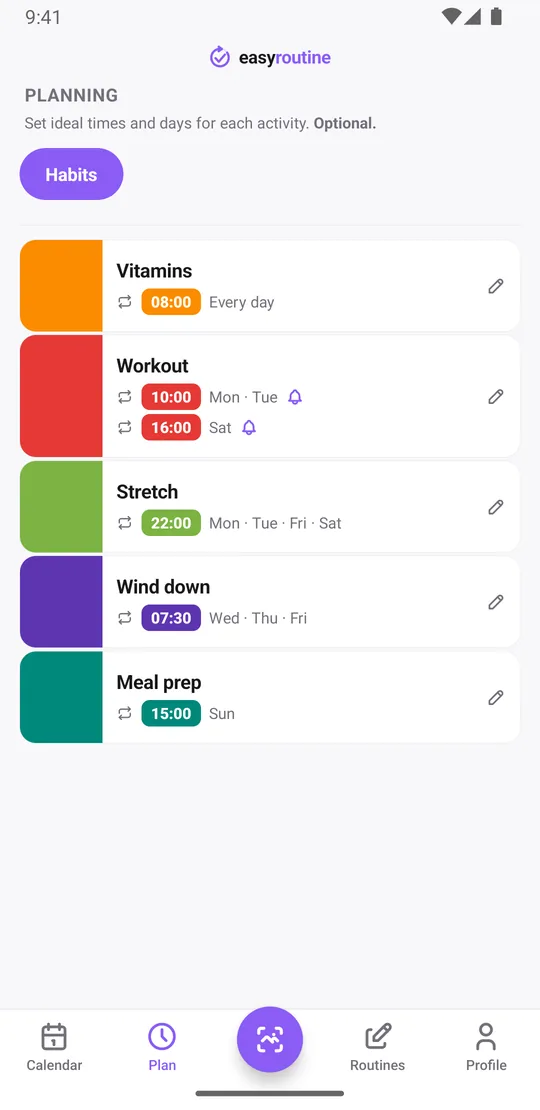
With Premium, open the Plan tab and choose the weekdays and a time for each activity. A habit does not have to run every day:
- Vitamins: every day at 8:00
- Workout: Monday and Tuesday at 10:00
- Stretch: Monday, Tuesday, Friday and Saturday at 10:00 pm
- Wind down: Wednesday to Friday at 7:30, after the night shifts
- Meal prep: Sunday at 3:00 pm
If a habit has a day but no fixed time, set it to "Any time". It shows at the top of that day without a reminder, which suits things like a walk you will fit in whenever you are up. More about scheduling.
Different times for different shifts
Each activity can have up to four recurring time slots, and each slot has its own days and time. That covers a fixed pattern where the time depends on the day:
- Workout: Monday and Tuesday at 10:00 (late shifts)
- Workout: Saturday at 4:00 pm (day off)
The same goes for a habit that runs twice a day only sometimes: give it a second slot on just those days, for example stretching at 7:00 and again at 10:00 pm on days off.
Slots repeat every week. A rota that rotates, such as a week of earlies followed by a week of lates, does not fit one weekly pattern. For that, give each slot a From and Until date that covers one block of shifts, or use single-day plans: each activity can hold up to 20 dated plans, so you can enter the coming weeks straight from your roster. You can edit or remove slots in the Plan tab whenever your roster changes.
Reminders tied to the scheduled time
Any slot with a time can carry a reminder, on time or 5, 10, 15 or 30 minutes before. Because the reminder belongs to the slot, Monday's 10:00 workout reminds you at 10:00 and Saturday's at 4:00 pm. Days with no slot stay quiet, which is what you want after a night shift. Reminders are scheduled on your phone, so once set they fire even without a connection. Scheduling and reminders are part of Premium. How reminders work.
What happens on days outside your schedule
Nothing is planned there, so nothing appears faded and no reminder fires. The day is not counted as missed. You can still log any activity on any day: logging never depends on a schedule. If you fit in an extra workout on a Thursday, tap + Log on that day, pick it, and it is on the record.
See an irregular week at a glance
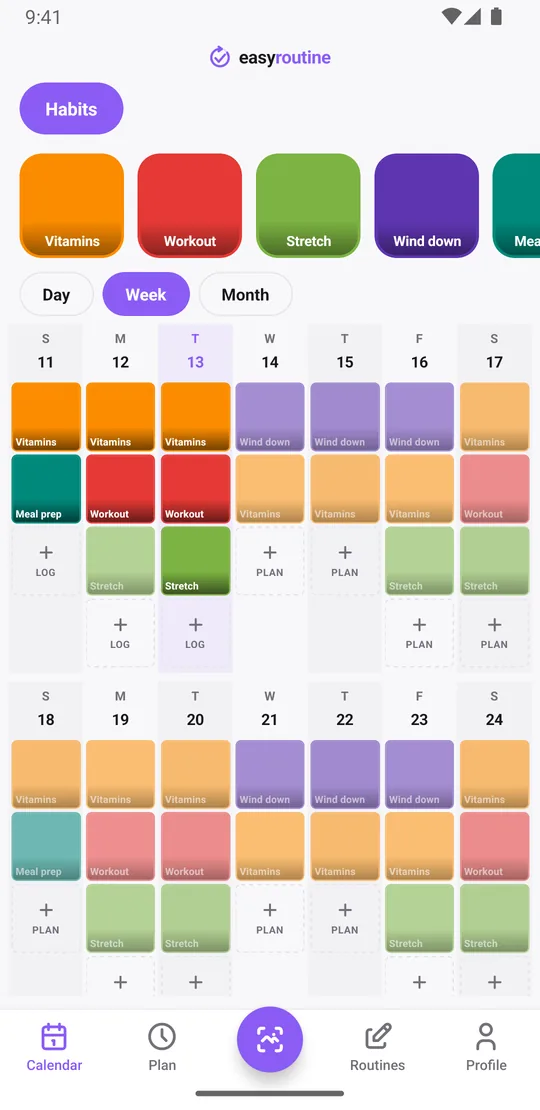
The week view shows a colored tile for every log and a faded entry for every planned slot you have not logged yet. On an irregular schedule that is the part a normal calendar cannot show: which habits survived the night block and which did not. The month view shows several rotations side by side, so a pattern like "I never stretch during nights" becomes visible.
The Day streak in your Profile counts consecutive days with at least one log of anything. It does not depend on schedules, so a day off with just one log still keeps it going.
Free and Premium
Logging, notes, flags, the calendar and the streak are free, with a banner ad. Schedules, time slots, date ranges and reminders are Premium, at $1.49 a month in the US (local prices elsewhere), with no trial. If you only want a record of what you did, the free plan is enough. See pricing.
Common questions
Can I schedule a routine for only certain days, not every day?
Yes. Each activity runs on the weekdays you choose, at the time you choose. Scheduling is part of Premium.
Can I set different times depending on my shift?
Yes. An activity can have up to four recurring slots, each with its own days and time. For rotating rosters, slots can have start and end dates, or you can add up to 20 single-day plans per activity.
Can a routine run twice a day only on some days?
Yes. Add a second time slot to the activity and pick only the days you want it twice.
What happens on days outside my schedule?
Nothing is planned, so there is no reminder and nothing shows as missed. You can still log any activity on any day.
How do I see when I last did a habit?
Tap the habit's tile at the top of the calendar. The calendar then shows only that habit, and the most recent entry is the last time you did it. This is free.
Does it repeat on a rotating pattern, like every third day?
No. Recurring slots repeat on weekdays every week. For other patterns, use slots with start and end dates or single-day plans.
Keep reading
Free on iPhone and Android. Sign in with Apple, Google or your email to start.