An app to remind you to eat: plan meals and snacks
If hunger only shows up once the afternoon is gone, a feeling is not a reliable signal. Put each meal and snack in a plan at a fixed time, let a reminder name the meal that is due, and log it when you have eaten. EasyRoutine logs meals for free; planned times and reminders are Premium.
Why do you keep forgetting to eat?
Forgetting to eat is rarely a decision. It happens in the gaps between other things:
- You are absorbed. A task, a game or a deadline swallows the hours, and lunch only comes to mind when you feel shaky or irritable.
- The day has no fixed shape. Shift work, working from home or looking after someone else means there is no lunch break to remind you.
- Food takes effort. If eating means deciding, shopping and cooking, it is easy to put off until "later", and later becomes bedtime.
- Low appetite. Some days you simply do not feel like it, so nothing prompts you.
If you recognize yourself in the first point and also struggle with other routines, the routine tracker for ADHD covers the wider setup. This page focuses on food.
How to build a meal routine
Waiting until you feel hungry does not work when the signal gets drowned out. A few practical changes can help you plan meals instead:
- Pick fixed times. Write down when breakfast, lunch, a snack and dinner should happen on a normal day. Workdays and weekends can differ.
- Tie each meal to something that already happens. Breakfast with the morning coffee, lunch when a meeting block ends, a snack when the kids come home.
- Keep easy defaults. Have a few things you can eat without cooking or deciding: a sandwich, yogurt, fruit, leftovers. A reminder you cannot act on in five minutes gets swiped away.
- Put food where you will see it. A snack on the desk is easier to eat than one in a cupboard two rooms away.
- Decide what counts. A plate of leftovers at the desk is a lunch. A biscuit on the way past the kitchen may not be. Decide once, so logging is quick.
What and how much to eat is not something an app should tell you. For that, talk to your doctor or a registered dietitian.
How to track meals in EasyRoutine for free
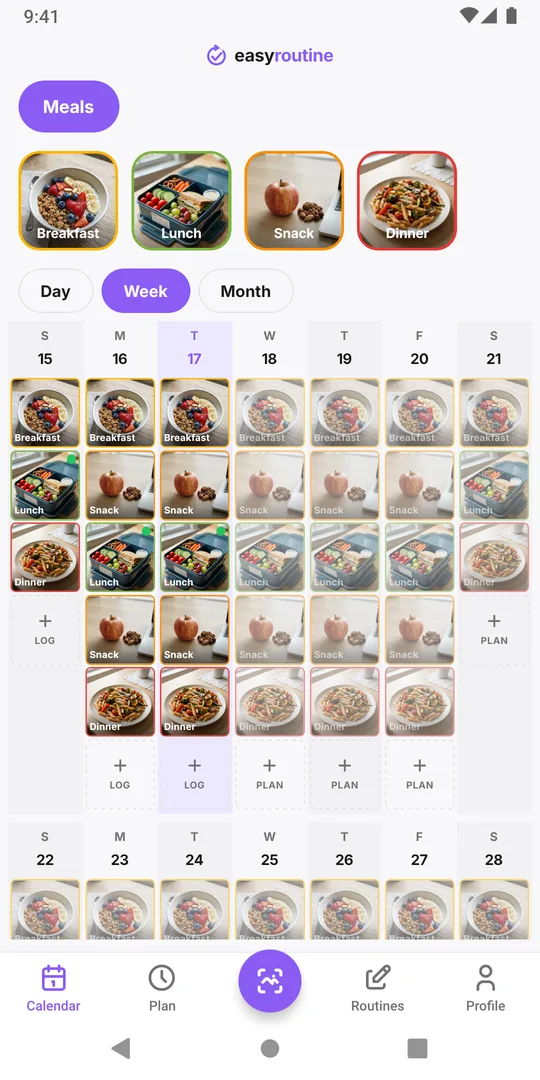
Create a routine called Meals and add one activity per meal: Breakfast, Lunch, Snack, Dinner. Each gets its own tile and color, so the week view shows which meals happened and which did not. If dinner is reliable and only lunch slips, track just lunch and the snack. Fewer tiles means less to ignore.
When you have eaten, tap + Log on the day, tick the meal and save. Recording what you ate is optional. A short note can help you find easy defaults that work, like "soup from the freezer" or "ate away from the desk", but the log itself only says that you ate and when. EasyRoutine does not count calories, portions or nutrients.
How to set a reminder for each meal (Premium)
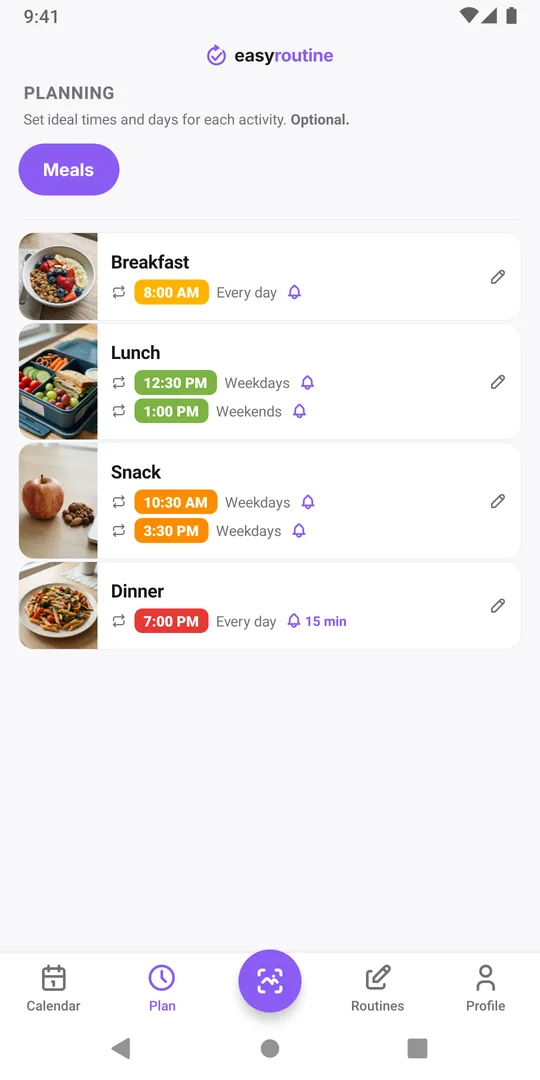
Scheduling and reminders are Premium. Open the Plan tab, tap a meal, add a Recurring time on the weekdays it applies and turn on the reminder. For example:
- Breakfast: every day at 8:00, reminder on time
- Lunch: Monday to Friday at 12:30, and Saturday and Sunday at 13:00
- Snack: Monday to Friday at 10:30 and 15:30
- Dinner: every day at 19:00, reminder 15 minutes before, so there is time to start cooking
One activity can hold up to four recurring times, so two snacks can share one Snack tile. Each reminder names the meal that is due, which is more useful than a general "eat something" notification. A time left as "Any time" appears on the day but cannot trigger a reminder, so give every meal you want a reminder for an actual time. More on reminders.
What to do when a meal reminder comes at a bad time
The reminder fires, you are in the middle of something, and you swipe it away. Here are a few ways to handle that situation:
- Eat something small right away and log the full meal later, or note "snack only".
- Move the time if one reminder always lands in a meeting. A reminder you can act on beats a "correct" time.
- Log late meals at their real time. Ate lunch at 15:00? Log it at 15:00. You can add a log to an earlier time or day, so the record stays honest (forgot to log).
- Leave missed meals empty. Do not fill them in to make the week look better. Until you log it, a planned meal stays faded on the calendar. A row of faded lunches shows which meal needs a new time or an easier default.
Can you track food and water together?
If you forget meals, you may forget to drink too. A glass of water with each meal is an easy cue to attach. You can also create a separate Water routine with its own times, keeping those logs out of your meal tiles. The water intake reminder explains how to set that up.
Is EasyRoutine a diet or meal planning app?
EasyRoutine is a log and a reminder. It is not a diet app, a meal planner or a medical tool, and it gives no advice about food. If eating is hard for reasons beyond forgetting, or you are worried about an eating disorder, talk to your doctor.
Common questions
Is there a free app to remind me to eat?
EasyRoutine lets you log meals, add notes and flags, and use the calendar for free. Planning meal times and receiving reminders require Premium.
How do I set reminders for breakfast, lunch and dinner?
Create a Meals routine, add Breakfast, Lunch and Dinner activities, then open the Plan tab. Set a recurring time for each meal on the weekdays you want and turn on its reminder. Scheduling and reminders require Premium.
Can I get a reminder to eat every few hours?
You choose specific times and weekdays rather than an automatic hourly interval. Each activity supports up to four recurring times, so a Snack activity can remind you at 10:30 and 15:30, for example.
Does a meal reminder app count calories or tell me what to eat?
No. EasyRoutine records that you ate and when, with an optional note. It does not count calories, portions or nutrients and gives no nutrition advice. A doctor or registered dietitian can help with what to eat.
Is it suitable if I have an eating disorder?
That is a question for your doctor. EasyRoutine is a general log and reminder, not a treatment or support tool.
Keep reading
Free on iPhone and Android. Sign in with Apple, Google or your email to start.