Routine tracker app for ADHD: a nudge for each task, a few taps to log
Did I already take my vitamins this morning? Did I start the evening routine, or only think about it? EasyRoutine reminds you about each task at the moment it is due and lets you log it in a few taps, so the answer lives on your phone instead of in your memory.
Good intentions, forgotten routines
You know what your morning routine is. The hard part is the moment itself: the 7:00 alarm that says "morning routine" goes off, you swipe it away, and the routine dissolves into the day. One alert for a whole routine is easy to dismiss and hard to act on, because it does not say what to do next.
EasyRoutine works the other way round. Every step is its own activity, with its own time and, if you want, its own reminder. Doing it and logging it are a few taps apart.
Break each routine into small activities
Create a routine, for example Morning, and add each step as an activity: Vitamins, Brush teeth, Breakfast, Pack bag. Short names work best because they show on small tiles. Each activity gets a color, and you can add a photo so the tile is recognizable at a glance.
Add as many routines as you need, such as Morning, Evening and Work. There is no limit on routines or activities, on the free plan either. If one step matters more than the rest, use Pin activity so it always sits at the top. Steps you stop doing can be archived instead of deleted, and they disappear from your activity list and from reminders, while their logs stay on the calendar. How routines, activities and logs fit together.
Logging takes a few taps, not a form
When you have done something, tap + Log on the day and tick it. Did several things in one go? Tick them all at once; they are logged with the current time. That is the whole job, and it is free. With a Premium schedule there is an even shorter way: tap the faded planned entry on the calendar, the Log Entry sheet opens with the planned time, and you save it.
A note or a red, amber or green flag is optional, never required. When a note helps, keep it short: "took them with lunch", "skipped, ran out", "started late, done by 8:30". An amber flag can mark a rough morning without any explanation. The Log Entry sheet lists the last few notes for that activity, so a pattern shows up without hunting for it. Notes stay on the log and are not shown on the calendar.
If your activities have photos, the Scan tab is another shortcut: point the camera at the vitamin bottle and EasyRoutine logs the matching activity straight away. It only compares against your own activities that have a photo, and when it is not sure it asks you to pick by hand. How the photo scan works.
Forgot to log? Add it later for any earlier day and time. Nothing is lost and nothing is punished; the record just catches up.
See whether you actually stuck to it
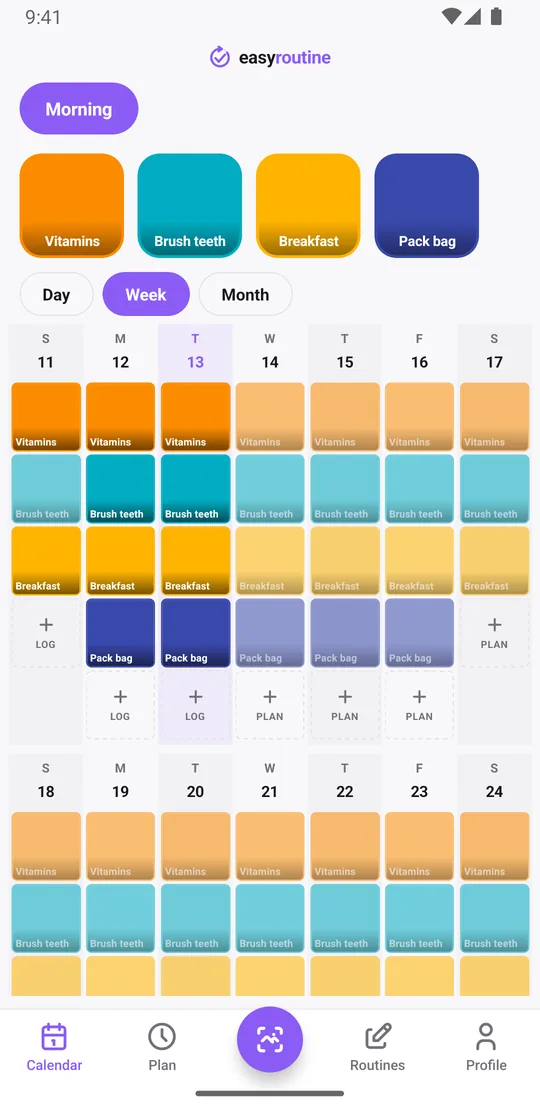
The week view shows a colored tile for everything you logged. Planned activities you have not logged yet stay faded, so a faded entry on a past day is one you missed, and a full row is a day that went to plan. There are no warning colors or messages for misses, only the record. Switch to the month view to see the longer pattern, or to the day view to check this morning.
The Profile tab shows a Day streak: the number of days in a row with at least one log of anything. It counts the whole app, not a single activity, so one logged step keeps it going on a rough day. There are no charts or percentages. The calendar is the review, and it answers the question you actually have: did I do it?
For the nagging question, did I already take my vitamins, or when did I last do the laundry, tap the activity tile at the top of the calendar. The calendar then shows only that activity, and the last tile is the last time you did it.
A reminder for each task, at its own time (Premium)
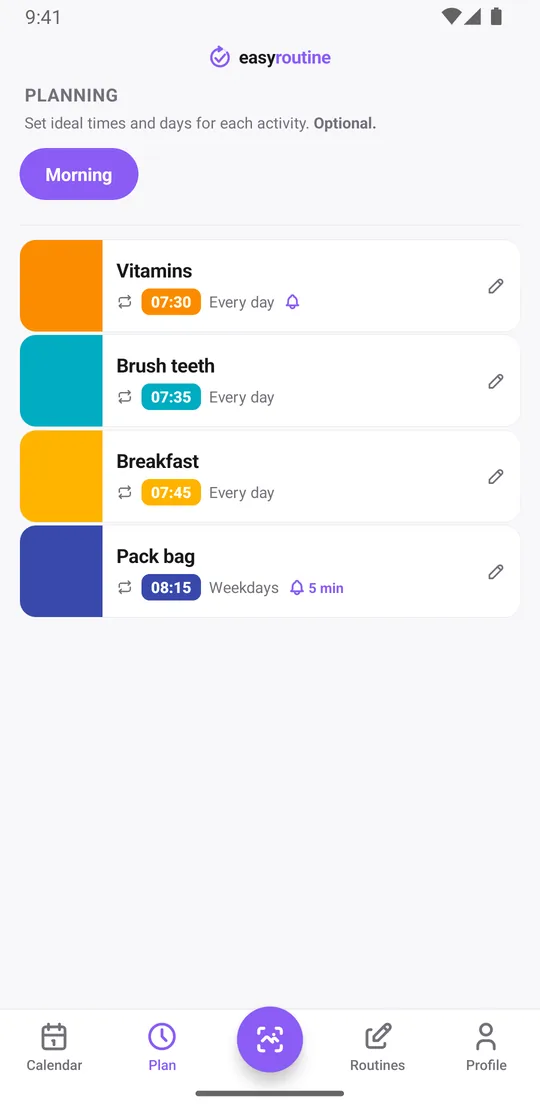
With Premium, open the Plan tab and give each activity its weekdays and a time:
- Vitamins: every day at 7:30, reminder on time
- Pack bag: Monday to Friday at 8:15, reminder 5 minutes before
- Bins out: Wednesday at 8:00 pm
- Laundry: Sunday at 11:00
A reminder can fire on time or 5, 10, 15 or 30 minutes before. The notification names the activity that is coming up, and tapping it opens that routine, ready to log. An activity can have up to four recurring times, so something you do twice a day gets two reminders, not one vague one. Steps without a set time can go in as "Any time": they sit at the top of the day, but they cannot carry a reminder.
Reminders are scheduled on your phone itself, so once set they also fire without a connection. Scheduling and reminders are part of Premium. How reminders work.
Why not just use a calendar app?
A calendar stores events. It never asks whether you did them: Tuesday's "vitamins" looks the same next week whether you took them or not. EasyRoutine keeps the plan and the record apart. A planned step stays faded until you log it, so looking back tells you what really happened.
A calendar app is still the better tool for appointments, events with other people and anything you share. Many people use both. EasyRoutine compared with a calendar app.
Free and Premium
The free plan includes routines, activities, logging, the photo scan, back-dating, notes, flags, the calendar and the streak, with a banner ad. Premium adds the Plan tab with schedules, the reminders that come with them, and removes ads. It is one monthly subscription, $1.49 in the US and a local price elsewhere, with no trial. Without Premium you can still log everything and look back; you just do not get the nudges. See pricing.
What EasyRoutine is not
EasyRoutine is a log and a reminder. It is not an ADHD treatment, a coaching program or a medical app, and it gives no advice. Questions about medication belong with your doctor or pharmacist. The app also needs an internet connection to open and to log.
Common questions
Can the app remind me about each task separately, not just with one daily alert?
Yes. Every activity has its own schedule and its own reminder, on time or 5, 10, 15 or 30 minutes before. An activity can have up to four recurring times. Scheduling and reminders are part of Premium.
Do I have to fill out a form to log something I did?
No. Tap the faded planned entry on the calendar and save it with the planned time, or use + Log on the day and pick the activity to log it with the current time. Notes and flags are optional. You can also log several activities at once, or log with a photo scan if the activity has a photo.
Can I see whether I actually stuck to my routine over time?
Yes. The week and month views show every logged activity, and planned activities you did not log stay faded. The Profile tab shows your day streak across all activities. There are no charts or percentages.
Why use this instead of a regular calendar app?
A calendar shows what you planned, not what you did. EasyRoutine records each time you actually did something and keeps unlogged plans faded, so you can tell the two apart. For appointments and shared events, a calendar app is still the better tool.
Are reminders free?
No. Reminders are set inside a schedule, and scheduling is part of Premium. Logging, the photo scan, the calendar and the streak are free.
Keep reading
Free on iPhone and Android. Sign in with Apple, Google or your email to start.