Water reminder app: drink water reminders through the day
You meant to drink more water today, and suddenly it is 4 pm and the bottle is still full. As a water reminder app, EasyRoutine sends a drink water reminder at the times you choose, one glass at a time, and each glass you log shows up on today's calendar so you can see how the day is going.
Why you forget to drink when you are busy
Thirst is easy to ignore when you are in a meeting, driving or deep in work. Most people drink well at breakfast and dinner and almost nothing in between. A single "drink more water" intention does not survive a busy afternoon.
What helps is a few small prompts spread over the day, tied to moments you already have: getting up, mid-morning, lunch, the afternoon slump, the evening. Each prompt is one glass, which is easy to act on right away.
One activity per glass
Create a routine called Water and add an activity for each glass you want to drink, named after its moment of the day:
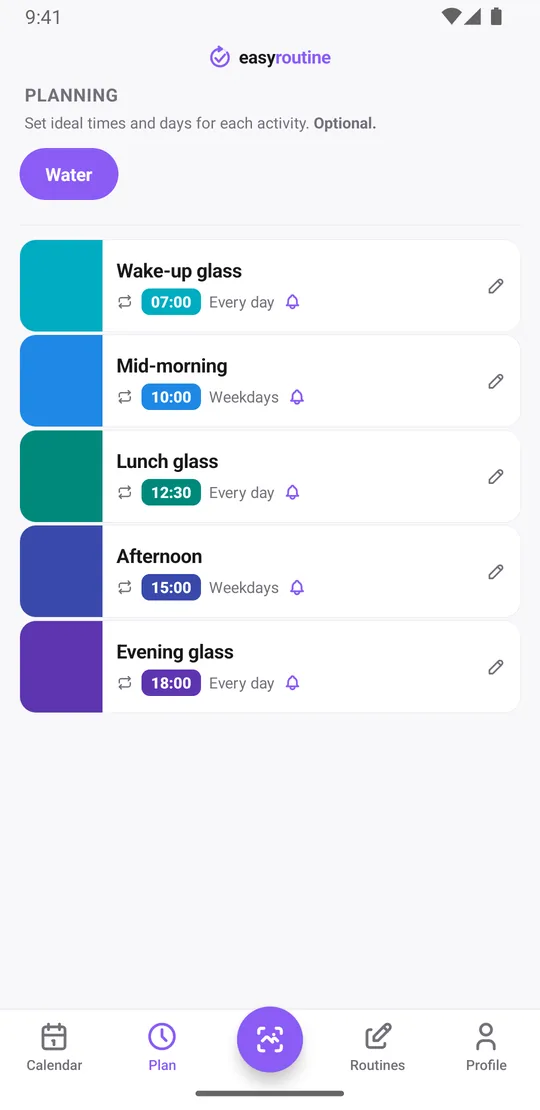
- Wake-up glass at 7:00
- Mid-morning at 10:00 on workdays
- Lunch glass at 12:30
- Afternoon at 15:00 on workdays
- Evening glass at 18:00
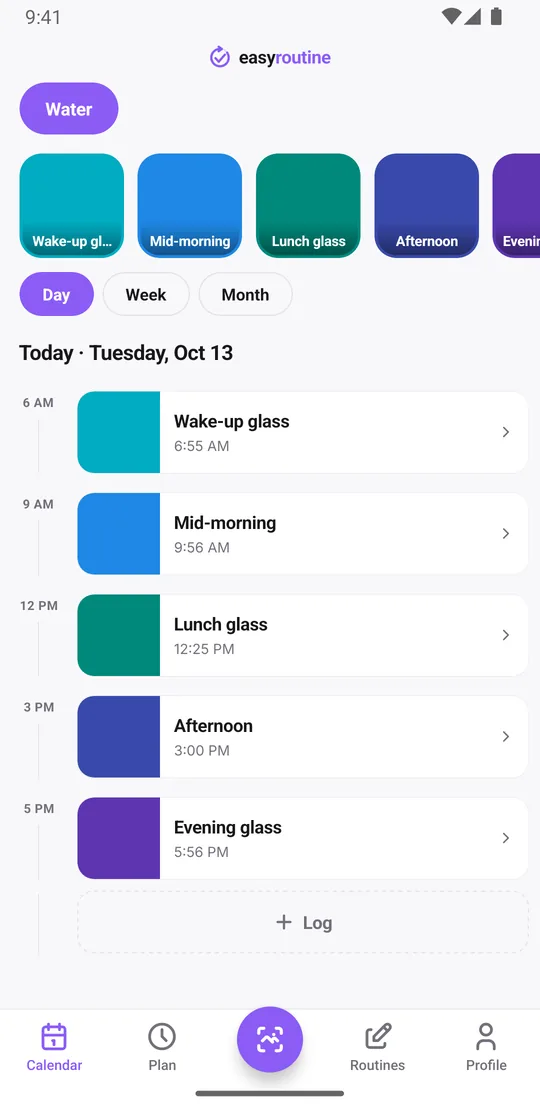
Separate activities make the day easy to read. Each glass gets its own tile and its own color, so a glance at the day view tells you which ones you drank and which are still waiting. There is no limit on activities, so you can add as many glasses as suit you.
Log each glass as you drink it (free)
Logging is free. When you have had a glass, tap + Log on the day and tick it; it is saved with the current time. Each glass is its own log with its own time. Drank two glasses since lunch without logging? Tick several at once. Logged one by mistake? Delete it. Forgot at lunch? Add it afterwards and set the right time. With a Premium schedule (below) it is even quicker: when the reminder goes off, tap the glass's faded planned entry and save it with the planned time.
A note is optional, but handy now and then: "after the run", "herbal tea instead" or "big bottle". You can also flag a log green, amber or red, for example amber on a day you felt you drank too little. When you open a log, the last few notes for that glass are listed under Previous comments. Notes are not shown on the calendar itself.
See how many glasses you had today
Open the day view. Every glass you logged is a solid tile at the time you drank it, and the glasses still planned are faded entries further down the day. Count the solid tiles and you know where you stand: three out of five by mid-afternoon, for example, means two to go.
To see whether one glass keeps slipping, say the afternoon one, tap its tile at the top of the calendar. The calendar then shows only that glass, and the last tile is the last time you had it.
The week and month views show the bigger picture, such as drinking well on workdays and forgetting on weekends. The app does not add up amounts or show a daily total in milliliters; it shows the glasses you logged.
Drink water reminders every couple of hours (Premium)
With Premium, open the Plan tab, tap each glass and give it a time and the days it repeats. Then turn on the reminder, on time or 5, 10, 15 or 30 minutes before. On time works well for water: the notification arrives, you drink, you log it.
Schedules repeat on chosen weekdays, so workdays and weekends can differ. On Saturday you might sleep in and only want three glasses, starting later. A single activity can also hold up to four times a day if you prefer one Water activity with several reminders, but one activity per glass keeps the day view clearer.
A reminder needs a time; a schedule left on "Any time" shows on the calendar without a notification. Scheduling and reminders are part of Premium, and logging is free. How reminders work.
Good to know
- Reminders are local notifications on your phone and still go off without a connection once scheduled.
- Reminders are scheduled on your phone, and the app keeps them topped up.
- EasyRoutine does not measure how much you drink, set a daily goal or give health advice. How much water you need is a question for your doctor; the app helps you remember the glasses you planned.
The free photo scan fits best with a single Water activity: give it a photo of your bottle, and pointing the camera at the bottle logs a glass with the current time. With one activity per glass, every glass is the same bottle, so pick the glass by hand instead.
If you mainly want a record of your drinking habit over weeks, read the water intake tracker guide.
Common questions
How do I get reminded to drink water every couple of hours?
Add an activity for each glass and give each one a time in the Plan tab, for example 7:00, 10:00, 12:30, 15:00 and 18:00, with a reminder. Scheduling and reminders are part of Premium.
Are water reminders free?
No. Reminders are set inside a schedule, and scheduling is part of Premium. Logging each glass, notes, flags, the photo scan and the calendar are free.
Can I log each glass of water separately?
Yes. Each glass is its own log with its own time. You can also tick several glasses at once with the log button on a day.
Can I see how many times I drank water today?
Yes. Open the day view and count the solid tiles: each one is a glass you logged. Glasses still planned show faded.
Does the app track milliliters or ounces?
No. It records that you had a glass and when, not the amount. If you want a sense of volume, name each activity after a fixed glass or bottle you use.
Can I set drink water reminders only on workdays?
Yes. Schedules repeat on the weekdays you choose, so a glass can have a reminder on Monday to Friday only, and weekends can have other times or fewer glasses. Scheduling and reminders are part of Premium.
Keep reading
Free on iPhone and Android. Sign in with Apple, Google or your email to start.