Potty training tracker app: a simple log of wins and accidents
When was the last accident, and does it always happen after lunch? EasyRoutine works as a potty training log: you record each potty trip and each accident when it happens, for free, and the calendar shows them by day and time. With Premium you can also schedule potty times and get a reminder for each one.
A log, not a method
There are many ways to potty train, and EasyRoutine does not pick one for you. It gives no advice on readiness, age or rewards. It records what happened and when, so you are not reconstructing the day from memory at bedtime.
If you have questions about whether your child is ready, about constipation, pain or anything else that worries you, talk to your pediatrician or health visitor. A clear log of the last few days can be useful to bring to that conversation.
Set it up: a few activities, one routine
Create a routine called Potty training and add a small set of activities:
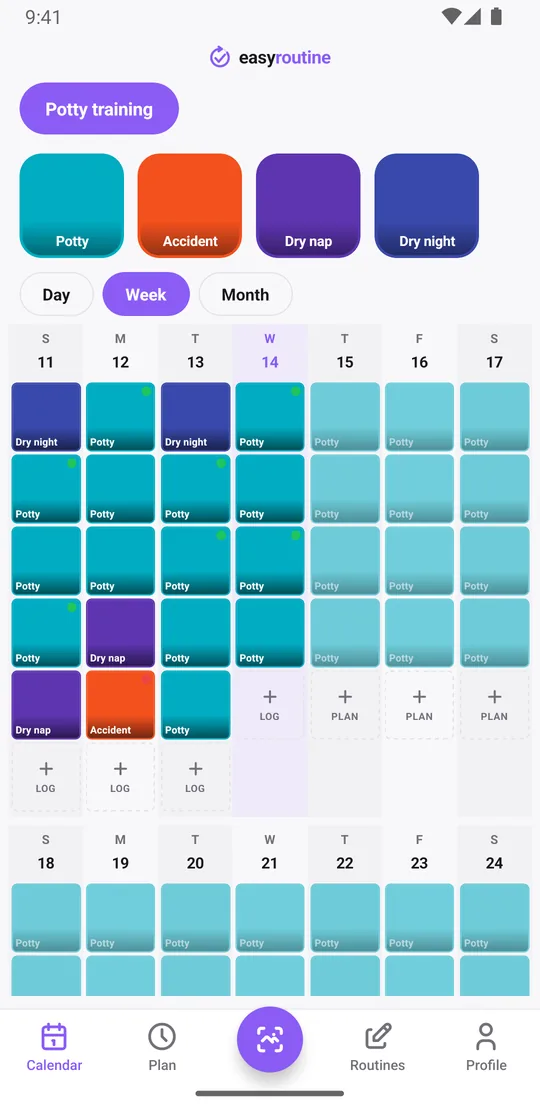
- Potty, each time your child sits on the potty or toilet
- Accident, each wet or soiled pair of pants
- Dry nap, when they wake up dry
- Dry night, when the morning diaper or bed is dry
Keeping accidents as their own activity matters: tap its tile and you see only the accidents, so "when was the last one?" takes a second. If you prefer, split Potty into Pee and Poo. There is no limit on activities, and you can rename or archive them as things change.
Free: log each trip and accident in a few taps
When something happens, open today on the calendar, tap + Log and pick the activity. It is saved with the current time. Too busy with wet clothes to log it right away? Add it later and set the time it really happened; logs can be added for any earlier time.
Logging, the calendar and the full history are free, with no limit on logs.
Free: flags and notes on each log
Every log can carry a green, amber or red flag and a short note. One way to use them on Potty:
- green: went in the potty
- amber: sat, nothing happened
- red: started but did not make it in time
Notes catch what you would forget by evening: "pee, asked by herself", "at grandma's", "after a big drink at lunch", "refused to sit". On an accident, note where and what was going on, like "during play" or "in the car". When you open the log sheet for an activity, it shows your last few notes for it, so you can see the recent run before you log the next one. Notes stay with each log and are not shown on the calendar itself.
The app does not count or score anything for you. The flags are just colors you pick, so you can read them at a glance.
Free: spot patterns by time of day
The week view lists each day's logs in time order, and the day view shows every log with its time: potty at 8:00 and 10:30, an accident at 15:10. After a few days, patterns show up on their own. Accidents that cluster in the late afternoon, or right after nap, or on daycare days, are easy to see once they are on a calendar instead of in your head.
Tap the Accident tile at the top to show only accidents. The last tile is the last accident, and the gaps between them show whether they are getting rarer. The month view shows the longer stretch: the first chaotic week next to the calmer ones. More about the calendar.
Premium: scheduled potty times with a reminder
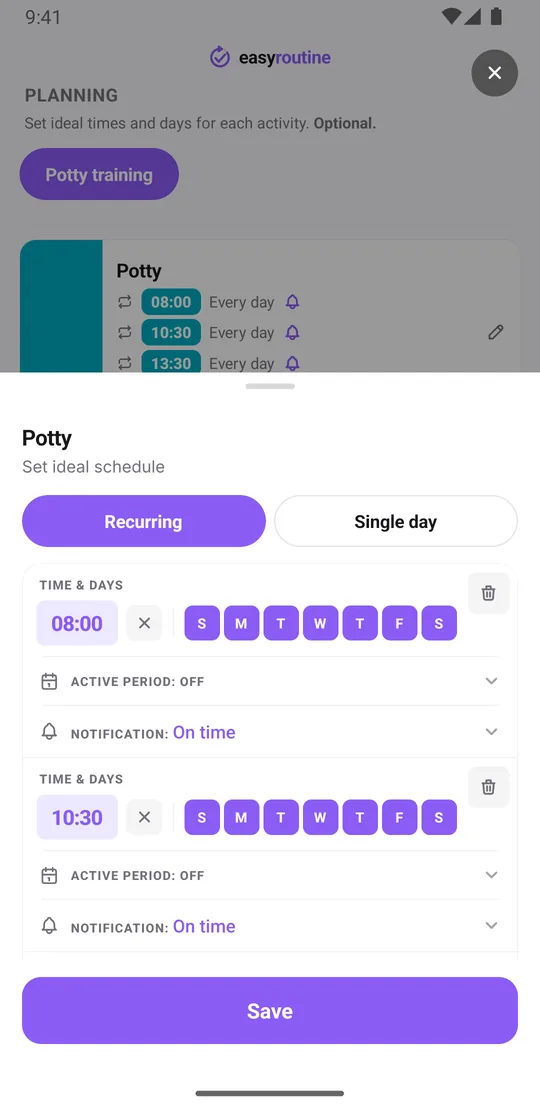
Many parents use regular potty times in the first weeks. With Premium, open the Plan tab and give Potty recurring times, for example 8:00, 10:30, 13:30 and 16:30 every day. An activity holds up to four recurring times; if you want more, add a second activity such as Potty (evening) with its own times.
Each time can carry a reminder, on time or 5, 10, 15 or 30 minutes before, so a busy morning does not slide past the 10:30 potty break. Planned times show as faded entries on the calendar until you log them. A start and end date can limit the schedule to the first weeks, so it stops on its own when you no longer need it. Premium also removes ads. How reminders work.
Two parents, one record?
Your routines and logs belong to your account and sync to every phone or iPad where you are signed in. There is no sharing between two different accounts and no family plan, so if each parent signs in with their own account, each keeps a separate log. How sign-in and sync work.
The app needs an internet connection to open and to log.
Common questions
Is this potty training tracker app free?
Logging potty trips and accidents, notes, flags and the calendar are free, with no limit on logs. Scheduled potty times and reminders need Premium.
Can I see when accidents usually happen?
Yes. The week view lists each day's logs in time order and the day view shows each log's time, so clusters such as late afternoon accidents stand out. Tap the Accident tile to see only accidents.
Can I get a reminder for potty breaks every two hours?
With Premium you set fixed times rather than an interval. One activity holds up to four daily times, such as 8:00, 10:30, 13:30 and 16:30, each with its own reminder. Add a second activity if you need more times.
Can my partner and I log on the same record?
Your data syncs to every device signed into your account. There is no sharing between two different accounts, so each parent with their own account keeps a separate log.
Does the app tell me if my child is ready or if something is wrong?
No. EasyRoutine only records what happened and when. For questions about readiness, health or anything that worries you, ask your pediatrician.
Keep reading
Free on iPhone and Android. Sign in with Apple, Google or your email to start.