A chore app for families: a parent's log of who did what, and when
Did Mia actually feed the cat yesterday, or did she just say she would? Most chore apps for families hand out points; EasyRoutine is a plain chore tracker app on your phone. A free log with notes records each child's chores when they get done, and Premium adds chore days and reminders, so the week's chores stop being a matter of who remembers it best.
A general routine tracker, used as a chore tracker app
EasyRoutine is not a health or fitness app. It is a general routine tracker: you decide what the activities are, and it records each time one is done. Supplements, workouts and skincare are common uses, but "Make bed" or "Take out the trash" works exactly the same way.
One thing to know up front: EasyRoutine is for people aged 16 and over. This is a tracker for you, the parent. The chore list lives in your account, on your phone, and you log a chore once you have seen it done. There are no kid accounts, points or rewards in the app.
Set it up like a chore chart: one routine per child
Create a routine for each child, named after them, and add their chores as activities:
- Mia: Make bed, Feed cat, Dishes, Homework, Tidy room
- Leo: Set table, Trash out, Water plants
Keep the names short, because they appear on small tiles in the calendar, and give each chore its own color. A routine per child keeps their week readable on its own: open Mia's routine and you see Mia's chores, nobody else's. If you would rather see everything together, one Chores routine with names like "Mia: dishes" also works. There is no limit on routines or activities, on the free plan either.
Log a chore when it is done
When you see a chore done, tap + Log on that day and tick it. Checking the whole evening at once? Tick several chores together, then tap a logged chore if you want to adjust its time. Did you forget to log Tuesday's dishes? Add the log afterwards for that day; nothing has to be entered on the spot.
You can also give a chore a photo, like the cat's food bowl or the trash bins by the door. The free photo scan then matches a quick snapshot against your own chores that have a photo and logs the right one with the current time. It does not recognize what your child did on its own, only which of your chores the picture fits.
Logging, the calendar and the scan are free.
When did Leo last take out the trash?
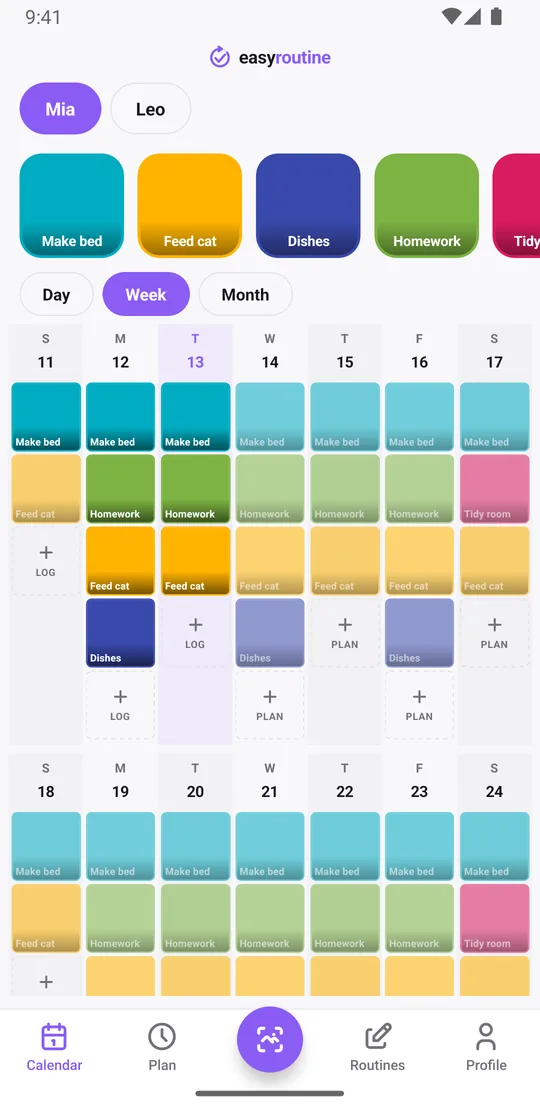
Every logged chore shows on its day in the calendar. Tap a chore's tile at the top and the calendar shows only that chore, so the last tile is the last time it was done. Switch to the month view to see the longer pattern, up to four dots a day: did homework happen every weekday this month, or did it fade after the first week?
This is useful when you want to talk about it calmly with facts rather than "you never do it". It also settles the classic "it's not my turn" argument: give each child their own version of a shared chore, such as Trash out in Leo's routine and in Mia's, and the calendar shows who did it last.
Notes and flags worth keeping
Every log can carry a short note and a green, amber or red flag. For chores, a few things are worth writing down:
- how it went: "did it without being asked", "needed three reminders"
- how well: flag amber for a half-made bed, red for a chore that had to be redone
- who helped, or a swap: "Leo did it, Mia was at practice"
- anything you agreed: "extra pocket money this week"
When you open the log sheet for a chore, it shows the last few notes for that chore, so you see at a glance whether the past week went well before you log the next one. Notes stay in the log sheet; the calendar itself only shows the tiles. That is a record for you, not a points system.
Premium: put each chore on the days it is due
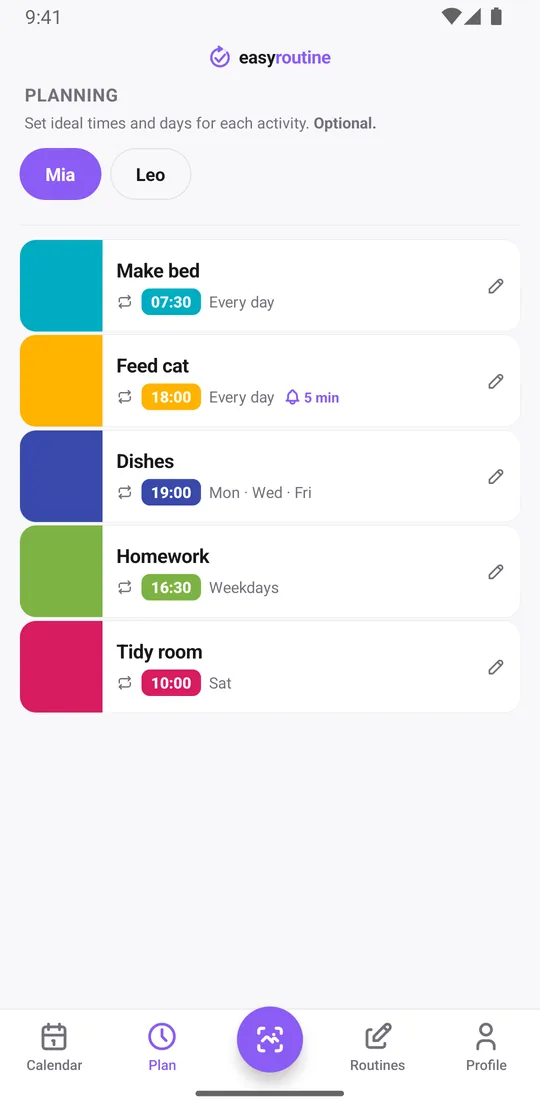
With Premium, open the Plan tab and pick the days and a time for each chore. A daily chore is simply all seven days ticked:
- Make bed: every day at 7:30
- Feed cat: every day at 6:00 pm
- Dishes: Monday, Wednesday and Friday at 7:00 pm
- Homework: Monday to Friday at 4:30 pm
- Tidy room: Saturday at 10:00
For a chore that only runs for a while, such as watering the neighbor's plants during their vacation, set a start and end date and it disappears from the calendar afterwards. A one-off job, like clearing out the garage on a particular Saturday, can go on a single date. When a scheduled chore is done, tap its faded planned entry on the calendar: the Log Entry sheet opens with the planned time filled in. More about scheduling.
Premium: a reminder at chore time
Each scheduled chore can send a reminder to your phone, on time or 5, 10, 15 or 30 minutes before. The notification names the chore, such as "Feed cat", so you know whose turn it is and can call it out at the right moment. Reminders come to your phone, not to your child's device. Reminders and scheduling are part of Premium. How reminders work.
See which days a chore was missed
Once chores have a schedule, the week view shows a colored tile for every chore you logged and leaves chores that were planned but not logged faded. A faded "Dishes" on Wednesday means the dishes did not get logged that day.
The day streak in the Profile counts days with at least one log of anything in your account. It is not per chore or per child, so for chores the calendar is the more useful view.
Free and Premium
Free: routines for every child, any number of chores, logging, notes, flags and the calendar, with a banner ad. Premium adds chore schedules in the Plan tab, reminders and no ads, for $1.49 a month in the US (local prices elsewhere), with no trial. Without Premium you can still log chores and see them on the calendar, you just will not see planned chores or get reminders. See pricing.
What it does not do
Your chore log is private to your account. There is no way to share it with a partner or with your kids, and the app has no family plan. Each person who signs in sees only their own routines. EasyRoutine also does not give rewards or allowances, rank children, or offer parenting advice. It answers one question well: was it done, and when?
Common questions
Can I use this to track my kids' chores instead of supplements or workouts?
Yes. EasyRoutine is a general routine tracker, so a chore is just another activity. Create a routine per child and add their chores. The app is for people 16 and over, so it runs on your phone and you log the chores.
Is there a free chore app for families?
EasyRoutine is free to use as a chore log: routines for every child, any number of chores, logging, notes, flags and the calendar, with a banner ad. Chore days and reminders need Premium. It runs on one parent's phone, with no kid accounts, points or sharing.
Can I set a chore to repeat every day?
Yes. Tick all seven days in the chore's schedule and give it a time. You can also choose specific weekdays. Scheduling is part of Premium.
Can I see which days a chore was missed?
Yes. Tap a chore's tile to see only that chore on the calendar, where every logged day shows; this is free. With Premium schedules, chores that were planned but not logged also stay faded in the week and month views.
Do I need Premium to get reminded about a chore?
Yes. Reminders are set on a chore's schedule, and scheduling is part of Premium. Logging and the calendar are free.
Can my partner or my kids see the same chore list?
No. Routines and logs are private to the account that created them, and there is no sharing or family plan. Each person only sees their own data.
Keep reading
Free on iPhone and Android. Sign in with Apple, Google or your email to start.