New Year's resolutions ideas you can actually track
Picking from a list of New Year's resolutions ideas on January 1 is the easy part. Knowing on a cold Thursday in February whether you actually went to the gym this week is harder. EasyRoutine logs each time you do it in a few taps and puts it on a calendar, so the answer is always one look away.
Turn your resolutions list into things you can log
"Get fit" or "be healthier" cannot be ticked off. The habits behind them can. EasyRoutine is built around three simple pieces:
- A routine is a group, like Resolutions.
- An activity is one thing you want to do, like Workout or Read. Give it a color, and a photo if you like.
- A log is a record that you did it, at a date and time, with an optional note and a red, amber or green flag.
So instead of one vague goal, you end up with three or four concrete activities. Each one gets its own days, and each log answers the question "did I do it?" for that day. How routines, activities and logs fit together.
New Year's resolutions ideas that work as habits
Good resolutions ideas have one thing in common: you can tell on any given day whether you did them. A few that fit well:
- Work out three times a week
- Read ten pages every evening
- Take a vitamin every morning
- Go for a long walk at the weekend
- Journal for five minutes before bed
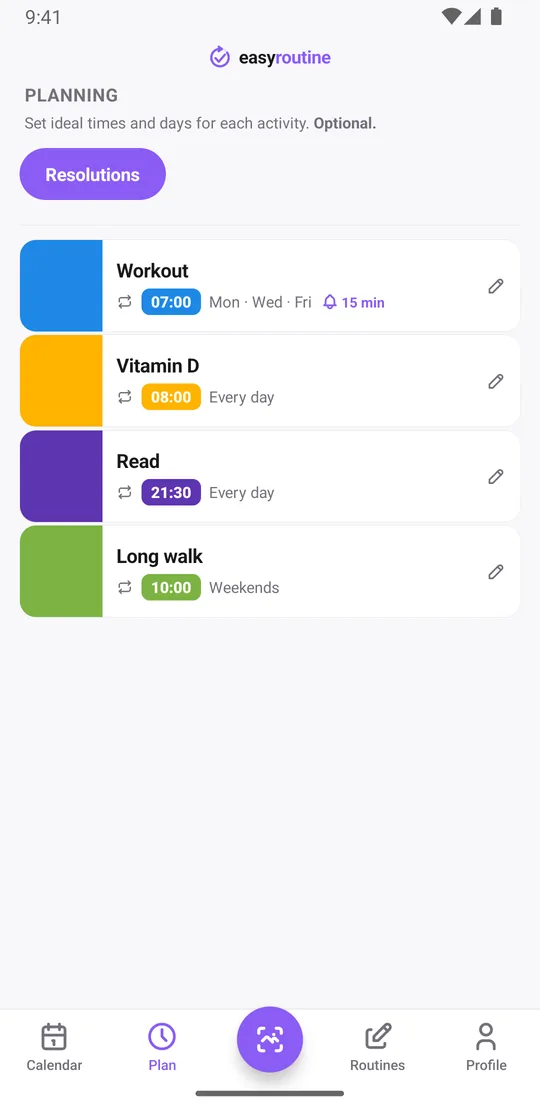
Say your resolution is to move more, read more and finally take the vitamin D you bought in December. A routine for that could look like this:
- Workout: Monday, Wednesday and Friday at 7:00
- Vitamin D: every day at 8:00
- Read: every day at 21:30, even if it is ten pages
- Long walk: Saturday and Sunday at 10:00
Start small. Two or three activities you can really keep beat seven you abandon by week two. You can add more later without losing anything you logged. For a specific goal, the workout log and the supplement tracker go into more detail, and tracking new supplements in the new year covers a fresh supplement stack.
Logging takes a few seconds
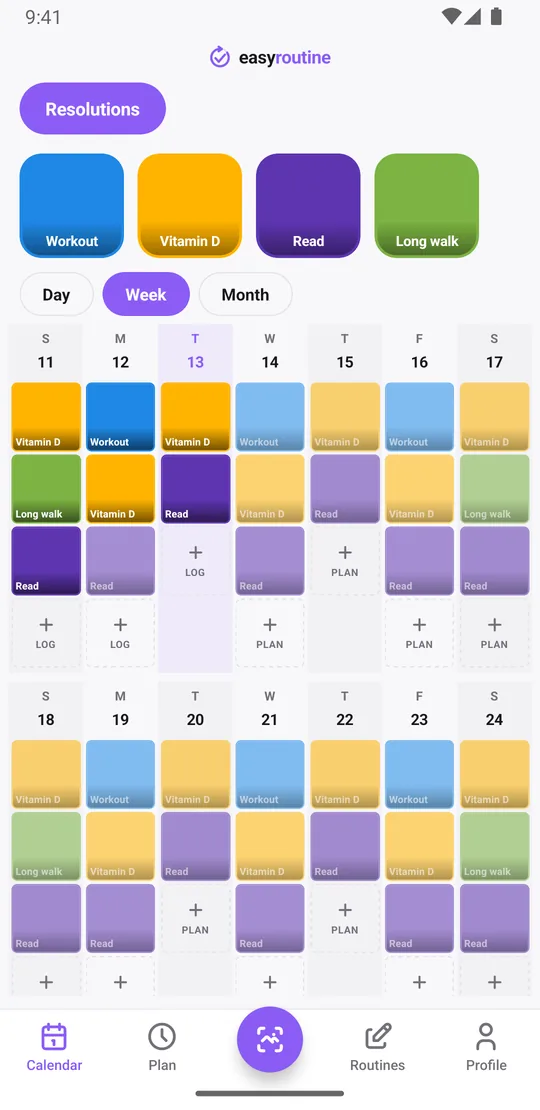
Done with the workout? Tap Log on the day, pick one or several activities and tap OK; today they are logged with the current time. Logging is free. With a Premium schedule, you can instead tap the faded planned workout: the Log Entry sheet opens with the planned time, and you save it. If an activity has a photo, such as your vitamin bottle, you can also log it for free by pointing the camera at it in the Scan tab. And if you forgot to log yesterday's walk, add it to yesterday afterwards: it is logged at 12:00, and you can tap it to fix the time.
Each log can also carry a note and a green, amber or red flag. For a resolution, that is where the useful detail goes: "Read: finished chapter 3", "Workout: legs, felt heavy" with an amber flag, or "Long walk: rained, cut it short". Notes do not show on the calendar itself, but the last few appear in the log sheet the next time you log that activity, so you can see where you left off in your book.
See your progress through the year
The week view shows which habits you did on which days, with faded entries for what is still planned. The month view shows whether January was a good month and whether February is keeping up. Your profile shows your current Day streak, the days in a row on which you logged anything, plus a running total of completed logs.
For a habit you do not do every day, ask the calendar directly. Tap the Long walk tile at the top and the calendar shows only that activity, so the last tile is the last time you went. If that was three weeks ago, you know before February tells you. Tap the tile again to see everything.
There are no charts or completion percentages. The calendar is the progress report: a month full of colored dots says more than a number. At the end of the year you can scroll back through every month; reviewing your year explains how.
Schedules and reminders for the days you would forget
With Premium, the Plan tab lets you give each activity its weekdays and a time, and an optional active period: start it on January 1, or end it after two weeks if you want to try a habit before committing. The two-week habit trial template shows that setup step by step.
Each timed slot can carry a reminder, on time or 5, 10, 15 or 30 minutes before. A workout reminder on Monday, Wednesday and Friday morning, and nothing on the other days. Planned entries appear faded on the calendar until you log them, so a missed session stays visible instead of quietly disappearing. Scheduling and reminders are both part of Premium.
Free or Premium for a resolution?
The free plan covers the tracking itself: unlimited routines and activities, logging by hand or by photo, notes, flags, the calendar, the streak and sync across phones. It shows a banner ad. Premium adds the Plan tab with schedules and reminders, and removes the ads. It is a monthly subscription, $1.49 a month in the US, with local prices elsewhere, and you can cancel any time in the App Store or Google Play. Compare the plans.
EasyRoutine records that you did something and when. It does not count reps, weigh you or coach you. If your resolution needs numbers, use a dedicated app for that part.
Common questions
What are good New Year's resolutions ideas?
Pick habits you can check off on a given day: work out three times a week, read every evening, take a vitamin each morning, take a long walk at the weekend or journal before bed. Two or three you can keep beat a long list you drop in January.
What app can help me keep my New Year's resolution?
A habit tracker that makes logging quick and shows your history clearly. In EasyRoutine you turn the resolution into a few activities, log each one in a few taps, and see on a calendar whether you kept it up.
How do I track a new habit I'm starting this year?
Create a routine, add the habit as an activity and log it with the Log button on the day each time you do it. With Premium you can schedule it on certain weekdays starting January 1 and get a reminder at the planned time.
Can I set reminders so I don't forget my resolution?
Yes, with Premium. Each scheduled time can have a reminder on time or up to 30 minutes before, so you are only reminded on the days the habit is planned.
Can I see my progress over the whole year?
Yes. The month view shows every day you logged something, and you can scroll back month by month. The profile shows your current streak and total logs. There are no charts or percentages.
Keep reading
Free on iPhone and Android. Sign in with Apple, Google or your email to start.