One app to track supplements, skincare and workouts
If you open one app for vitamins, another for skincare and a third for the gym, EasyRoutine can hold all three as separate routines in one place. You give up the specialist extras, like sets, reps or doses, in exchange for one calendar, one account and one way of logging.
What one app can cover
EasyRoutine does not know what a supplement or a squat is. It tracks anything you repeat, so the same app works for:
- Supplements: Vitamin D in the morning, magnesium at night. Supplement tracker.
- Skincare: morning and evening steps, retinol on some nights only. Skincare routine tracker.
- Workouts: strength days, runs, stretching. Workout log.
- Medication: a quick "did I already take it today?" check. It is a log and a reminder, not a medical tool: dosing questions belong with your doctor or pharmacist. Medication tracker.
The same goes for watering plants, flossing or changing contact lenses. There is no limit on the number of routines or activities, on the free plan either.
Each routine stays separate
Will everything get mixed up together? No. EasyRoutine has three building blocks. A routine is a group like Supplements, Skincare or Workouts. Inside each routine you add activities: Vitamin D, Retinol, Leg day. Each time you do one, you add a log. How it works.
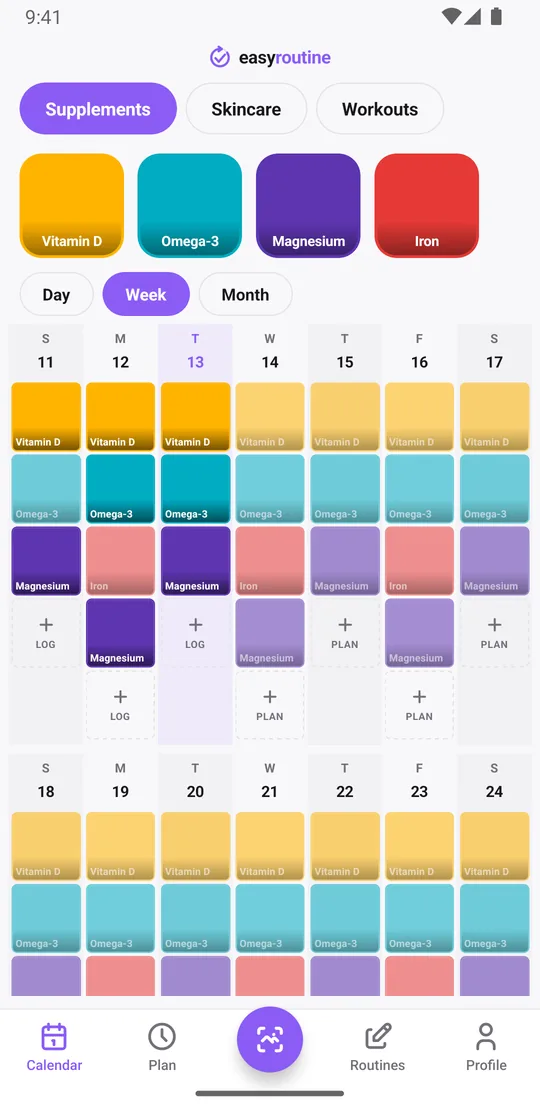
The Calendar tab shows one routine at a time, and switching to another is a tap. Morning skincare does not crowd your workout week, and your supplement week shows only supplements. Inside a routine, each activity gets its own color, picked automatically so they differ, or chosen by you. You can reorder activities, pin the important ones to the front, and move an activity to another routine if you filed it in the wrong place. Running several routines at once.
One way to log everything
Instead of learning three apps, you learn one way to log: tap + Log on a day and pick the activity, or several in one go, like all your morning supplements. With a Premium schedule, you can also tap a faded planned entry and save it. Tap a logged entry to add a comment or a red, amber or green flag, or to change the time if you are logging later.
If you give activities a photo, the Scan tab can log them from a picture: point the camera at your serum or your vitamin bottle and EasyRoutine logs the matching activity, even if it sits in another routine. It only recognizes your own activities that have a photo. How the photo scan works.
Reminders per activity, not per app
With Premium, the Plan tab gives every activity its own schedule: weekdays plus a time, up to four times a day, single dates, and an optional start and end date. Retinol on Monday, Wednesday and Friday at 22:00, Vitamin D every day at 8:00, leg day on Tuesday at 18:00. Each timed slot can remind you on time or 5, 10, 15 or 30 minutes before, and the notification names the activity. Tapping it opens that routine. Scheduling and reminders.
Scheduling and reminders are Premium. Logging, the calendar and the photo scan are free.
One account, one set of numbers
Everything lives in one EasyRoutine account, so all your routines sync to every phone where you sign in, iPhone or Android. You sign in once, with an email code, Google, or Apple on iPhone. Sign-in and sync.
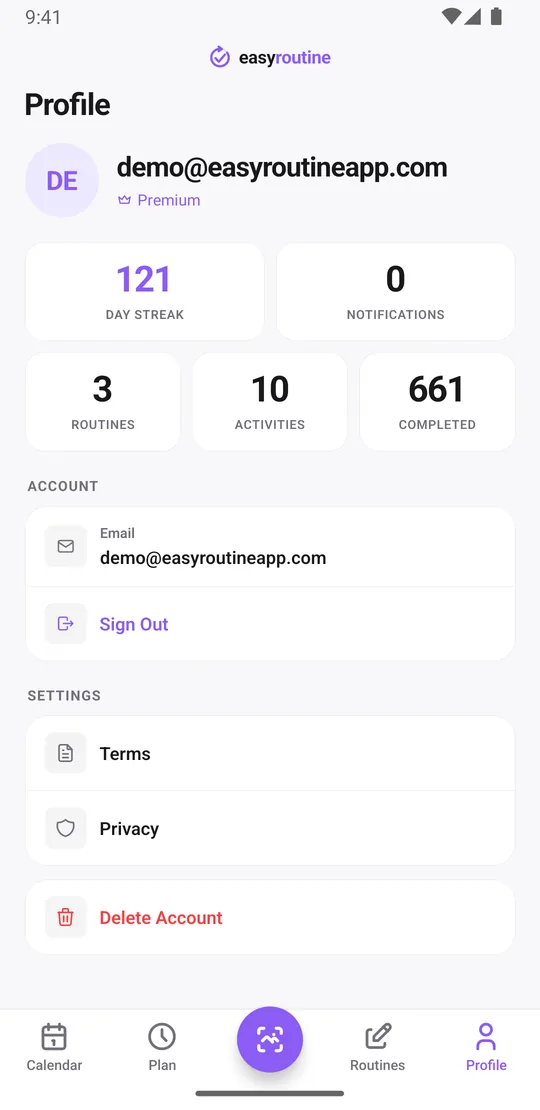
The Profile tab sums it up across all routines: your Day streak (consecutive days with at least one log of anything), how many routines and activities you have, how many reminders are active, and how many logs you have completed in total.
What dedicated apps do better
Yes, you give some things up. EasyRoutine records that and when you did something, plus a note and a flag. It does not:
- store amounts, doses, sets, reps or weights
- show charts, progress graphs or completion percentages
- attach a separate photo to each log (photos belong to activities)
- connect to health apps, watches or widgets
- work offline (it needs an internet connection and an account)
If you train with progressive overload and need every set and weight, keep your workout app. If you need any of the other extras, a specialist app is the better fit for that routine. Our closer looks compare EasyRoutine with a supplement app, a skincare app and a workout app.
Who should consolidate
Move to one app if what you mostly want from each of your apps is the answer to "did I do it today?", plus a nudge at the right time. Keep a dedicated app for any routine where the numbers matter more than the check-off. Mixing is fine too: EasyRoutine for supplements and skincare, your workout app for the gym.
Common questions
Can one app really replace my supplement tracker, skincare app and workout log?
For checking off what you did and getting reminded, yes. If you rely on amounts, sets, reps, weights or charts, EasyRoutine does not record those, so keep a dedicated app for that routine.
Do different routines get mixed up together?
No. Each routine is its own group, and the calendar shows one routine at a time. You switch between them with a tap.
Will I lose features that dedicated apps have?
Some. EasyRoutine has no amounts, doses, sets, charts, per-log photos, health app connections or offline mode. It keeps the parts that are the same everywhere: logging, notes, a calendar and reminders.
Can I organize routines separately inside the same app?
Yes. Create as many routines as you like, add activities to each, give them colors, pin, reorder and move activities between routines.
Keep reading
Free on iPhone and Android. Sign in with Apple, Google or your email to start.