Study routine tracker for students: plan the sessions, then prove you did them
Did I actually revise chemistry this week, or did I only plan to? EasyRoutine keeps a free record of the sessions you really did, and with Premium it puts each subject on the days you choose and reminds you when a session is due, so the week before the exam holds no surprises.
The gap between the study plan and the studying
Making a revision timetable feels productive. Following it is the hard part. By Thursday you no longer know whether Monday's math session happened or just moved in your head to "later". A paper plan or a note on your phone cannot tell you, because it only ever shows the plan.
EasyRoutine keeps two things side by side: what you planned and what you logged. The difference between them is exactly the studying you still owe yourself.
One activity per subject
Create a routine called Study and add each subject as an activity: Math, Chemistry, History, Vocabulary, Past paper. Each gets its own color, so the calendar shows at a glance which subjects got time this week and which did not.
You can also give each subject a routine of its own if you prefer, for example one per course with its topics as activities. There is no limit on routines or activities. For most students one Study routine with a subject per activity is easier to read, and a second routine can hold the rest of your day, such as Morning or Gym. Running several routines at once.
Log each session and see when you last studied a subject
Logging is free. When you finish a session, tap + Log on the day and pick the subject; it is logged with the current time. Forgot to log yesterday's session? You can add it for any earlier day and time.
To answer "when did I last do chemistry?", tap the Chemistry tile at the top of the calendar. The calendar then shows only that subject, so the last tile is your last session. The month view shows the whole revision period, so you can spot the subject that keeps getting pushed back while there is still time to catch up.
Note where you stopped and how it went
Every log can carry a short comment and a red, amber or green flag. Write what you will want to know at the next session:
- "Chapters 4 to 6" or "stopped at page 112"
- "Timed, ran out of time on question 5"
- "Ask about titration in class"
Use the flag for how it went: green when it clicked, amber when it was shaky, red when you need to redo it. The next time you log that subject, the log sheet shows your last few comments, which is a quick way to see where you stopped. Comments stay with the log; they do not show on the calendar itself.
Premium: a study schedule on weekdays, at set times
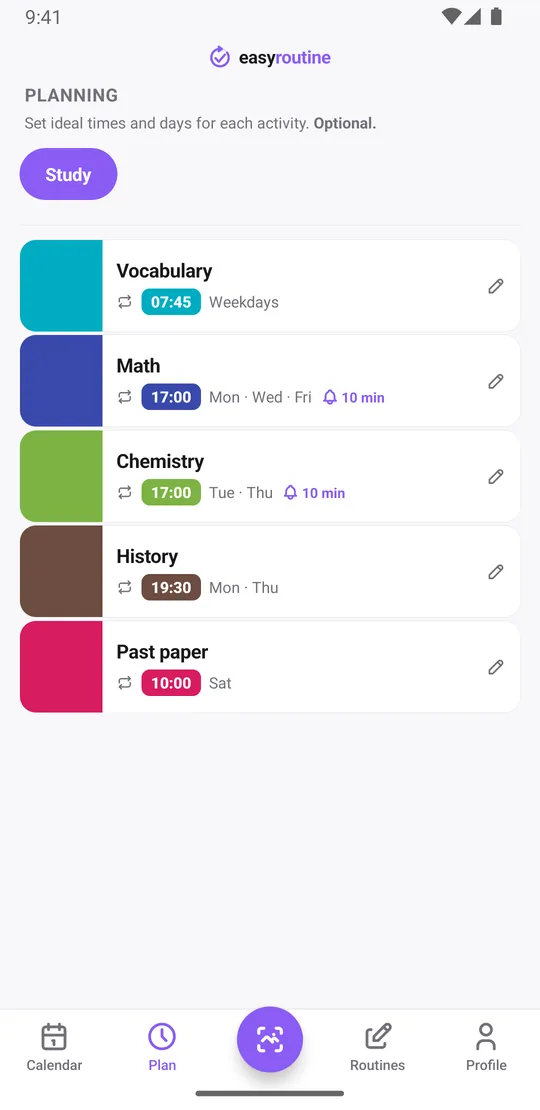
With Premium, open the Plan tab and set the days and time for each subject:
- Vocabulary: Monday to Friday at 7:45
- Math: Monday, Wednesday and Friday at 5:00 pm
- Chemistry: Tuesday and Thursday at 5:00 pm
- History: Monday and Thursday at 7:30 pm
- Past paper: Saturday at 10:00
For a weekdays-only plan, tick Monday to Friday; the Plan tab then simply shows it as "Weekdays". An activity can have up to four recurring times, so a subject you want to touch in the morning and again in the evening gets both.
Each recurring schedule can have a From and an Until date. Set them to your revision period, for example from the first of May until the day before your exam, and the sessions stop appearing on their own once the exam is over. For the exam day itself, or a one-off tutoring session, add a single-day plan instead. More about scheduling.
A reminder when a session is due
Any scheduled time can carry a reminder: on time, or 5, 10, 15 or 30 minutes before, which is enough to close the other tabs and find your notes. The notification says which subject is coming up. Sessions without a fixed time can be set to "Any time": they show at the top of the day but do not send a reminder. Reminders come with scheduling as part of Premium. How reminders work.
When you finish a planned session, tap its faded entry on the calendar and save it in the Log Entry sheet, with the planned time filled in.
See your study streak before the exam
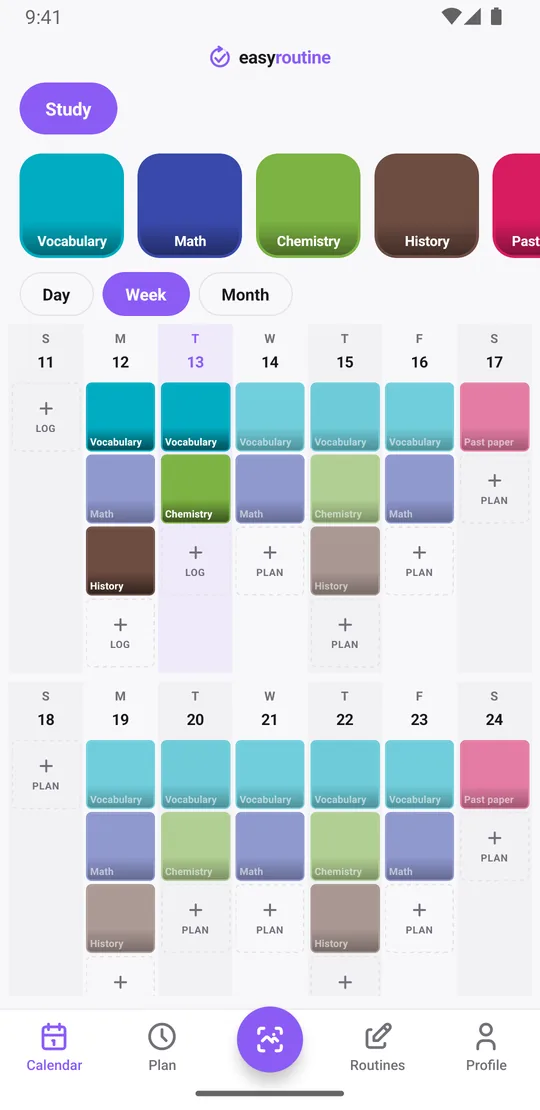
The week view shows a colored tile for every session you logged and a faded entry for every session you planned but have not logged. Past faded entries are the sessions you skipped.
The Day streak in your Profile counts the days in a row with at least one log. It covers every activity in the app, not one subject. If you use EasyRoutine only for studying, it is your study streak; if you also track other routines, the calendar is the better place to judge your studying. There are no charts or percentages, just the record.
Free and Premium for students
Logging, notes, flags, the calendar and the streak are free, with a banner ad. Scheduling sessions in the Plan tab and getting reminders need Premium, a monthly subscription of $1.49 in the US (local prices elsewhere) with no trial. You could log for free during the term and subscribe only for the exam weeks, then cancel. See pricing.
What it does not do
EasyRoutine does not build a revision timetable for you, time your sessions or count hours. It records that a session happened and when. If you want to log how long you studied, a note like "90 min" works, but it will not be added up.
Common questions
Can I set a study schedule for weekdays only?
Yes. Tick Monday to Friday when you schedule a subject and it repeats on weekdays at the time you set. You can also pick any other combination of days. Scheduling is part of Premium.
Can I track separate subjects separately?
Yes. Add each subject as its own activity in a Study routine, or give each subject its own routine. There is no limit on routines or activities, and each subject gets its own color on the calendar.
Will it remind me when a study session is due?
Yes, with Premium. Each scheduled session can send a reminder on time or 5, 10, 15 or 30 minutes before.
Can I see my study streak before exams?
The Profile shows a day streak, counting days in a row with at least one log of any activity. It is not per subject. The week and month views show which subjects you studied on which days. Tap a subject's tile at the top of the calendar to see only its sessions.
Can a schedule end when my exams are over?
Yes. A recurring schedule can have a start and end date, so you can set it to run only during your revision period. The exam day itself can be added as a single-day plan.
Can I track how long I studied?
Not as a timer. EasyRoutine records that a session happened and when. You can write the length in a note, such as 90 min, but notes are not added up.
Keep reading
Free on iPhone and Android. Sign in with Apple, Google or your email to start.