Water tracker app: track water intake one glass at a time
Have I had any water since breakfast? EasyRoutine works as a simple water tracker app: log a glass in a few taps, as many times a day as you drink, and the day's glasses show on a calendar so the answer is right there instead of a guess.
Two ways to track water intake
Create a routine called Hydration. Then pick the setup that matches how you think about water.
One activity, many logs
Add a single activity, Water, and log it every time you finish a glass or a bottle: tap Log on the day and pick Water. Each log has its own time, so you can log the same activity five or eight times in one day. The day view shows each of them at the time you logged it.
One activity per point in the day
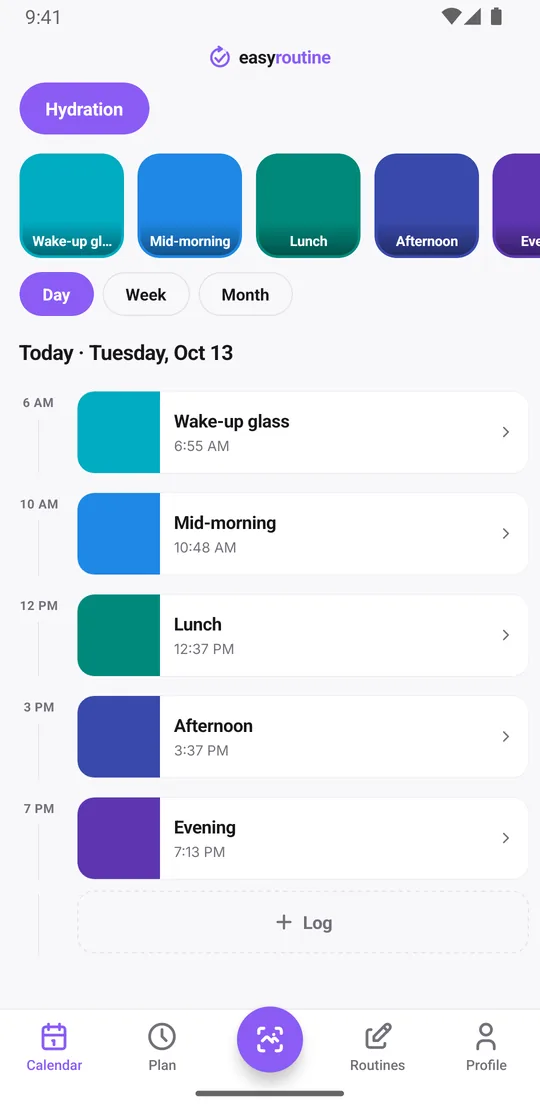
Add an activity for each moment you want to drink: Wake-up glass, Mid-morning, Lunch, Afternoon, Evening. This takes a minute longer to set up, but it makes gaps obvious. If Afternoon is missing at 5:00 pm, you know exactly which glass you skipped. This is the setup shown in the screenshots.
Either way, logging takes a few taps: with a Premium schedule, tap a faded planned glass and save it; without one, use the Log button on the day, which logs with the current time. If you drank earlier and forgot, add the log afterwards and tap it to set the right time.
Check today's water in the day view
The day view lists today's logs by time. With the second setup, the planned glasses you have not logged yet show faded, so by mid-afternoon you see at a glance that the morning went well and the 3:30 pm glass is still waiting.
This is the tracking side of hydration: a record of when you actually drank, not just a reminder to do it. It is useful on days when you are not sure whether "I had some water" means one glass or four.
Last glass, streaks and longer patterns
The Profile tab shows a Day streak: the number of days in a row on which you logged at least one activity in EasyRoutine. It counts all your activities together, and it does not know about a daily water goal. So it is not a "hit my water target" streak; one glass on a day counts the same as eight.
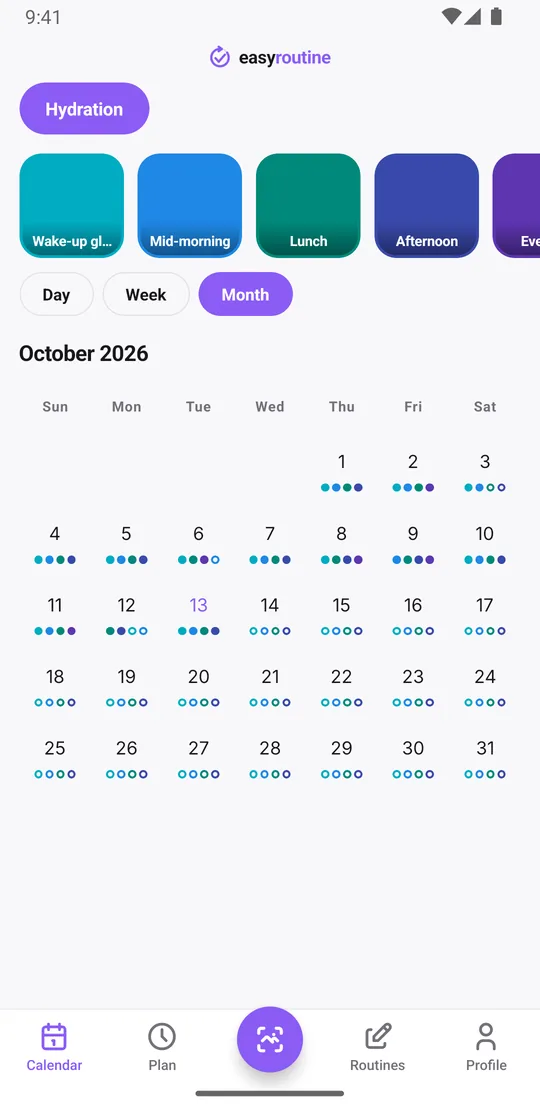
For your hydration pattern, use the month view. Each activity leaves a dot in its color on the days you logged it. With one activity per glass, a day full of dots (the month view shows up to four per day) is a day you drank across the whole day, and days with only one or two dots stand out. For the exact glasses on a given day, open the day view. Weekends that go dry are easy to spot.
For the simplest question, when did I last drink, tap an activity tile at the top of the calendar. The calendar then shows only that activity, so the last tile is the last time you logged it. If you remember a glass later, add it on that day afterwards: logs can go on past days, just not future ones.
Notes, flags and a photo scan
Every log can carry a short note and a green, amber or red flag, both free. Use them for what the tile cannot show: "sparkling", "1 l bottle at the gym", "tea instead", or an amber flag on a glass you only half finished. When you open the log sheet, the last few notes for that activity are listed under Previous comments, so you can see how the past days went without scrolling the calendar. Notes do not appear on the calendar itself.
If you always drink from the same bottle, give the Water activity a photo of it. The free photo scan then logs a glass when you point the camera at the bottle. It only matches your own activities that have a photo, and it logs with the current time. If it finds no match, pick the activity by hand.
Reminders spaced through the day (Premium)
With Premium, open the Plan tab and give each glass a time: 7:00 am, 10:30 am, 12:30 pm, 3:30 pm and 7:00 pm, every day. Add a reminder to any of them, on time or 5, 10, 15 or 30 minutes before. Each activity can have up to four recurring time slots, so with the single-activity setup you can spread up to four reminders across the day; with one activity per glass, each glass gets its own.
If reminders are the main thing you are after, the water intake reminder page goes deeper into setting them up. Scheduling and reminders are part of Premium; logging is free. How reminders work.
What it does not measure
EasyRoutine records that you had a glass and when. It does not count milliliters or ounces, set a daily target, or tell you how much water you should drink. How much is right for you is a question for your doctor, especially if you have a health condition. If you want to note the size of a bottle, put it in the log's comment; the app keeps the note but does not add up amounts.
Common questions
Can I log water several times in the same day?
Yes. Every log has its own time, so you can log the same activity as often as you drink. You can also create one activity per glass to see which ones you missed.
Can I be reminded to drink water throughout the day?
Yes, with Premium. Give each glass a time in the Plan tab and turn on a reminder. One activity can have up to four daily time slots, or you can use one activity per glass.
Can I see a streak of days I hit my water goal?
Not directly. EasyRoutine does not track amounts or goals, and the day streak counts days with any log. The month view shows which days you logged your glasses, which works as a visual record.
Can I add a note to a glass or log it with a photo?
Yes, and both are free. Each log can carry a note and a green, amber or red flag. If the Water activity has a photo of your bottle, scanning the bottle logs a glass with the current time.
Does EasyRoutine count how much water I drank?
No. It records each glass you log, not its volume. You can add the size in a comment, but the app does not total it.
Is EasyRoutine a free water tracker app?
For tracking, yes: logging glasses, notes, flags, the photo scan and the calendar are free. Scheduled glasses and reminders are part of Premium. It tracks each glass you log, not milliliters or ounces.
Keep reading
Free on iPhone and Android. Sign in with Apple, Google or your email to start.