An app that reminds you to floss every day
Most people do not forget to brush in the morning. They forget the floss at night, when they are tired and already half in bed. EasyRoutine puts a reminder right at that moment, and a quick log shows you whether you really did it.
The night-time step is the one that slips
Morning brushing is tied to waking up, coffee and leaving the house, so it happens by itself. Flossing at night has no such anchor. You brush, you are tired, the floss stays in the drawer, and a week later you cannot say whether you flossed twice or five times.
Two things help: a nudge at the exact time you usually get ready for bed, and an honest record that makes a skipped night visible instead of easy to ignore.
Set up your dental routine
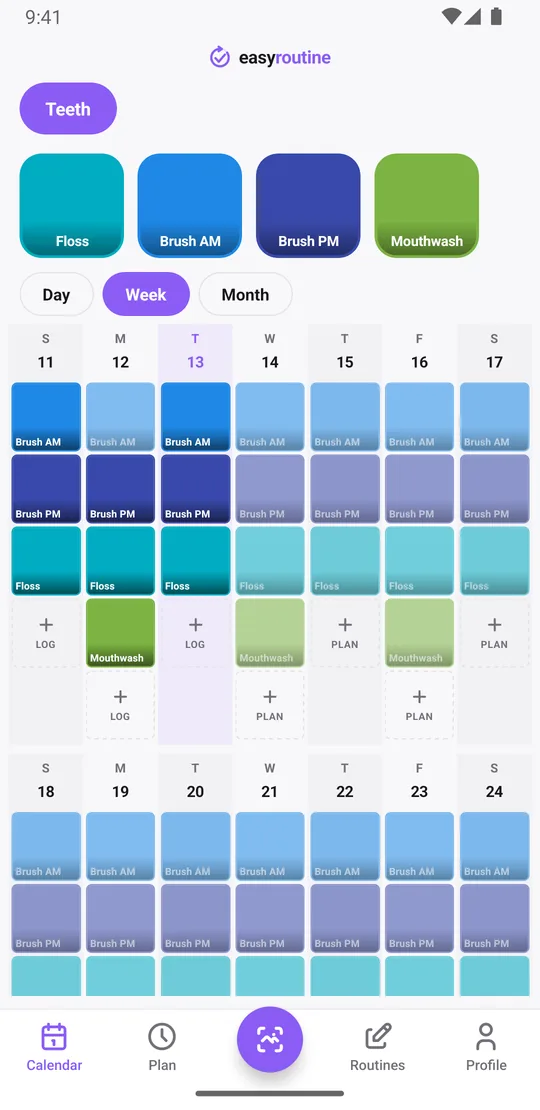
Create a routine called Teeth and add each step as an activity: Floss, Brush AM, Brush PM, and anything else you do, like Mouthwash or wearing a retainer. Separate activities for morning and evening brushing make the calendar easy to read: you see at a glance which one is missing.
If you prefer one activity, that works too. A single activity can have up to four recurring times a day, so Brush teeth at 7:15 and 21:40 is one activity with two times.
Log it right after, check it before bed
Floss, then tap + Log on the day, pick Floss and tap OK. It takes a few seconds, it is free, and it answers the question "did I already floss today?" for good. With a Premium schedule (below), you can also tap the faded Floss entry on the calendar and save the Log Entry sheet. Open the day view and a solid tile means done; a faded entry means it is planned and still waiting.
If you did it and forgot to log it, add the log afterwards with the right time. Logs can go on any earlier day, so a forgotten log does not turn into a fake gap.
You can add a short note to any log and flag it green, amber or red. Useful things to write down: "floss picks", "new floss brand", "travelling", or "skipped, too tired" with an amber flag, so you can see later what got in the way. Notes do not show on the calendar itself, but the last few notes for that activity appear in the log sheet the next time you log it.
If you give Floss a photo of your floss box, you can also log it with the Scan tab: point the camera at the box and EasyRoutine logs the matching activity with the current time. It only compares against your own activities that have a photo. Logging, notes, flags, the scan and the calendar are free.
See your consistency in the week view
The week view is the honest mirror. Each day shows a tile for every step you logged, so a row of Floss tiles with two holes tells you exactly which nights slipped. The month view shows the longer pattern, like flossing well on weekdays and skipping on Fridays.
To answer "when did I last floss?", tap the Floss tile at the top of the calendar. The calendar then shows only flossing, so the last tile is the last time, and the month view shows every flossing night of the month as dots. Tap the tile again to see the whole routine.
The Profile also shows a Day streak. It counts the days in a row on which you logged anything, across all your routines, so it is a general consistency number rather than a flossing streak. A day with no logs at all ends it. To check flossing specifically, look at the Floss tiles in the week or month view.
Two reminders a day, morning and night
With Premium, open the Plan tab, tap an activity, add a time and choose the days. Then pick when the reminder goes off: on time, or 5, 10, 15 or 30 minutes before.
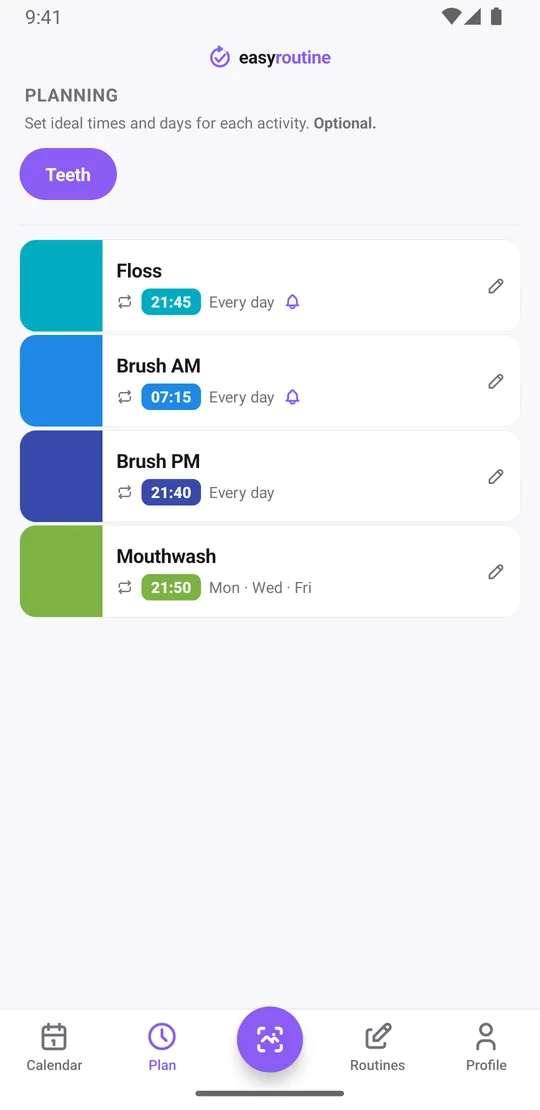
- Brush AM: every day at 7:15
- Brush PM: every day at 21:40
- Floss: every day at 21:45, reminder on time
- Mouthwash: Monday, Wednesday and Friday at 21:50
The best time for the floss reminder is just before you usually go to the bathroom at night, not an hour earlier when you are still on the sofa. If your evenings differ on weekends, give the same activity a second time for Saturday and Sunday, such as 23:00.
Reminders are local notifications on your phone, so once they are scheduled they also go off on a plane or in a hotel without Wi-Fi.
A schedule without a time ("Any time") still shows on the calendar but cannot send a reminder, so give the night routine a real time. Scheduling and reminders are part of Premium; logging is free. How reminders work.
What it does not do
EasyRoutine is a reminder and a log. It does not give dental advice or tell you how to floss; your dentist is the right person for that. What it does is make sure the night-time step gets a nudge and leaves a trace. For other daily habits that are easy to drop, see the retainer wear tracker and the water intake reminder.
Common questions
How do I remember to floss every night?
Add Floss as an activity and give it a time every day in the Plan tab, just before you usually get ready for bed, with a reminder. Scheduling and reminders are part of Premium.
Can I set two reminders a day, morning and night?
Yes. Use two activities, such as Brush AM and Brush PM, or give one activity two times. Each activity can have up to four recurring times, each with its own reminder.
How do I know if I already flossed today?
Open today's day view. A solid Floss tile means you logged it; a faded entry means it is still waiting.
Does missing one night reset my streak?
The Day streak counts days on which you logged anything, not flossing in particular, so it only ends on a day with no logs at all. Gaps in flossing show as missing tiles in the week and month views.
Keep reading
Free on iPhone and Android. Sign in with Apple, Google or your email to start.