Journaling habit tracker: log the days you write, and keep going
When did I last actually write in my journal? EasyRoutine is a simple journal habit tracker: it logs each session in a few taps with an optional note, so the calendar shows which days you wrote and the streak shows how long the habit has held.
A habit tracker for your journal, not a replacement for it
Most people who build a journaling habit already have a place to write: a notebook, a notes app, a dedicated journaling app. What they lack is a quick way to see whether they have actually been doing it. That is the part EasyRoutine handles.
Create a routine called Journaling and add an activity for each kind of writing you want to keep up:
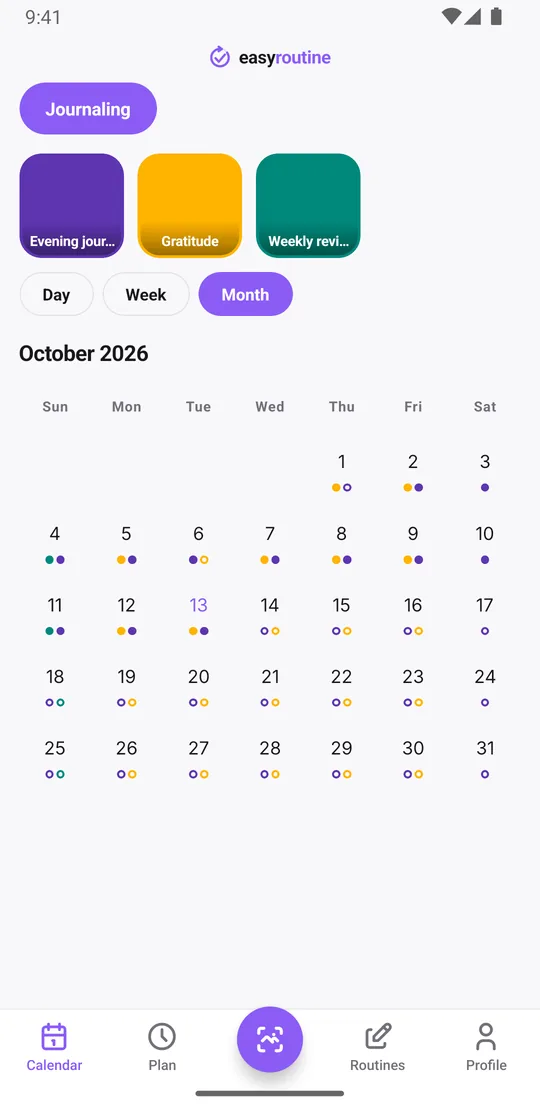
- Evening journal: the main daily entry
- Gratitude: three lines on weekday mornings
- Weekly review: a longer look back on Sunday
If you only have one habit, a single activity is enough. Give it a color and, if you like, a photo of your notebook so the tile is easy to spot.
Log each entry in a few taps, with a note
After writing, tap + Log on today in the Day view, pick Evening journal and confirm with OK. That alone is a complete log, saved with the current time. Tap the logged entry to open the log sheet: it has a comment field that holds up to 2,000 characters, which is room for a few paragraphs. Some people use it for the entry itself; others write a one-line summary like "long day, but the walk helped" and keep the real entry in their notebook.
You can flag a log green, amber or red, which works as a simple mood marker for the day. When you open the log sheet, it shows your last few comments for that activity, a small look back before you write today's line. Forgot last night? Use + Log on yesterday (it is saved at 12:00), then tap the entry and set the time you wrote.
Logging, comments, flags, the calendar and the streak are all free.
Can you add a photo to a journal entry?
No. In EasyRoutine, photos belong to activities, not to individual logs. You can give the Evening journal activity a photo, such as your notebook's cover, but you cannot attach a different photo to each day's entry. If photos are part of how you journal, keep them in your journaling app or photo album and use EasyRoutine to track that you did it.
With a notebook photo on the activity, you can also log a session with the AI photo scan: point the camera at the notebook in the Scan tab and it logs the matching activity at the current time.
See your journaling streak
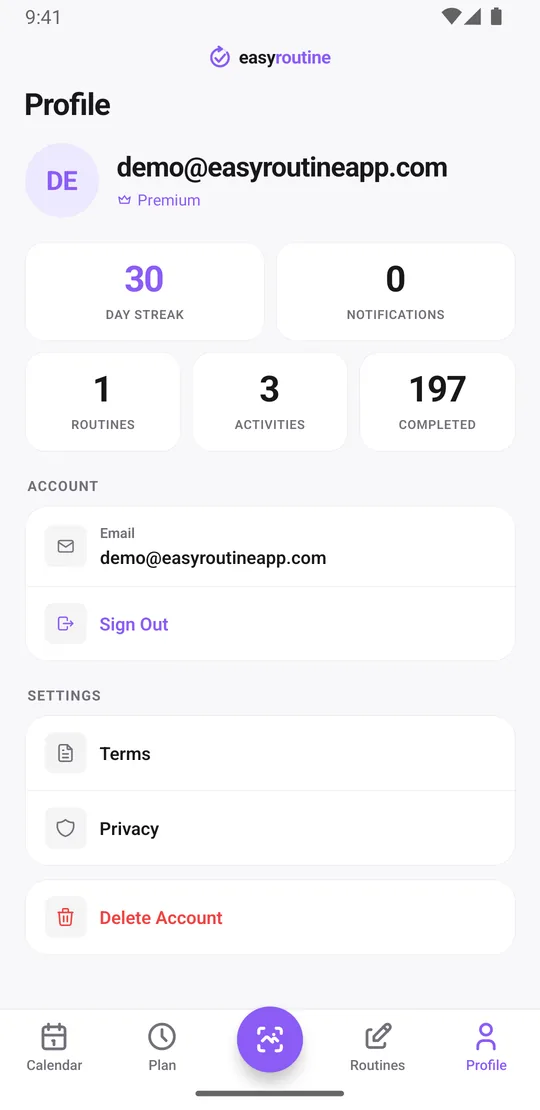
The Profile tab shows your Day streak: the number of days in a row on which you logged at least one activity in EasyRoutine, counting back from today (or from yesterday if you have not logged anything yet today, so the streak does not reset in the morning).
The streak counts all your activities together, not journaling alone. If journaling is the only thing you track, the day streak is your journaling streak. If you also track other habits, the month view is the clearer record: each day you wrote leaves a dot in the journal's color, and a missed day is a visible gap. The Profile tab also shows your total number of completed logs.
When did you last write, and which days slip?
Tap the Evening journal tile at the top of the calendar and the calendar shows only that activity, so the last entry you see is the last time you wrote. Switch to the month view, which shows up to four dots per day, and the pattern over several weeks appears: maybe Fridays are always empty, or the gratitude lines stop whenever work gets busy. Filter by Weekly review to see how many Sundays you actually did it.
Comments do not show on the calendar itself, so use them for what you want to read back later: the prompt you used, what kept you from writing, or one line about the day. Because the log sheet shows your last few comments for that activity, you get a short look at what was on your mind the last few times before you write again.
Get reminded at your journaling time
Scheduling and reminders are Premium. Open the Plan tab and give Evening journal a time, for example every day at 9:30 pm, then turn on a reminder on time or 5, 10, 15 or 30 minutes before, and your phone nudges you before you get pulled into something else. Weekday-only habits like Gratitude can be scheduled Monday to Friday at 7:30 am. An activity can hold up to four recurring time slots, so morning pages and an evening entry can share one activity if you prefer. Trying a 30-day journaling challenge? Give the slot a start and end date so it stops on its own. For a once-a-month review, plan single dates instead. Planned sessions show faded on the calendar until you log them. How reminders work.
On the free plan you still log, comment and see every day you wrote; you just pick your own moment to sit down. Starting the habit as a New Year's resolution? See the New Year resolution tracker page.
Common questions
Can I attach a written note to each day's journal log?
Yes. Every log has an optional comment of up to 2,000 characters, and the log sheet shows your last few comments for that activity.
Can I add a photo to a journal entry?
No. Photos are set on the activity, not on individual logs, so each entry cannot carry its own picture.
How do I see my journaling streak?
The Profile tab shows a day streak of consecutive days with at least one log. It covers all your activities, so if you track more than journaling, use the month view to see the days you wrote.
Can I get reminded to journal at a set time each day?
Yes, with Premium. Schedule the activity every day at your time in the Plan tab and turn on a reminder on time or up to 30 minutes before.
Is this journaling habit tracker free?
Logging, comments, flags, the photo scan, the calendar and the streak are free. Scheduling a set journaling time and getting reminders need Premium.
Keep reading
Free on iPhone and Android. Sign in with Apple, Google or your email to start.