Trash and recycling day reminder: never miss pickup again
Is it trash this week or recycling? EasyRoutine gives each bin its own schedule, reminds you the evening before pickup and keeps a record of every time you put the bins out, so you are not standing at the window watching the truck drive past.
Separate activities for each bin
Create a routine called Bins and add one activity per collection:
- Trash out
- Recycling
- Compost, garden waste or glass, if your area collects them
- Bins back in, if you also tend to leave them on the curb
Separate activities matter because the bins are collected on different days, and you want to know which one you put out, not just that "bins" happened sometime this week. Give each one the color of the actual bin, so the calendar matches what you see at the curb.
Log it when the bins go out
When the bin is at the curb, tap + Log on the day, pick the bin and tap OK. That is the log, with the current time, and it is free. Put out trash and recycling in the same trip? Pick both at once. With a Premium schedule (below), you can also tap the bin's faded entry on the calendar and save it in the Log Entry sheet.
Forgot to log last night? Add it to yesterday with + Log, then tap the entry and set the time you actually put the bins out. Add a comment if something happened, like "not collected" or "bin lid broken", and flag it amber or red so it stands out.
If your bins look different (a green lid, a blue box), give each activity a photo of its bin. Then you can log from the curb with the Scan tab: point the camera at the bin and EasyRoutine logs the matching activity right away. It only compares against your own activities that have a photo, so two identical gray bins are easier to log by hand.
Check that the bins really went out this week
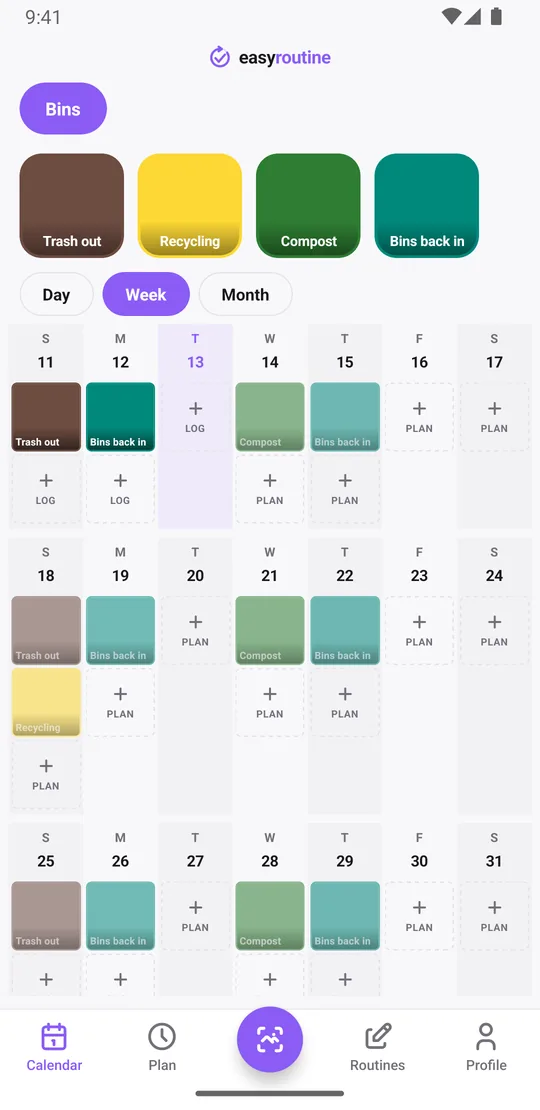
Open the week view. Every bin you logged shows as a solid tile in its color. Planned bins you have not logged yet show faded. On Sunday night, a glance tells you whether Trash out is done or still waiting.
Not sure whether this is a recycling week? Tap the Recycling tile at the top of the calendar. The calendar then shows only recycling, so the last tile is the last time it went out, and the gap since then tells you whether it is due. Tap the tile again to see all bins. The notes you added, like "not collected", do not show on the calendar, but the log sheet shows your last few comments for that bin the next time you log it.
A faded entry on an evening that has already passed means that bin did not go out, or you did not log it. Either way, it is worth checking before the next pickup. The month view shows the longer pattern, such as whether recycling actually goes out every other week.
Get reminded the night before pickup
Reminders in EasyRoutine fire at the scheduled time or up to 30 minutes before it. So to be reminded the night before, schedule the activity on the evening before collection, not on collection day.
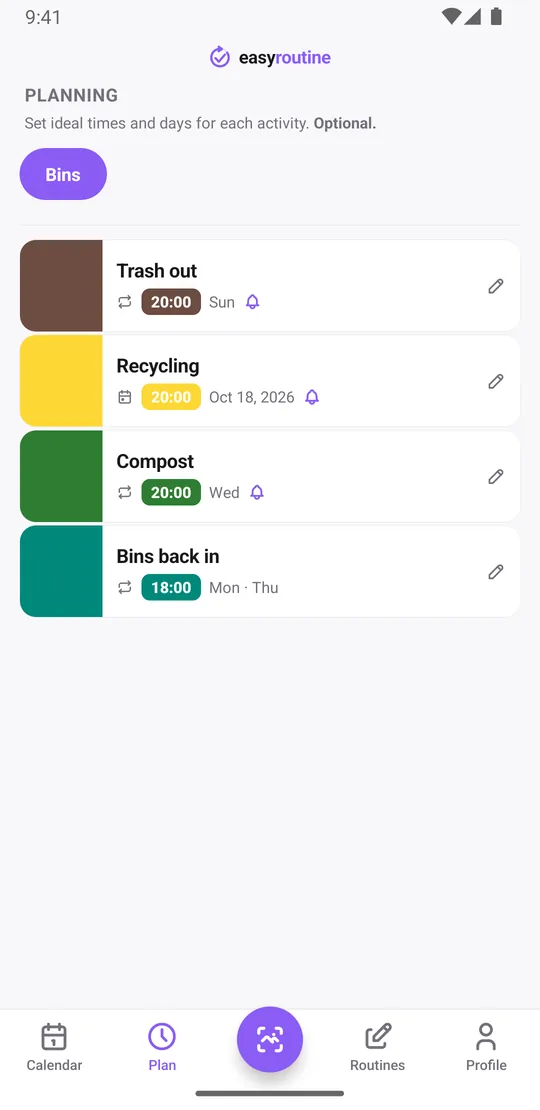
If trash is picked up early on Monday morning, schedule Trash out on Sunday at 8:00 pm with a reminder on time. Compost collected on Thursday? Schedule it on Wednesday at 8:00 pm. If you prefer to put bins out in the morning, schedule the slot for 6:45 am on collection day instead.
With Premium, open the Plan tab, pick the activity, choose the weekday and time and set the reminder. Scheduling and reminders are part of Premium; logging is free. How reminders work.
When recycling is every other week
Many areas collect recycling every two weeks, or alternate it with trash. EasyRoutine's repeating schedules work on weekdays (every Sunday, every Wednesday), not on a count of days or weeks, so there is no "every other Sunday" rule.
For an alternating pickup, use single-day plans. Open your council's collection calendar, then add the evenings before each recycling pickup as single-day plans with a time and reminder. Each activity can hold up to 20 single-day plans, which covers about nine months of fortnightly collections. Add the next batch when they run low. Holiday changes to the schedule are easy to handle the same way: move that one date. More about scheduling.
What it does not do
EasyRoutine does not know your local collection schedule or holiday changes, and it does not look anything up for you. You enter the days once, from your council's calendar or the notice on your bin, and the app reminds you and keeps the record.
Common questions
Can I get reminded the night before trash or recycling day?
Yes, with Premium. Schedule the activity on the evening before pickup, for example Sunday at 8:00 pm for a Monday collection, and turn on a reminder on time. Reminders fire at most 30 minutes before the scheduled time.
Can trash and recycling have separate schedules?
Yes. Make each bin its own activity and give it its own days and time.
Can I schedule recycling every other week?
Not as a repeating rule. Add each pickup evening as a single-day plan instead. Each activity holds up to 20, about nine months of fortnightly collections.
How do I check I actually put the bins out this week?
Open the week view. Bins you logged show as solid tiles, and planned bins you have not logged show faded.
Keep reading
Free on iPhone and Android. Sign in with Apple, Google or your email to start.