Bill reminder app: a nudge before it is due, and a record once it is paid
Did I pay the electricity bill this month, or just mean to? EasyRoutine keeps a free record of every payment you log, with a note on how you paid, so you can check in a second instead of logging into your bank. With Premium it works as a bills reminder too, with a nudge before each bill is due.
One routine, one activity per bill
Create a routine called Bills and add each bill as its own activity: Rent, Electricity, Phone, Internet, plus any subscription you tend to forget. Give each one a color so the calendar tells them apart.
Separate activities are the point. Every bill has its own due date, and you want to know that rent is paid and the phone bill is still open, not just that you "did bills" sometime last week. There is no limit on how many bills you add, on the free plan or with Premium. Bills that come once or twice a year, like home insurance or a TV licence, fit in the same routine.
Mark a bill as paid in a few taps (free)
After paying, use + Log on the day and pick the bill. That is your record, and it costs nothing. Paid several bills on the same evening? + Log lets you tick all of them at once.
Paid a bill last week and forgot to log it? Use + Log on the day you actually paid (it is saved at 12:00, and you can tap it to change the time). Logs go back as far as you need, so you can also fill in the last few months from your bank statement and start with a full history.
If you pay paper bills, the free photo scan can save a few taps: give each bill's activity a photo of that letter, then scan the bill after paying and EasyRoutine logs the matching activity. It only matches your own activities that have a photo, and you can always pick the bill by hand.
Write down how you paid
Every log can carry a comment and a green, amber or red flag, also on the free plan. Worth noting for a bill:
- how you paid: "bank transfer", "card", "paid at the post office"
- a reference or confirmation number, for example "ref 4471"
- the amount, if you want it on record (the app does not add it up)
- anything to sort out next time: "price went up", "switch to direct debit"
Use the flag for payments that need attention: amber for "paid late", red for "disputed". When you log the same bill again, the Log Entry sheet shows its previous comments, so last month's reference or amount is right there to compare. Comments are not shown on the calendar itself; tap a log to read its note.
When did I last pay it?
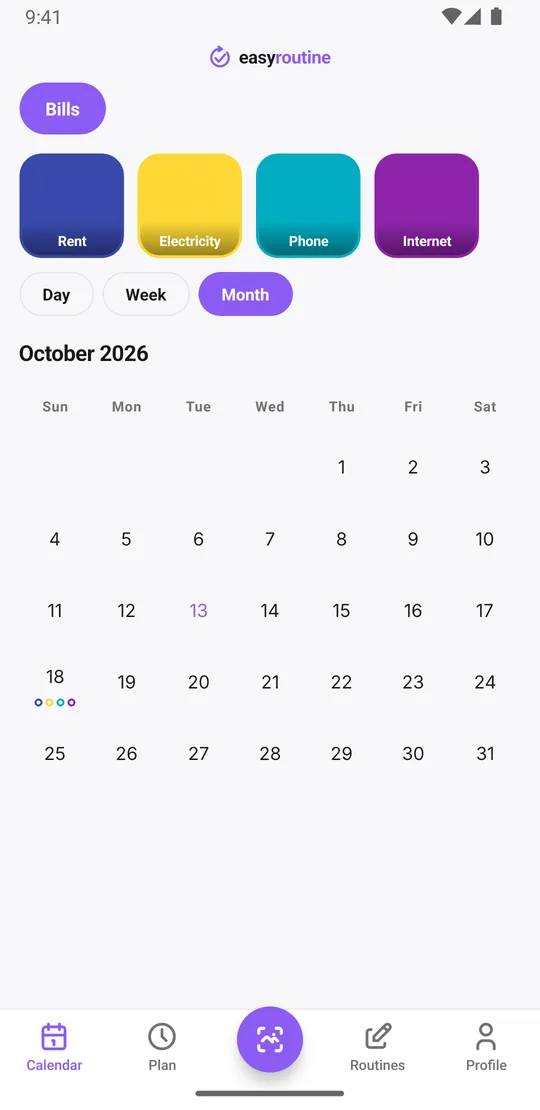
Tap a bill's tile at the top of the calendar and the calendar shows only that bill. The last entry is the last time you paid it, so "did I pay the internet this month?" takes one tap.
The month view shows the long pattern: every payment as a dot in the bill's color on the day you paid, up to four dots per day. Flip back through the months and you can see that rent went out on the 1st every month and the internet bill slipped a few days in March. Amber and red flags in the history show which bill keeps causing trouble.
Plan each bill on its due date (Premium)
Bills are usually due on a day of the month, like the 1st or the 15th. EasyRoutine's repeating schedules work on weekdays (every Monday, every Friday), not on a date of the month. So for monthly bills you use single-day plans instead.
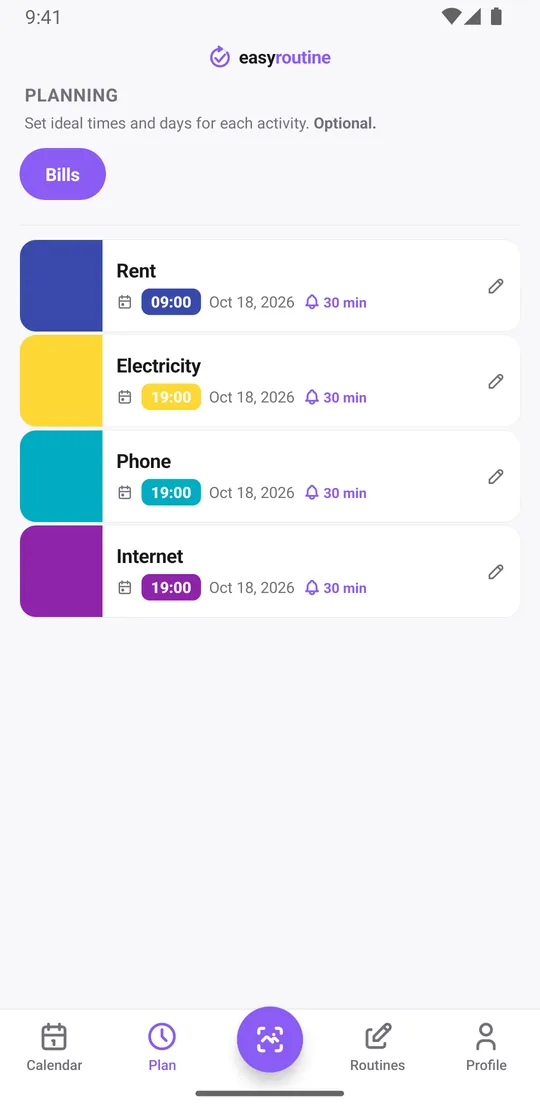
With Premium, open the Plan tab, pick the bill, choose Single day and add the due date. Each activity can hold up to 20 single-day plans, so you can add the next twelve due dates in one sitting and not think about it again for a year:
- Rent: the 1st of every month at 9:00 am
- Electricity: the 12th at 7:00 pm
- Phone: the 20th at 7:00 pm
- Internet: the 25th at 7:00 pm
If a bill has a grace period or you like to pay early, plan it a few days before the real due date. Planned payments show as faded entries on the calendar until you log them; tap one after paying to log it. A faded entry on a day that has already passed is a bill you planned to pay and did not tick off, which is exactly the one to check. More about scheduling.
Bill reminders before the due date (Premium)
Give the plan a time and turn on a reminder: on time, or 5, 10, 15 or 30 minutes before. On the 12th at 7:00 pm your phone says the electricity bill is coming up, and nothing else. Reminders are local notifications on your phone, and they still fire if you happen to be offline at that moment.
If you want a nudge a day or two ahead, plan the bill on that earlier date. The reminder fires at the time of the plan, so the plan date is the day you hear about it. Scheduling and reminders are part of Premium; logging payments, notes and the calendar are free. How reminders work.
What it does not do
EasyRoutine is a reminder and a log. It does not pay bills, connect to bank accounts, read your statements or know the amount due. If you want automatic payments, your bank's direct debit or standing order does that. EasyRoutine is for the bills you pay by hand and want to stop forgetting.
Common questions
Is the bill reminder app free?
Recording payments is free: logging each bill, notes, flags and the calendar. The reminders themselves need Premium, because they are set inside a schedule.
Can I be reminded to pay a bill on a specific day each month?
Yes, with Premium, using single-day plans. Repeating schedules work on weekdays, so add each monthly due date as a single-day plan. Each bill can hold up to 20 of them, enough for the next year.
Can I mark a bill as paid and see past payments?
Yes, and that part is free. Use + Log on the day you paid and pick the bill, add a comment such as the reference number if you like, and every payment stays on the calendar. Tap the bill's tile to see only its payments, or use the month view to see them all.
Can I note how I paid or a reference number?
Yes, for free. Each log can have a comment and a green, amber or red flag. The next time you log that bill, its previous comments appear in the Log Entry sheet.
Can I get a reminder a few days before the due date?
Reminders fire at the planned time or up to 30 minutes before it. For an earlier warning, plan the bill on the day you want to be reminded rather than on the due date itself.
Does EasyRoutine connect to my bank?
No. It does not pay bills, read accounts or know amounts. It reminds you and records that you paid.
Keep reading
Free on iPhone and Android. Sign in with Apple, Google or your email to start.