Stretching routine app: keep track of when you actually stretch
When did I last do my hip mobility work? EasyRoutine is a simple stretching and mobility routine tracker: you log each session when you finish it, for free, and the calendar shows how often you really stretch. With Premium you can also plan stretching days and get a reminder.
What this app does, and what it does not
Most stretching apps are coaching apps: they play exercise videos, count down each hold and build a program for you. EasyRoutine does none of that. It has no exercise library, no videos and no timer.
What it does is remember. You already know your stretches, from a physio sheet, a class, a video you like or your own routine. EasyRoutine records that you did a session and when, so the question "am I actually doing this?" has an honest answer. If you want a guided program, use a dedicated stretching app and EasyRoutine alongside it as the log.
Set it up: one activity per session type
Create a routine called Stretching and add each kind of session as its own activity:
- Morning stretch, the short one after getting up
- Hip mobility or Shoulder mobility, the focused work
- After run, the cool-down after a run
- Desk break, a few minutes away from the screen
- Foam roll
Separate activities matter because they slip at different rates. A single "Stretch" task can tell you that you stretched on Tuesday, but not whether the hip work you keep putting off happened at all. Give each one a color so the calendar reads at a glance.
Free: log each session and see when you last did it
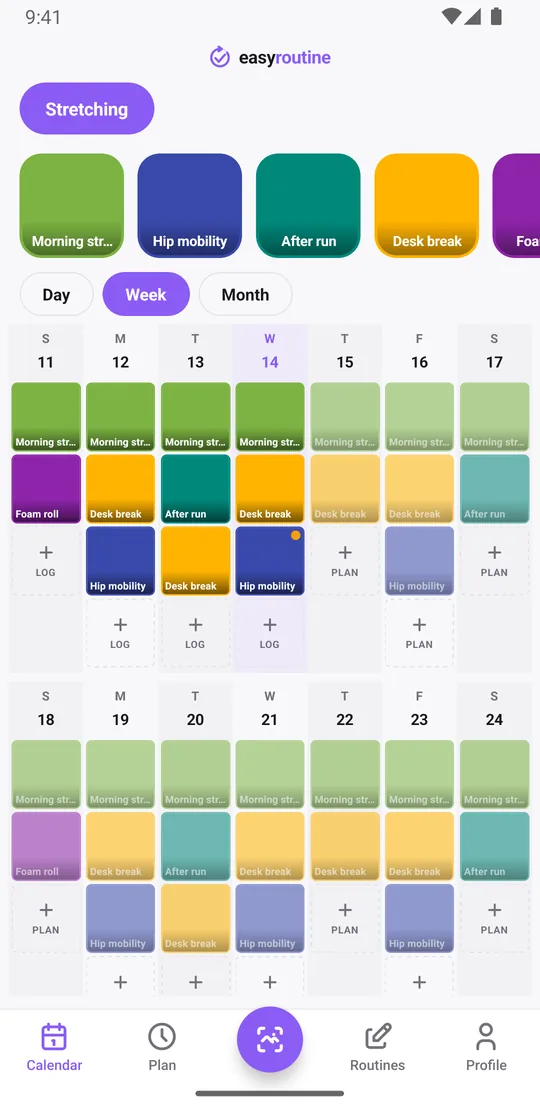
After a session, open the day on the calendar, tap + Log and pick it. Did a morning stretch and foam rolling in one go? Tick both at once. Forgot to log yesterday's cool-down? Logs can be added for any earlier day and time.
The week view shows a colored tile on every day you stretched. Tap an activity's tile at the top, such as Hip mobility, to show only that one: the last tile is the last time you did it. The month view shows up to four dots per day, which makes the long pattern visible: three good weeks, then a gap after a busy stretch at work. The day streak on your profile counts consecutive days with any log.
Logging, the calendar and the history are free, with no limit on activities or logs. More about the calendar.
Free: notes and flags for each session
Every log can carry a note and a green, amber or red flag. Useful things to write down:
- how long you went, like "12 min"
- which side felt tighter
- what you added or skipped from your usual sequence
- a new stretch from class you want to keep
Use the flags your own way, for example green for a good session, amber when something felt stiff, red when you stopped early. When you open the log sheet for an activity, it shows your last few notes for it, so before today's hip work you can see what you wrote last time. Notes stay with each log; they are not shown on the calendar itself.
EasyRoutine does not judge what you write. If a stretch hurts or something keeps feeling wrong, ask a doctor or physiotherapist rather than an app.
Premium: plan your stretching days
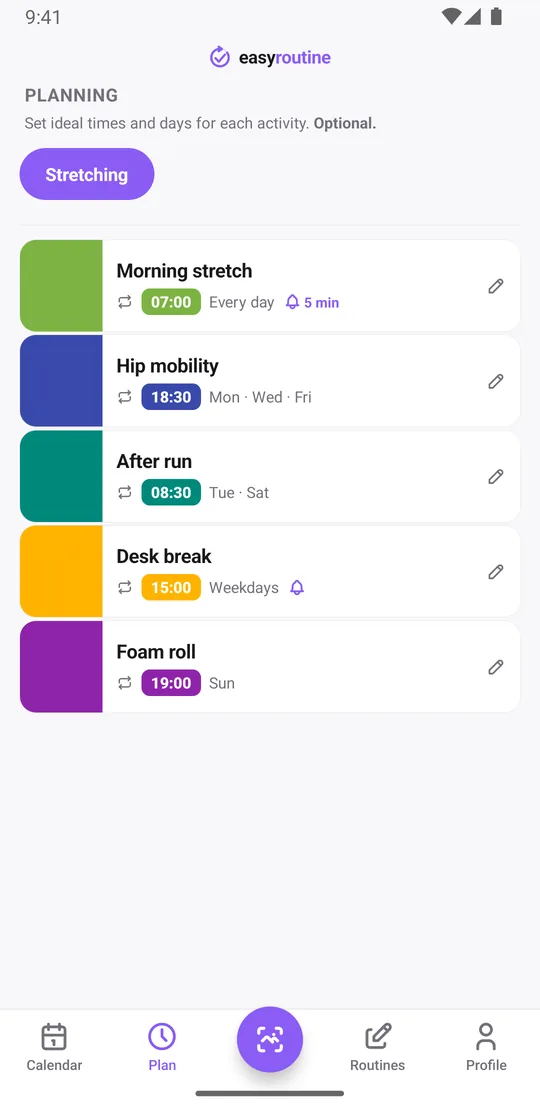
With Premium, open the Plan tab and give each activity weekdays and a time:
- Morning stretch: every day at 7:00
- Hip mobility: Monday, Wednesday and Friday at 18:30
- After run: Tuesday and Saturday at 8:30
- Desk break: weekdays at 15:00
- Foam roll: Sunday at 19:00
Planned sessions show as faded entries on the calendar until you log them, so a faded hip session on Wednesday evening means it has not happened yet. An activity can have up to four recurring times, for example a desk break at 11:00 and at 15:00. A start and end date limit a block of sessions to a few weeks, such as a mobility block before a race. More about scheduling.
Premium: a reminder when it is time to stretch
Each scheduled time can carry a reminder, on time or 5, 10, 15 or 30 minutes before. The desk break is where this helps most: a reminder at 15:00 on weekdays gets you out of the chair before the afternoon disappears. Because reminders belong to each activity's schedule, Saturday morning reminds you about the run cool-down and nothing else. Premium also removes ads. How reminders work.
Stretching next to your other routines
Stretching often lives next to training. Keep it as its own routine next to a workout log, so each has a clean calendar, or add a Cool-down activity to your training routine if you always stretch right after lifting. Logging workouts works the same way.
Common questions
Is there a free stretching routine app that just tracks sessions?
Yes. In EasyRoutine, logging each session, notes, flags and the calendar are free with no limit on activities or logs. Planning days and reminders need Premium.
Does EasyRoutine show stretching exercises or have a timer?
No. It has no exercise videos, no instructions and no hold timer. It records that you did a session and when, plus an optional note and flag.
Can I track mobility work separately from my daily stretch?
Yes. Make each session type its own activity, such as Morning stretch and Hip mobility. Tap one activity's tile at the top of the calendar to see only its history.
Can I get a reminder to stretch every weekday afternoon?
Yes, with Premium. Schedule the activity on Monday to Friday at the time you want and add a reminder, on time or up to 30 minutes before.
Will the app tell me which stretches are right for me?
No. EasyRoutine gives no exercise or health advice. Ask a doctor or physiotherapist about which stretches suit you, then use the app to keep track of doing them.
Keep reading
Free on iPhone and Android. Sign in with Apple, Google or your email to start.