Retainer wear tracker: a record of every night you wore it
Did I put my retainer in last night, or did I fall asleep without it? EasyRoutine keeps a log of each night and shows them on a calendar, so you know where you stand before your next orthodontist appointment. Logging and the calendar are free; Premium adds a nightly reminder.
Set up a Retainer activity
Create a routine for your evening, called Bedtime for example, and add an activity named Retainer. Putting it next to the other things you do before bed helps: Brush teeth, Floss, then Retainer, in the order you actually do them. A morning Clean retainer activity works the same way if you want to track that too.
Give the activity a photo of the retainer case and EasyRoutine can suggest a name from it. With a photo, you can also log a night with the AI photo scan by pointing the camera at the case.
If you wear an upper and a lower retainer on different nights, make them two activities, Upper retainer and Lower retainer, so each has its own record.
Log each night in a few taps
When the retainer is in, tap + Log on the day, pick Retainer and save. If you are already in bed and the phone is on the nightstand, log it the next morning and set the time back to last night. With a Premium schedule (below), tonight's entry is already on the calendar, faded, and one tap logs it.
The log sheet has room for a comment and a red, amber or green flag. Use it for things worth mentioning at your next appointment: "felt tight", "cracked corner", "wore it only half the night". The log sheet shows your last few comments each time, so a pattern of "tight" nights is easy to notice. A note is also the place for facts you would otherwise forget: the day a replacement retainer arrived, or what changed at a check-up. Notes stay with the log; they do not show on the calendar itself.
See whether you kept it up
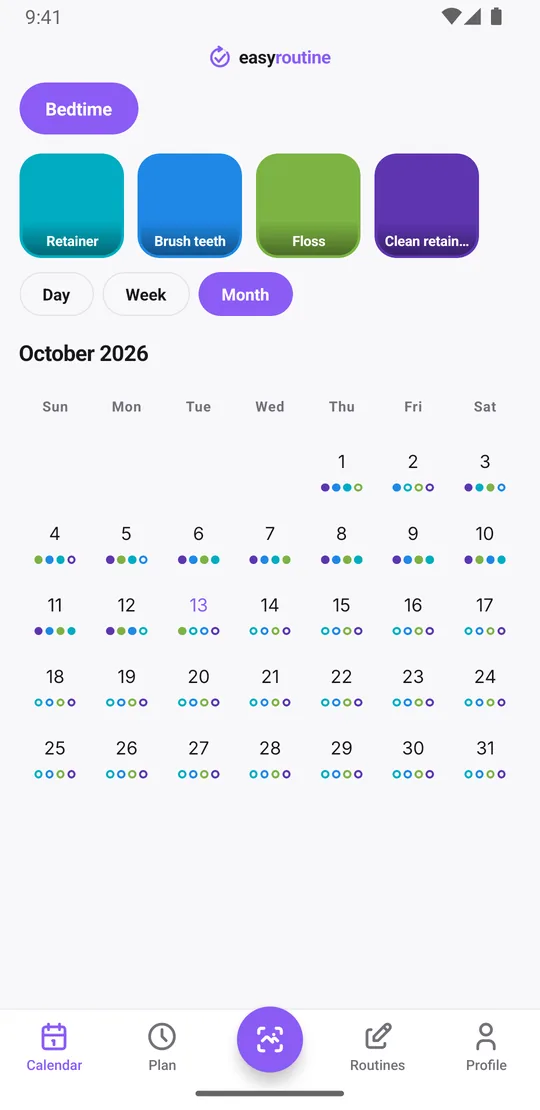
The month view answers the question your orthodontist will ask. Each night you logged leaves a dot in the retainer's color, and a missed night is a gap. You can see at a glance whether you wore it every night, most nights, or had a bad week on holiday.
To answer "when did I last wear it?", tap the Retainer tile at the top of the calendar. The calendar then shows only that activity, so the most recent entry is the last night you logged it.
If you schedule the retainer with Premium, planned nights you have not logged show faded in the day and week views. A faded entry on a past day is a night you planned and did not log.
The Profile tab also shows a Day streak, the number of days in a row on which you logged anything in EasyRoutine. It counts all your activities, so if you track brushing as well, the streak is about the whole routine, not the retainer alone. For the retainer itself, the month view is the honest record.
Premium: a reminder every night at bedtime
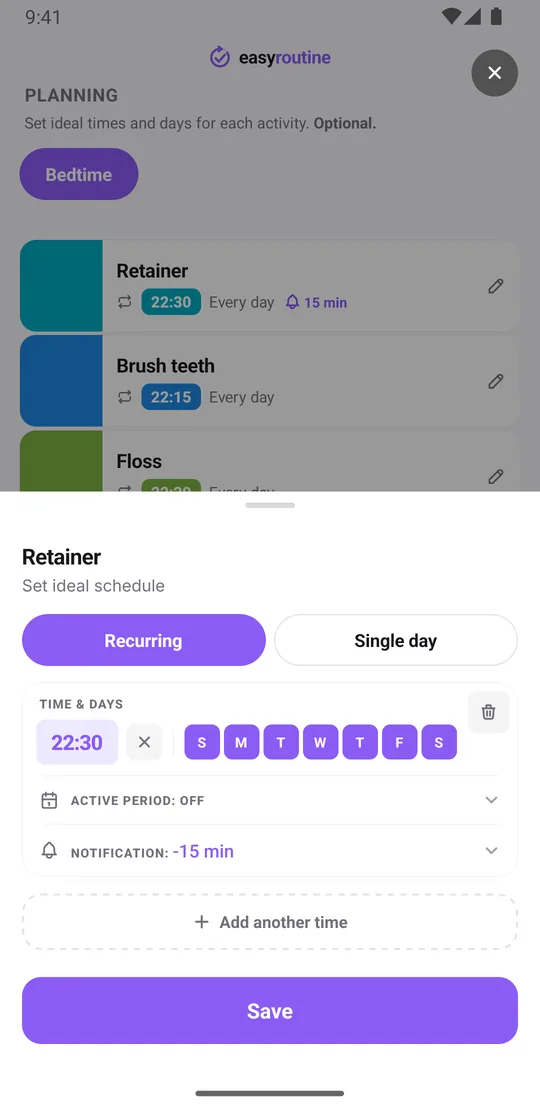
With Premium, open the Plan tab and schedule Retainer every day at your bedtime, for example 10:30 pm. Turn on a reminder, on time or 5, 10, 15 or 30 minutes before, and your phone nudges you while you are still in the bathroom with the case in reach.
Reminders are local notifications on your phone, so they arrive even if you are offline at night. Scheduling and reminders are part of Premium; logging is free. How reminders work.
Only needed for a set number of weeks?
If your orthodontist said nightly wear for a limited stretch, for example the first twelve weeks after the braces come off, give the recurring slot a From and Until date. The schedule and its reminders run inside that period and stop after the end date, so you do not have to remember to switch them off.
When the next phase starts, say a few nights a week instead of every night, add a new slot with the new weekdays and its own start date. Each activity can hold up to four recurring slots, which is enough for a schedule that changes in stages. More about scheduling.
A routine tracker, not dental software
EasyRoutine is a general routine tracker. It is not a dental or medical device and does not know anything about your treatment. It records that you logged the retainer and when, not how many hours you wore it or how well it fits. How long and how often to wear it is your orthodontist's call; if something hurts or does not fit, ask them, not an app.
Common questions
Is the retainer tracker free?
Logging each night, notes, flags, the photo scan and the calendar are free. Scheduling and bedtime reminders need Premium.
Can I get reminded every night to wear my retainer?
Yes, with Premium. Schedule the Retainer activity every day at your bedtime in the Plan tab and turn on a reminder on time or up to 30 minutes before.
Can I track a retainer schedule that only lasts a set number of weeks?
Yes. Give the recurring slot a start and end date. The plan and its reminders stop after the end date.
How do I see if I have worn it every night?
Open the month view. Each logged night shows a dot in the retainer's color, and missed nights show as gaps.
Does EasyRoutine track how many hours I wore my retainer?
No. It records that you logged it and when. It does not measure wear time and gives no dental advice.
Keep reading
Free on iPhone and Android. Sign in with Apple, Google or your email to start.