Practice log app: track your instrument practice, session by session
When did I last practise scales, or that piece for the recital? EasyRoutine works as a practice tracker for any instrument: log each session in a few taps, note what you worked on and at what tempo, and the calendar shows which days you practised what.
A practice log, not a music app
EasyRoutine records that you practised and when, plus an optional note and a colored flag. It has no metronome, no tuner, no practice timer, no recording and no sheet music, and it does not count minutes or repetitions for you. Keep your metronome and tuner apps for that.
What it replaces is the paper practice diary: a quick, honest record of which days you actually picked up the instrument, what you worked on, and what you wrote down about it. That record is what you, or your teacher, look at when you ask why a piece is not improving.
One activity per instrument, or per kind of practice
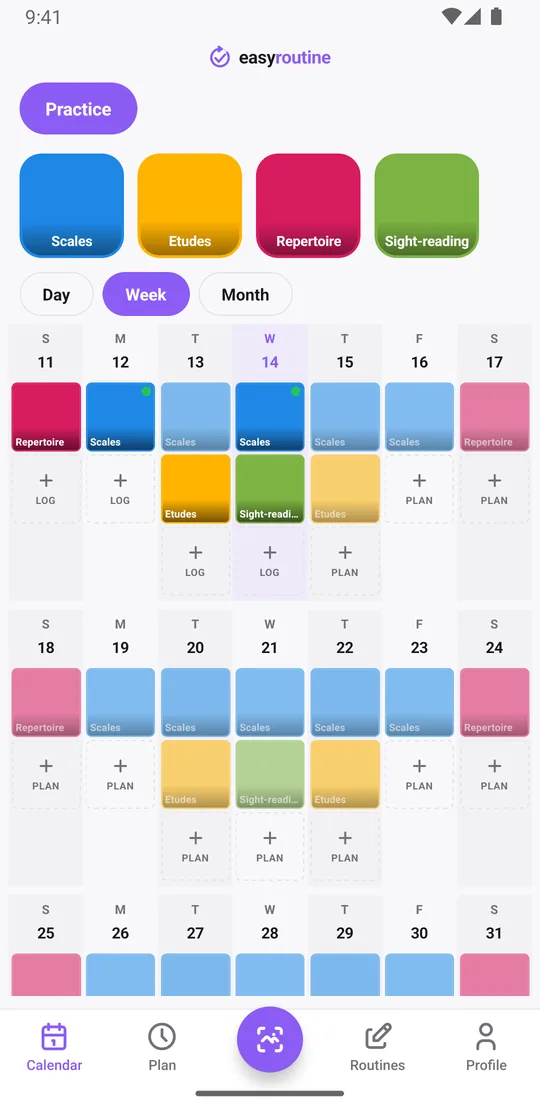
Create a routine called Practice and split it the way you think about your practice:
- Per kind of practice: "Scales", "Etudes", "Repertoire", "Sight-reading". Best when you want to see which part keeps getting skipped.
- Per instrument: "Piano", "Guitar", "Voice". Best if you play more than one.
- Per piece: "Bach prelude", "Recital piece". Useful in the weeks before a performance.
Each activity gets its own color, so the calendar shows the mix at a glance. Pin the piece you are preparing so it shows first, and archive it after the concert: its practice days stay on the calendar. A family with two learners can keep a second routine, for example Practice: Mia, alongside your own.
Log a session and note the tempo
After practising, tap + Log on today in the Day view, pick what you practised (several at once if you did scales and repertoire) and confirm with OK. Each becomes a log with the current time. Tap an entry to open the log sheet and write what matters for next time:
- "C, G, D major, 2 octaves, 92 bpm"
- "Bars 17 to 32 hands separately, slow"
- "Full run-through at 80, slips in the coda"
The log sheet shows your last few comments for that activity, so before writing today's note you see the tempo you reached last time. Flags work as a quick verdict: green when it went well, amber when it was a struggle, red when something hurt or nothing worked. Forgot to log yesterday's lesson homework? Use + Log on yesterday and set the time.
Logging, comments, flags and the calendar are free.
When did you last practise that?
Tap the Scales tile at the top of the calendar and the calendar shows only that activity: the last entry is the last time you played them. Do the same for Sight-reading and you may find it has not happened in two weeks. The month view, with up to four dots per day, shows the long pattern: repertoire every day, etudes only on weekends.
Notes are not shown on the calendar itself, so use them for what you want to read back: tempos, problem bars, what your teacher asked for. Reading back through a piece's logs shows how the tempo climbed from 60 to 92 over a month, which is a better answer to "am I getting anywhere?" than a feeling.
Practice times and reminders (Premium)
Scheduling and reminders are Premium. In the Plan tab, give Scales a time, for example Monday to Friday at 6:30 pm, and turn on a reminder on time or 5, 10, 15 or 30 minutes before so practice starts before the evening disappears. Schedule Repertoire on weekends at 10:00 am, and sight-reading on Wednesdays. An activity can hold up to four recurring time slots.
Preparing for an exam or recital? Give the recital piece a slot with a start and end date that covers the weeks before the date, and add the lesson or performance itself as a single date. Planned sessions show faded on the calendar until you log them, so a skipped day is plain to see. How reminders work.
On the free plan you still log, note tempos and see every session; you just choose your own moment to play.
Common questions
Does the app have a metronome or practice timer?
No. There is no metronome, tuner or timer. Practise with your usual tools and log the session in EasyRoutine, with the tempo or minutes in the note if you want them.
Should I track by instrument or by exercise?
Either. Activities per kind of practice (scales, etudes, pieces) show what gets skipped; activities per instrument suit people who play several. You can mix both.
Can I see the tempo I reached last time?
Yes, if you write it in the comment. The log sheet shows your last few comments for that activity when you log it again.
Can I get reminded to practise every evening?
Yes, with Premium. Schedule the activity on the weekdays and time you want in the Plan tab and turn on a reminder on time or up to 30 minutes before.
Is this practice tracker free?
Logging, comments, flags, the calendar and the streak are free. Practice times and reminders need Premium.
Keep reading
Free on iPhone and Android. Sign in with Apple, Google or your email to start.