A hot tub maintenance schedule and log
A hot tub maintenance schedule runs on three clocks: water tests at least twice a day as the CDC advises, filter rinses and cover cleans, and the drain and refill on the interval your manufacturer gives. EasyRoutine logs each job with your readings in the note for free, and with Premium it reminds you on the day.
Every day: test the water and keep the sanitizer up
Hot tub water is a small volume of hot water, and a few people in it can change the chemistry quickly. The CDC advises testing chlorine and pH at least twice a day, and more often when many people use the tub. For hot tubs, it recommends a pH of 7.0 to 7.8 and at least 3 ppm of chlorine. It also recommends not using cyanuric acid or chlorine products that contain it in hot tubs (CDC: home pool and hot tub water treatment and testing).
If you use bromine, the CDC's hot tub guidance gives at least 4 ppm. It also lists daily removal of the slime or biofilm layer by scrubbing and cleaning among the signs of a well-kept tub (CDC: Legionella and hot tubs). The water should not be hotter than 104°F (40°C) (CDC: staying healthy in hot tubs).
Add sanitizer according to your test results and the product label, not by habit, and write down what you added. The next reading only makes sense alongside that information.
Weekly to yearly hot tub maintenance: filter, cover, drain and refill
The longer maintenance jobs come around every few weeks or months, so they are easy to overlook:
- Rinse the filter cartridge with a hose to clear debris.
- Deep clean the filter with a filter cleaner, following its label.
- Replace the filter when it is worn out.
- Clean the cover, including the top and underside.
- Drain, scrub and refill the tub.
Use your hot tub manual and filter manufacturer's instructions for the intervals. They depend on how much the tub is used. The CDC also says to replace the filter according to the manufacturer's recommendations and replace the water as often as the health department requires or the manufacturer recommends. Its Legionella toolkit says to scrub all surfaces vigorously each time the tub is drained (CDC: controlling Legionella in hot tubs).
How a hot tub log differs from a pool log
If you also have a pool, much of the pool maintenance log applies, but a hot tub has its own maintenance schedule. Its chlorine target is higher, it should not get cyanuric acid, and it needs a full drain and refill on the manufacturer's interval rather than seasonal opening and closing. It also has a cartridge filter you handle yourself and a cover that sits on the water most of the time. Keep the hot tub as its own routine so the two logs never mix.
Common hot tub maintenance mistakes
- Testing only before guests come. The CDC's twice-a-day advice applies every day the tub is in use.
- Topping up instead of draining. Adding water is not the same as replacing it on the manufacturer's interval.
- Mixing up rinsing and deep cleaning. Months later, you might not remember which job you last completed.
- Not recording what you added. If the water goes cloudy, the amount and the date are the first things to check.
How to keep a hot tub maintenance log (free)
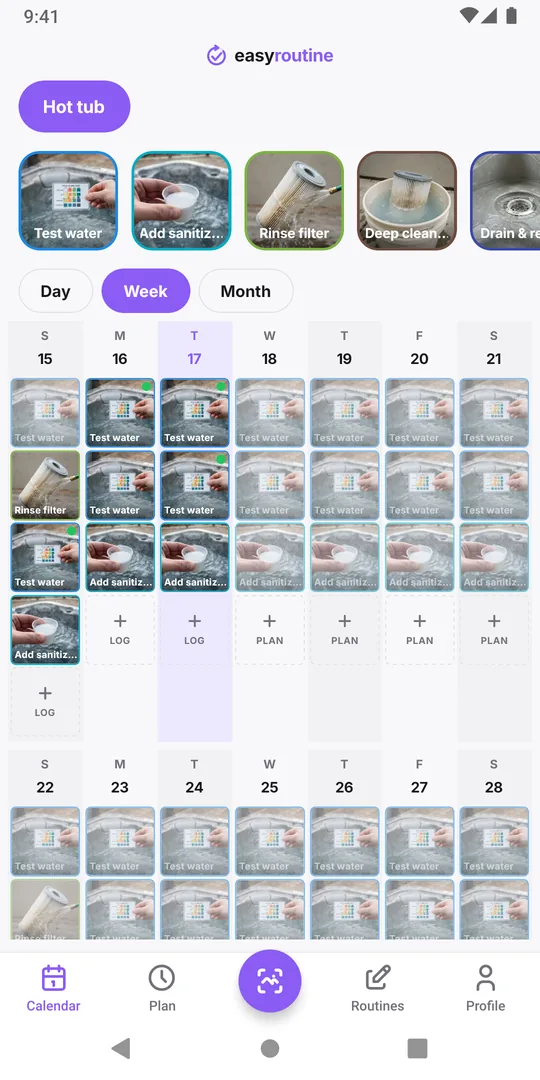
In EasyRoutine, create a routine called Hot tub with one activity per job: Test water, Add sanitizer, Rinse filter, Deep clean filter, Drain & refill and Clean cover. After a test, tap + Log, pick Test water and type the reading in the note, such as "pH 7.4, free chlorine 3 ppm". Flag it green when it is in range, amber when a value is drifting, and red when the tub should stay closed until it is fixed. Added sanitizer straight after? Tick both at once.
The app does not read test strips, calculate doses or chart readings. It keeps your notes in date order. To answer "When did I last drain it?", look for the latest Drain & refill entry.
Hot tub maintenance schedule with reminders (Premium)
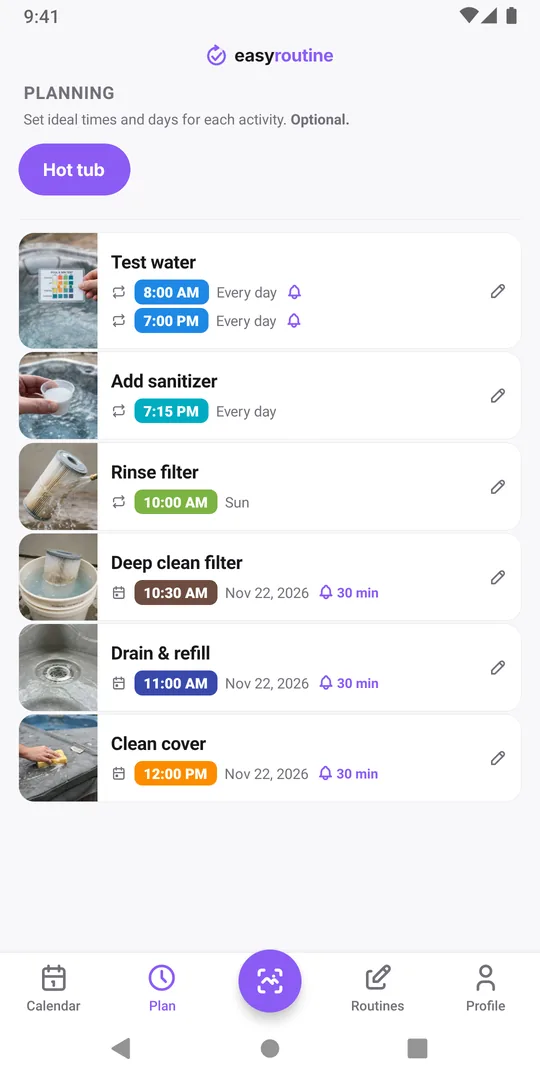
With Premium, you can schedule recurring jobs on weekdays with a time. Test water can have two daily time slots, at 8:00 and 19:00, Add sanitizer can follow the evening test, and Rinse filter can be scheduled for Sundays.
Longer jobs do not follow a weekly rhythm, and EasyRoutine has no "every 3 months" rule. Add Deep clean filter, Drain & refill and Clean cover as Single day plans on the dates your manual gives, up to 20 per activity, each with its own reminder. Moved the refill because of a cold spell? Log it on the day you did it and move the next date. A planned job you have not logged stays faded on the calendar. To order cartridges before they are due, see the filter replacement reminder. More about scheduling.
Common questions
How often should I change my hot tub water?
Follow your hot tub manufacturer's instructions. The CDC says hot tub water should be replaced as often as the health department requires or the manufacturer recommends. Record the next drain and refill date in your maintenance schedule.
How often should I test hot tub water?
The CDC advises testing chlorine and pH at least twice a day, and more often when many people use the tub. Log each test with the readings in the note.
What should a hot tub maintenance schedule include?
Include water testing, sanitizer checks and adjustments, filter rinsing, filter deep cleaning and replacement, cover cleaning, and draining and refilling. Use your manufacturer's instructions for the maintenance intervals.
Can I keep my pool and hot tub maintenance logs in the same app?
Yes. Create two separate routines in EasyRoutine. The calendar shows one routine at a time, so pool jobs and hot tub jobs never mix.
Is a hot tub maintenance log free?
Yes. Logging jobs, adding readings in notes, using flags and viewing the calendar are free. Scheduling jobs and setting reminders require Premium.
Keep reading
Free on iPhone and Android. Sign in with Apple, Google or your email to start.