An eye drops reminder app for several drops a day
Did you already do the noon drops, or was that yesterday? When you use drops several times a day, sometimes two kinds in each eye, it is easy to lose track. EasyRoutine logs every dose for free and, with Premium, reminds you at each time on your plan.
Why eye drops are hard to keep track of
A drop takes five seconds and leaves no trace. After a cataract or laser operation you may get two or three bottles, each four times a day, and a printed sheet with a schedule that changes after the first week. Add drops for dry eyes on top, and by the afternoon you cannot say whether you did the 12:00 round.
Two things help: a record you can check in a second, and a nudge at each time on your sheet. EasyRoutine does both. It does not tell you which drops to use or how often. Follow your doctor's or pharmacist's instructions and enter them as they are written.
Set up one activity per drop
Create a routine called Eye drops and add one activity for each bottle on your sheet, for example:
- Antibiotic
- Steroid
- Lubricant for dry eyes
- Check-up for the follow-up appointment
If each eye gets different drops, or only one eye is treated with one of them, split them further: Antibiotic left and Antibiotic right. Each activity keeps its own history, its own color on the calendar and its own times. A short name helps, because names show on small tiles. You can give each activity a photo of the bottle, so the free photo scan can log it when you point the camera at it.
Log each dose and check what you already did
Logging is free. After a dose, tap + Log on the day and pick the drops you just used. If you did two bottles back to back, select both and log them at once. Forgot to log the 16:00 dose? Add it afterwards with the right time.
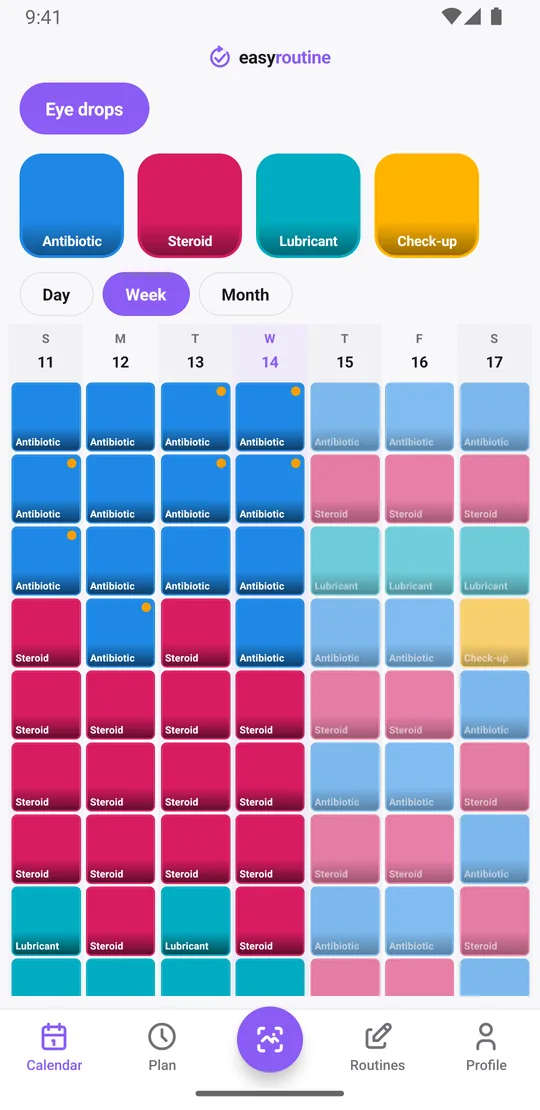
To see when you last used a drop, tap its tile at the top of the calendar. The calendar then shows only that activity, so the last tile is the last dose. The day and week views show every dose at its time, which answers "did I do the noon one?" at a glance.
Each log can carry a note and a flag. Write "late, 13:10" with an amber flag when a dose slipped, or note that a drop stung or that you started a new bottle. The log sheet shows your last few notes for that activity. Notes stay with the log and do not show on the calendar itself. If you have questions about a late or missed dose, ask your doctor or pharmacist.
Premium: up to four fixed times a day
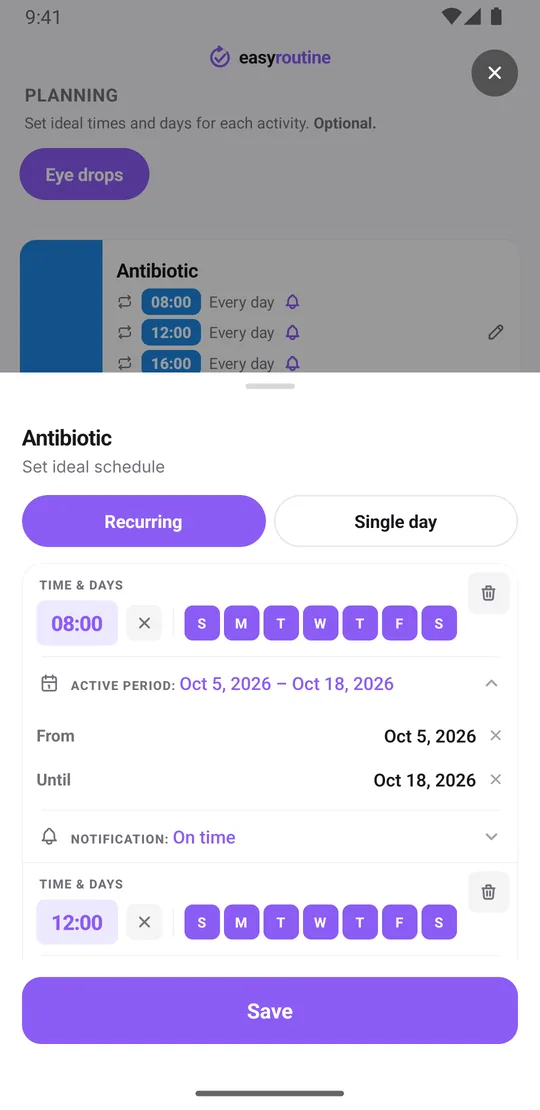
With Premium, open the Plan tab, tap an activity and add a Recurring time. Pick every day of the week and the time, then Add another time for the next dose. Each activity holds up to four recurring times, which covers the common four times a day schedule: 8:00, 12:00, 16:00 and 20:00, for example.
If your sheet asks for a gap between two different drops, give the second bottle times a few minutes later, such as 8:05 and 12:05. Each one then shows as its own planned entry.
Courses with an end date
Drops after an operation usually run for a set number of days. Give each recurring time a From and Until date, and the plan stops on its own when the course ends, so the antibiotic does not keep showing up after its last day. A drop that continues longer, like a steroid that runs for four weeks, gets its own dates.
If the doctor changes the schedule partway, from four times a day to two for example, set Until on the old times and add new times starting the next day. The follow-up appointment fits as a Single day plan on its date, with a reminder 30 minutes before.
Reminders at each dose time
Every timed plan can send a reminder: on time, or 5, 10, 15 or 30 minutes before. When it is time, the planned dose shows faded on the calendar until you log it. Tap it, save, and it turns solid. At the end of the day, anything still faded is a dose you did not log.
Scheduling and reminders are part of Premium. Logging, notes, flags, the photo scan and the calendar are free. How reminders work.
What EasyRoutine does not do
EasyRoutine is a log and a reminder, not a medical device. It does not know your medicine, check doses, warn about interactions or tell you what to do after a missed drop. It only remembers that you did a dose and when. For other medicine after an operation, see tracking medication after surgery. If you also wear lenses, the contact lens reminder works the same way.
Common questions
Can I get a reminder for eye drops four times a day?
Yes, with Premium. Each activity can have up to four recurring times, each with its own reminder on time or up to 30 minutes before.
Can I track left and right eye separately?
Yes. Make one activity per eye, or per eye and drop, such as Antibiotic left and Antibiotic right. Each keeps its own history and times.
Can the reminders stop when my course ends?
Yes. Give each recurring time an Until date. After that day the plan no longer shows on the calendar and no reminder is sent for it.
Is logging my drops free?
Yes. Logging, notes, flags, the photo scan and the calendar are free. Scheduled times and reminders need Premium.
Does the app tell me what to do if I miss a dose?
No. EasyRoutine gives no medical advice. Ask your doctor or pharmacist about missed or late doses.
Keep reading
Free on iPhone and Android. Sign in with Apple, Google or your email to start.