An app that reminds you to change your contact lenses
Was it two weeks ago that you opened this pair, or closer to three? With biweekly and monthly lenses, the day to switch is easy to lose. EasyRoutine keeps the date of every change you log for free, and with Premium it reminds you on the morning they are due.
Why the change date slips
Lenses do not tell you when they are done. They feel fine on day 14 and often on day 20 too, and the box on the shelf has no date on it. Unless you write it down somewhere, the replacement day becomes a guess.
What fixes it is simple: a reminder on the day the next pair is due, at the moment you usually put them in, and a record you can check in two seconds when you are not sure.
Set up a Lenses routine
Create a routine called Lenses and add the things you want to remember:
- New lenses for the replacement day
- New case if you swap the lens case every few months
- Lenses out as an evening reminder, if you tend to fall asleep with them in
If you open the left and right lens on different days, make them two activities, Left lens and Right lens, so each keeps its own date.
Log each change and see when you last did it
Logging is free. After putting in a new pair, tap + Log on the day and pick New lenses. If you gave the activity a photo of your lens box, you can also point the camera at the box in the Scan tab and EasyRoutine logs it. Changed them yesterday and forgot to log? Add it to that day afterwards.
To see when you last changed them, tap the New lenses tile at the top of the calendar. The calendar then shows only that activity, so the last tile is the last change. The month view shows a dot in the activity's color on each change day, so a late change stands out.
Add a note when you open a new box, like "New box, 2 pairs left", and a flag when something was off: amber for a pair that felt dry early, red for one you had to throw out. When you log the next change, your last few notes for that activity appear in the log sheet, a natural moment to see that it is time to reorder. Notes stay with the log and do not show on the calendar itself.
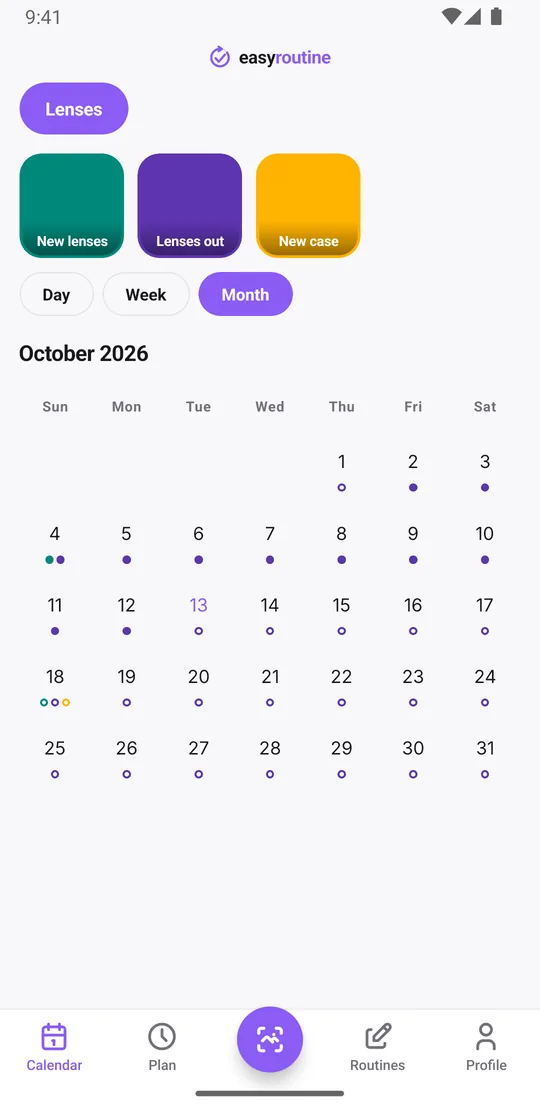
Premium: plan two-week and monthly change dates
EasyRoutine schedules repeat on weekdays, so there is no "every 14 days" or "every month" setting. Instead, you plan the change dates themselves.
With Premium, open the Plan tab, tap New lenses and add a single day plan for the next change, with a time and a reminder. Then add the following dates:
- Two-week lenses: a date every 14 days, for example every second Monday at 7:30
- Monthly lenses: the same date each month, such as the 1st at 7:30
Each activity holds up to 20 single-day plans. That covers about nine months of two-week lenses or more than a year and a half of monthly ones, entered in one sitting. If you prefer, add only the next date and plan the one after when you change, which keeps the cycle right if you switched a day early or late.
Daily lenses are simpler: give Lenses out a recurring time every day, such as 22:30, if you want a nudge at night.
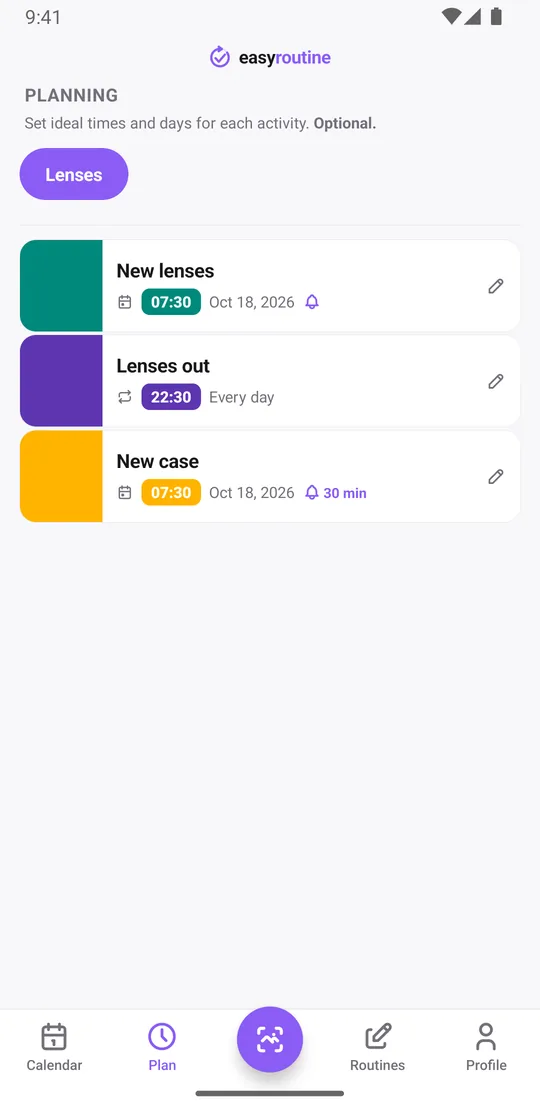
A reminder when you can act on it
Each timed plan can carry a reminder: on time, or 5, 10, 15 or 30 minutes before. The most useful time is when you are standing at the bathroom mirror anyway, so set the change for the time you usually put your lenses in. A reminder at 7:30 on change day means the fresh pair goes in instead of the old one. On change day, tap the faded New lenses plan on the calendar and save the Log Entry sheet, which opens with the planned time filled in.
The longest lead time is 30 minutes, so the app will not warn you days ahead that your box is running low. A note on each change helps with that (see above), or add a separate activity like Order lenses with its own date. A schedule left on "Any time" still shows on the calendar but cannot send a notification.
Scheduling and reminders are part of Premium. Logging, notes, the photo scan and the calendar are free. How reminders work.
What it does not do
EasyRoutine is a reminder and a log. It does not know your lens brand, tell you how long to wear them or give any eye care advice. Use the replacement schedule from your optician or the box; the app remembers it for you. If what you mostly want is the record side, see the contact lens replacement tracker. For other daily care habits, the flossing reminder works the same way.
Common questions
How do I remember when to change my contact lenses?
Add New lenses as an activity and plan the next change as a single day with a time and a reminder in the Plan tab. Scheduling and reminders are part of Premium.
Can I set a reminder every two weeks or every month?
Not as a repeating rule, because recurring schedules use weekdays. Add single-day plans for the change dates instead, up to 20 per activity, each with its own reminder.
Can I set a custom interval like every 14 days?
There is no interval setting. You enter each date yourself, which takes a minute for the next few months and lets you adjust when a change happens early or late.
How do I know when I last changed them?
Tap the New lenses tile at the top of the calendar to show only that activity: the last tile is your most recent change. The month view shows every change day at a glance.
Keep reading
Free on iPhone and Android. Sign in with Apple, Google or your email to start.