Dog flea, tick and heartworm prevention reminders
To keep your dogs on their monthly flea, tick and heartworm preventives, log every dose on the day you give it and plan the next dates ahead. EasyRoutine keeps that record for free, and with Premium it reminds you on each date. Your vet chooses the product and the schedule.
Why are monthly flea, tick and heartworm doses missed?
Monthly is the hardest rhythm to remember. It is too rare to become a habit and too frequent to feel like an event. With two dogs and two people in the house, each of you can easily assume the other one gave it. The questions that matter are simple: when did Rex last get his heartworm chew, did Mia's flea and tick dose go on this month, and who gave it?
What the vet and the label decide
Which product, which dose and how often are your vet's call. The box tells you how to give it. A few points from public sources are worth knowing:
- The FDA says year-round heartworm prevention is best, cites the American Heartworm Society's advice to give dogs 12 months of prevention and test them every 12 months, and notes that all heartworm preventives for dogs need a veterinarian's prescription. Most are given monthly as a topical liquid or an oral tablet, and one is an injection that only a vet can give, every 6 or 12 months (FDA: facts about heartworm disease).
- For fleas, the CDC advises treating pets year-round, talking to your vet about the right product, and always following the product instructions (CDC: preventing fleas).
- The FDA strongly recommends involving your vet when choosing a flea and tick product, making sure it matches your pet's species, life stage and weight class, following the directions exactly, watching your pet for side effects after applying it, and saving the packaging in case you need to report a problem (FDA: safe use of flea and tick products).
If a dose was missed or given late, call your vet and ask what to do rather than guessing. That call goes much faster when you know the exact date of the last dose.
How to organize flea, tick and heartworm prevention at home
- Use one record that both carers check before giving anything. A note on the fridge works until someone forgets to tick it.
- Create one entry per dog per product. "Did the dogs" does not tell you whether Mia got her chew.
- Write down the product and weight band from the box. Products are sold by weight class. If your dog has grown or lost weight, your vet decides whether a different one is needed. Having the band you bought in writing makes reordering and the next vet visit easier.
- Keep the box until the next dose, as the FDA suggests saving the packaging.
- Agree on a fixed day, such as the 1st of the month, so both of you know when a dose is due.
How to track each dog's preventive doses for free
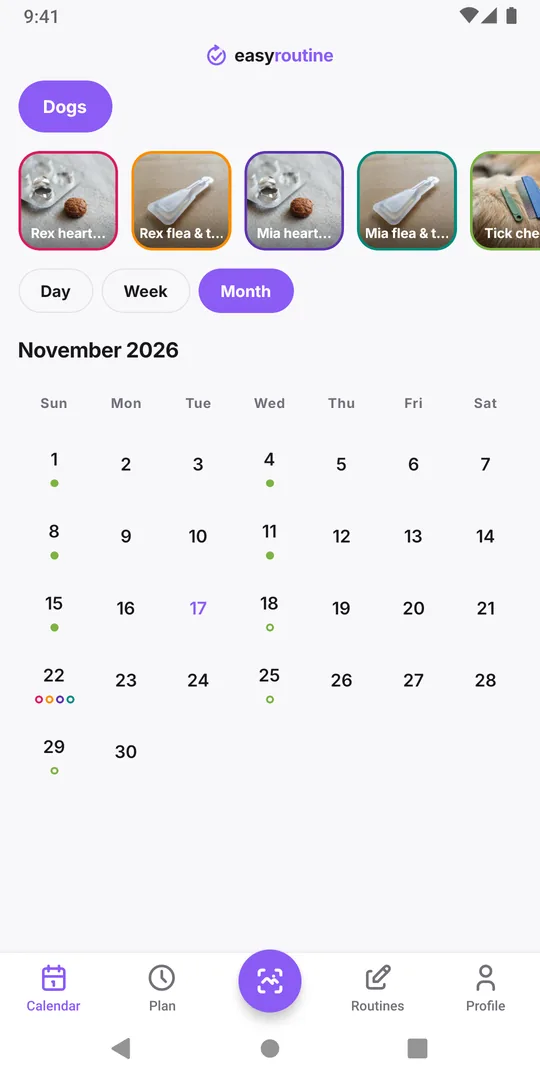
In EasyRoutine, create a routine called Dogs with one activity per dog and product: Rex heartworm, Rex flea & tick, Mia heartworm and Mia flea & tick. Add Tick check if your vet suggests checking after walks. When you give a dose, open today, tap + Log and select the activity. Both chews at breakfast can be logged together.
In the log's note, write the product name and the weight band exactly as printed on the box, plus who gave it. Flag a dose amber or red if the dog spat out the chew or you noticed something afterwards, so it stands out when you talk to the vet. EasyRoutine records when a dose was given, but it does not identify products, weights or doses, and it gives no advice. Open the Month view and the last entry for each activity answers "when was the last one?" in a second.
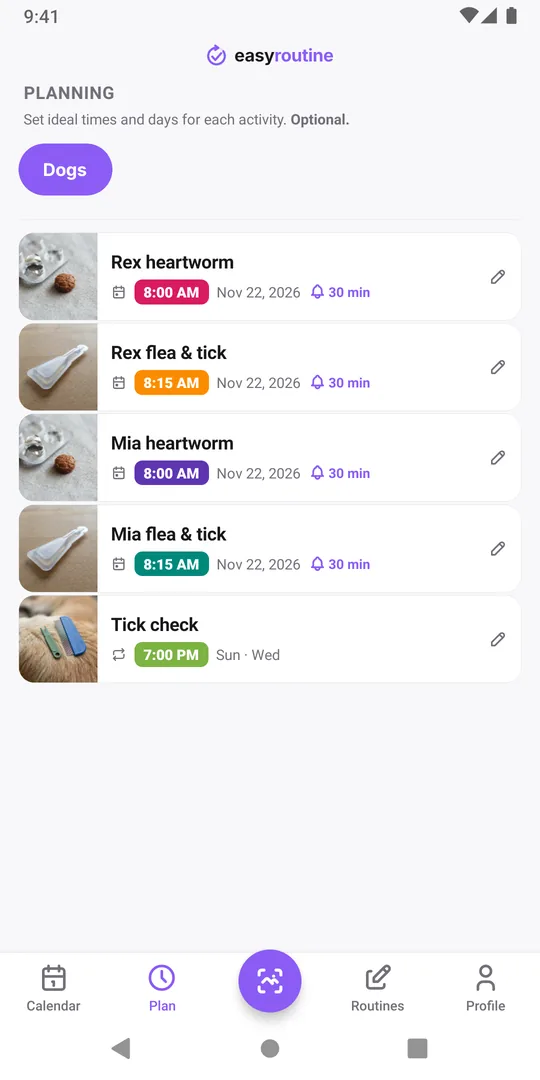
Plan the next doses on single dates (Premium)
Recurring schedules in EasyRoutine repeat on weekdays, and a monthly dose does not land on the same weekday each time, so there is no "every 30 days" or "1st of the month" rule. With Premium, add the doses as Single day plans instead: open the Plan tab, tap Rex heartworm and add the next dates, each with a time and a reminder, such as 1 December, 1 January and 1 February at 8:00. Each activity holds up to 20 single dates, so a full year fits, or you can add a few months at a time. If the product your vet prescribed runs on a different schedule, use the dates from its label instead.
A planned dose that has not been logged stays faded on the calendar, so either of you can see at a glance that Mia's flea and tick dose is still waiting. For a long-acting injection, plan the next vet appointment as a single date on its own activity. More about reminders.
How can two dog carers share one medication record?
The simplest setup is both of you signed in to the same EasyRoutine account, using the same email address, on your own phones. You see the same log, so whoever opens the app first sees whether today's dose is done. Both phones can also deliver reminders for the planned doses. Everyone signed in can edit or delete everything, so keep the account to people you trust.
Sharing the routine by link works differently: the other person gets a copy of the activity names, colors and photos only. Logs, notes, schedules and reminders never travel with it, so you would be keeping two separate records. For more on managing meals and medicines in a shared household, see the pet feeding and medication reminder guide.
Common questions
Does EasyRoutine tell me which flea, tick or heartworm product to use?
No. Your vet chooses the product, dose and schedule. EasyRoutine records when you gave each dose and can remind you on the dates you enter with Premium.
Can I set a dog flea and tick reminder for the same day every month?
Yes, by adding each monthly dose as a separate single-day plan with a reminder. Recurring schedules use weekdays rather than calendar dates. You can add up to 20 single-day plans per activity. Scheduling and reminders require Premium.
What should I do if I gave my dog a heartworm or flea treatment late?
Log the dose on the day you actually gave it, then contact your vet to ask what to do about the late dose and remaining dates. Move future plans if your vet tells you to count from the new date.
Is tracking flea, tick and heartworm doses free?
Yes. Logging, notes, flags and the calendar are free. Planning future dose dates and setting reminders require Premium.
Keep reading
Free on iPhone and Android. Sign in with Apple, Google or your email to start.