Pet care app for feeding and walks: has the dog been fed today?
Did someone already feed the dog, or is she just very convincing? EasyRoutine works as a simple pet care app: it logs every meal and walk in a few taps, so one look at today's calendar settles it before the dog gets a second breakfast.
Set up your dog care routine in the app
Create a routine named after your dog, or simply Dog, and add one activity for each thing you want to keep track of:
- Breakfast and Dinner
- Morning walk and Evening walk
- Brushing, flea treatment or anything else that comes up weekly
Separate activities for the morning and evening make the day easy to read. If Breakfast is logged and Dinner is not, you know exactly what is still missing. Give each activity its own color, and add a photo if you like (the food bowl, the leash) so the tiles are easy to tell apart.
Two pets? You can give each animal its own routine, so their days do not mix, or keep them in one routine with activities like "Luna breakfast" and "Milo breakfast". There is no limit on routines or activities on either plan.
Log a meal or a walk in a few taps
Back from the walk? Tap Log on the day, pick Morning walk and tap OK: it is logged with the current time. Fed the dog at the same time? Pick Breakfast too, and both are logged at once. Logging is free. With a Premium schedule (below), you can instead tap the faded Morning walk entry on the calendar: the Log Entry sheet opens with the planned time, so adjust it if needed and save.
The Log Entry sheet (tap any logged entry to open it) has room for a short comment and a flag. Write "ate only half" or "long walk in the park" and flag a log amber or red when something seems off. The next time you log that activity, your last few comments are shown, which helps you notice when the dog has been off her food for a few days. If you forgot to log, add it later at the time it actually happened.
Check whether the dog was already walked today
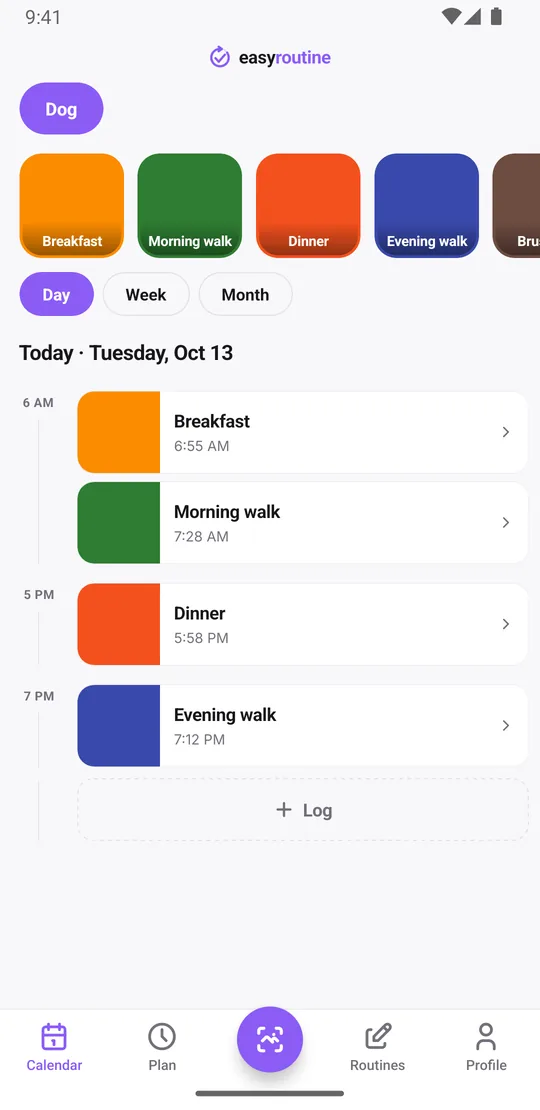
Open the day view. Today's meals and walks are listed by time. Solid tiles are the ones you logged, and faded entries are the ones still planned. If the 7:30 am walk is solid and the 7:00 pm walk is faded, the evening walk is still due.
Your logs sync across every phone or tablet signed in to your account, so the answer is the same on each of them. The week and month views show the longer pattern, for example which evenings the walk keeps getting skipped.
When was the last flea treatment?
Not everything in pet care happens at a fixed time. Add activities for the irregular jobs too, such as Flea treatment, Worming, Nail trim, Bath or Vet visit, and log each one on the day you do it. Forgot? Add it later to the day it actually happened.
When you need the date, tap that activity's tile at the top of the calendar. The calendar then shows only that activity, so the last tile is the last flea treatment. Switch to the month view for the longer pattern, up to four dots a day, and tap the tile again to see everything.
The note on each log is the place for details you would otherwise forget: the flea product you used, what the vet said, the groomer's name, or "nervous during nail trim" with an amber flag. Notes do not show on the calendar itself, but the log sheet shows your last few comments for that activity when you open it again, so last month's product name is right there.
If you gave the food bowl or the flea treatment box a photo, you can also log with the Scan tab: point the camera at it and EasyRoutine logs the matching activity with the current time. It only matches your own activities that have a photo. Logging, notes, flags, the scan and the calendar are all free.
Schedule feeding and walks twice a day
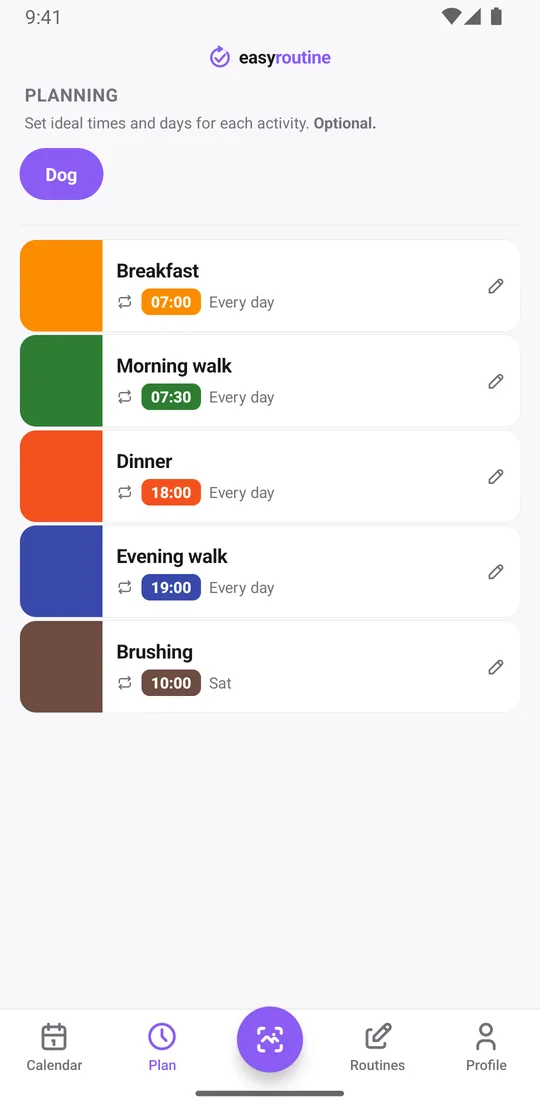
With Premium, open the Plan tab and give each activity its days and time. For a dog fed and walked twice a day, every day:
- Breakfast: every day at 7:00 am
- Morning walk: every day at 7:30 am
- Dinner: every day at 6:00 pm
- Evening walk: every day at 7:00 pm
- Brushing: Saturday at 10:00 am
Weekend times can differ. An activity can have up to four recurring time slots, so Morning walk can be 7:30 am on weekdays and 9:00 am on Saturday and Sunday. Planned meals and walks show as faded entries on the calendar until you log them. More about scheduling.
For jobs on a longer cycle, such as a monthly flea treatment, use Single day plans: add the next few dates, each with a time and a reminder if you want one. There is no "every 30 days" rule, but each activity can hold up to 20 single-day plans.
Get reminded at feeding time
Each timed slot can carry a reminder, on time or 5, 10, 15 or 30 minutes before. Set one on Dinner at 6:00 pm and your phone tells you it is feeding time even when you are still at your desk. Reminders are local notifications on your phone, so they arrive on time even without a connection. Scheduling and reminders are part of Premium. How reminders work.
If you also need to remember a pet's medication, see the pet feeding and medication reminder page.
What this pet care app does not do
EasyRoutine records that a meal or a walk happened and when. It does not measure portions, count steps on a walk, track your pet's weight or give care advice. Questions about diet or health belong with your vet.
Common questions
Can I track feeding and walking twice a day?
Yes. Add separate activities for the morning and evening meal and walk, then schedule each one every day at its time in the Plan tab. Logging is free; scheduling needs Premium.
How do I check whether the dog has already been walked today?
Open the day view. Walks you logged show as solid tiles, and planned walks that have not happened yet show faded.
How do I see when I last gave the flea treatment?
Log it as its own activity each time. Then tap its tile at the top of the calendar: the calendar shows only that activity, so the last tile is the last treatment. Logging and the history are free.
Can I get reminded at feeding time?
Yes, with Premium. Give the feeding activity a time and set a reminder on time or up to 30 minutes before.
Can I track two pets separately?
Yes. Give each pet its own routine, or use clearly named activities for each pet in one routine. There is no limit on routines or activities.
Does it work for cats and other pets, not just dogs?
Yes. You name the activities yourself, so a cat's feeding, a litter box clean or a rabbit's fresh hay work the same way as a dog's walks. The app only records that something was done and when.
Keep reading
Free on iPhone and Android. Sign in with Apple, Google or your email to start.