Recovery tracker after surgery: medication and exercises in one place
Did I take the evening dose? Did I do my physio exercises today, or was that yesterday? After surgery, days blur together. EasyRoutine keeps a simple record of each dose and each exercise session for the weeks you are recovering, so you can check instead of guessing.
A log and a reminder, nothing more
Before anything else: EasyRoutine is not a medical device, and it does not know your medication, your doses or your exercises. It records that you did something and when, and it can remind you at a time you set. What to take, how much and which exercises to do comes from your surgeon, physiotherapist or pharmacist. If you have questions about your recovery, ask them, not an app.
Medication and exercises in one app
Create a routine called Recovery and add one activity for each thing on your plan:
- Morning meds and Evening meds, one activity per dose time
- Physio, for the exercise session your physiotherapist gave you
- Short walk
- Dressing, if you look after a wound at home
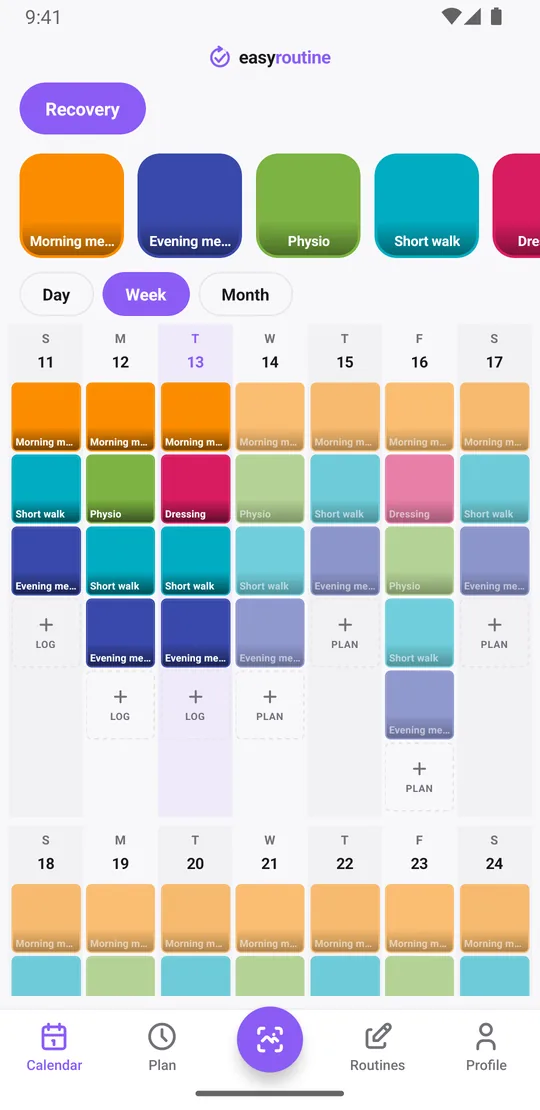
If you prefer, split it into two routines, Medication and Exercises. Either way it is one app, with each activity in its own color on the calendar. When you take a dose or finish a session, use the + Log button on the day and pick it; it is logged with the current time, and logging is free. With a Premium schedule you can also tap its faded planned entry and save the Log Entry sheet. If you forget, add the log afterwards for the right day and time. More on the medication tracker.
If you give an activity a photo, say the pill organizer for Evening meds or the exercise band for Physio, the free photo scan logs it when you point the camera at that object. It only matches your own activities that have a photo, and if it is not sure you pick by hand.
No sets or reps, just whether you did it
EasyRoutine works like a lighter workout log: it records that a session happened, not sets, repetitions, weights or range of motion. For most recovery plans that is the useful part: did I do today's exercises? If you want to remember a detail, add a short note, like "easier than Monday" or "stopped early, knee sore", and a green, amber or red flag. The note is plain text; it is not counted or charted. The log sheet shows your last few notes for that activity, which is handy to have with you at the next physio appointment. About the workout log.
Notes work for the other activities too: "changed after shower" on Dressing, "took it late" on Evening meds, "to the corner and back" on Short walk. Notes stay with the log and are not shown on the calendar itself.
See how the weeks are going
The week view shows a colored tile for each dose and session you logged. Planned ones you have not logged stay faded, so a faded "Evening meds" on Thursday tells you Thursday's evening dose was not logged. The month view shows the whole recovery period in one screen.
The Day streak in your Profile counts consecutive days with at least one log of anything in the app. It is not a measure of your recovery, and it is not tied to your plan. EasyRoutine does not judge progress; it shows what you logged.
For the quick question, when did I last change the dressing or do physio, tap that activity's tile at the top of the calendar. The calendar then shows only that activity, so the last tile is the last time you logged it.
Schedule it only for the weeks you are recovering (Premium)
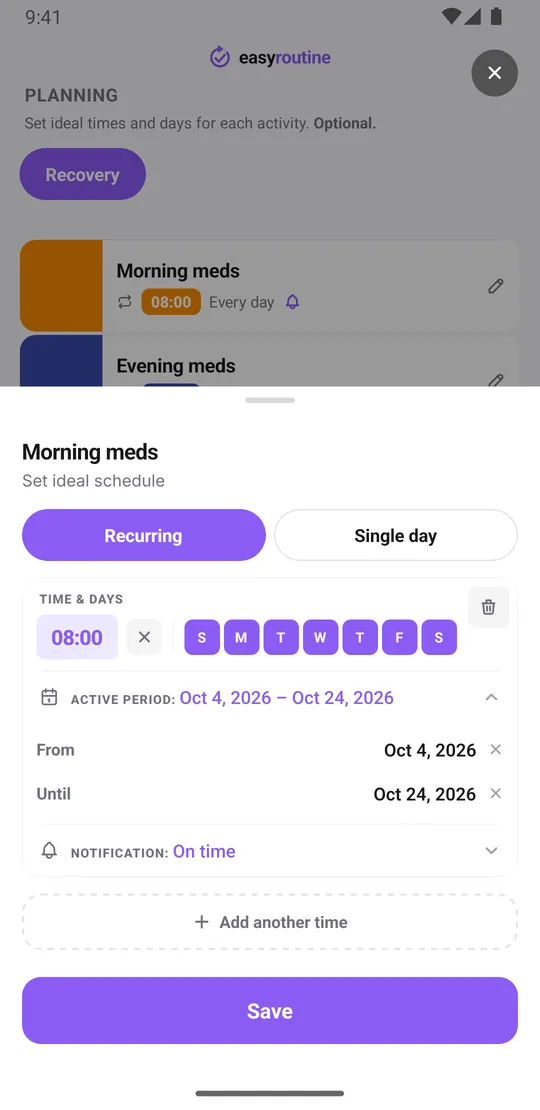
With Premium, open the Plan tab and give each activity its days and times. Each recurring schedule can also have a From and an Until date, so the plan runs only for your recovery period:
- Morning meds: every day at 8:00, from the day you get home until the date your doctor gave you
- Physio: Monday, Wednesday and Friday at 10:00, for the weeks your physiotherapist set
- Short walk: every day at 4:00 pm
When the end date passes, those entries stop appearing on the calendar. Your logs stay, so you can look back later. If your plan changes after a check-up, edit the dates or times. A one-off appointment, like a follow-up or stitches out, can go in as a single-day plan. More about scheduling.
Reminders at the time you set (Premium)
Each scheduled time can send a reminder, on time or 5, 10, 15 or 30 minutes before. That helps on days when you sleep at odd hours or lose track of time. Reminders are scheduled on your phone, so once set they fire even without a connection. Scheduling and reminders are part of Premium; logging is free. How reminders work.
When recovery is over
Archive the recovery activities instead of deleting them. Archived activities are hidden from the activity list, the scan and the reminders, but their logs stay on the calendar, and you can bring them back if you need them again. Deleting a routine deletes its logs too, so archive if you might want the record later.
Free and Premium
Logging, notes, flags, back-dating and the calendar are free, with a banner ad. Schedules with date ranges and reminders need Premium, a monthly subscription of $1.49 in the US (local prices elsewhere). You can subscribe for the recovery weeks and cancel in your App Store or Google Play settings afterwards. See pricing.
Common questions
Can I track both my medication and my recovery exercises in one app?
Yes. Add each dose time and each exercise session as an activity, in one Recovery routine or in two routines for medication and exercises. Logging takes a few taps and is free.
Can I set this up only for the weeks I am recovering?
Yes. Recurring schedules can have a start and end date, so they only appear during your recovery period. Scheduling is part of Premium.
Do I need to log sets and reps for my physio exercises?
No. EasyRoutine records that a session happened and when. You can add a short note if you want, but it does not track sets, reps or weights.
Can I see a simple streak of how my recovery is going?
The Profile shows a day streak, counting days in a row with at least one log of anything. The week and month views show which doses and sessions you logged. EasyRoutine does not assess your recovery. Tapping an activity's tile shows only that one, so you can see when you last did it.
Is EasyRoutine a medical app?
No. It is a general routine tracker, not a medical device. It does not know medications, doses or exercises. Follow your surgeon, physiotherapist and pharmacist.
Keep reading
Free on iPhone and Android. Sign in with Apple, Google or your email to start.