Birth control reminder app: did I take my pill today?
Did I take my pill tonight, or am I thinking of yesterday? EasyRoutine lets you log each pill with a tap, so the calendar answers that in a second. The log, notes and history are free; a daily birth control pill reminder at the time you choose is part of Premium.
A log and a reminder, not medical advice
What the app does is simpler: it records that you took your pill and when, with an optional note, and with Premium it reminds you at the time you pick. A phone can be muted, flat or left in another room, so treat the app as a helper, not your only safeguard.
Set it up once
- On the Routines tab, tap Add routine and name it, for example Birth control.
- Tap Add activity and add Pill. A photo of the pack is optional; with one, you can log later by pointing the photo scan at the pack.
- Add the other dates worth keeping: New pack for the day you start one, Refill for picking up the next pack or prescription, and Check-up if you want your appointment in the same place.
- When you take the pill, log it: tap "+ Log" on the day and pick Pill.
All of this is free. Keep the pill as its own activity, apart from the pack and refill entries, so its tiles show only pills and a missing day stands out.
Did I take it today, or yesterday?
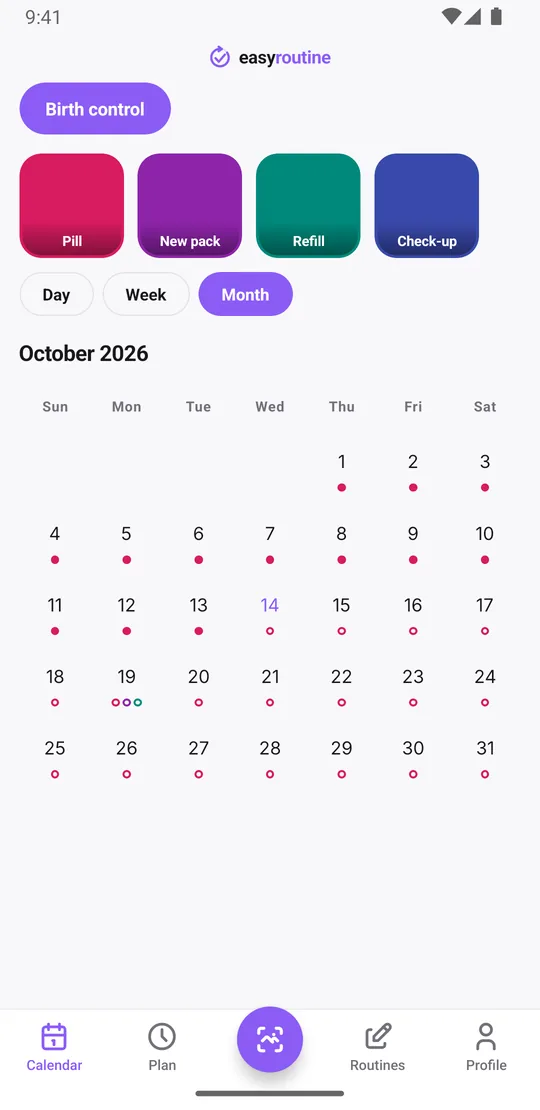
Open the calendar. In the week view, today shows a colored Pill tile once it is logged, at the time you logged it, and yesterday sits right next to it. That is the whole check, and it takes a second.
To see only the pill, tap its tile at the top of the calendar. The calendar then filters to that one activity, so the last tile is the last time you logged it. The month view shows the long pattern, up to four dots per day, which makes a day without a pill easy to spot.
Forgot to log but know you took it? Add the log for that day and set the time you actually took it. Logs can be added for past days, not future ones. If a day has no log and you are not sure what happened, the app cannot tell you; it only shows what was logged. For what to do next, check the leaflet or ask a pharmacist.
Notes for a new pack or a late pill
Every log can carry a note and a green, amber or red flag. Both are free, and they turn the log into something you can look back on:
- New pack: log New pack when you start one, with a note if the brand or pharmacy changed.
- Late pill: "Took it late, 11:10 pm", with an amber flag so these stand out later.
- Something to ask: a question or something you noticed, written down the day it happened, so you have it at your next appointment.
When you log, the log sheet shows your last few notes for that activity, so you see at once when you last started a pack or took a pill late. Notes are not shown on the calendar itself; tap a log to read its note. What each flag color means is up to you.
Premium: a daily pill reminder at your time
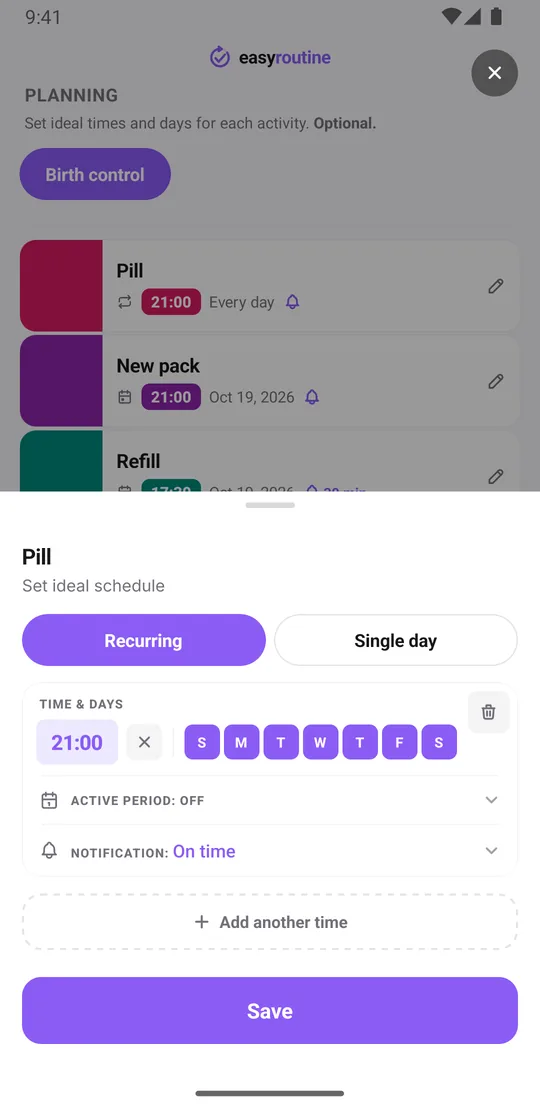
With Premium, open the Plan tab, pick Pill and under Recurring set your time, for example 21:00, and tap all seven weekdays. Then choose the Notification: on time, or 5, 10, 15 or 30 minutes before. The reminder appears as a notification on your phone, and tapping it opens the routine.
Every day's pill then shows as a faded planned entry until you log it, so tonight's open pill is easy to see. Tap the faded entry and the Log Entry sheet opens with the planned time filled in; change it if you took the pill at another time, then save. Reminders already scheduled on the phone still go off without an internet connection.
The schedule repeats on the weekdays you choose. It does not count the days in a pack. If your pill has break days, set the schedule to match your leaflet: a recurring time can have a start and end date (From and Until), and one activity can hold up to four recurring times. More on how reminders work on the reminders page.
Refills and new packs as single dates
A refill does not fall on the same weekday every week, so give it a Single day plan instead: in the Plan tab, pick Refill, add the date you want to pick up the next pack, set a time and a reminder. Do the same for a check-up. One activity can hold up to 20 single-day plans, so you can add the next few dates ahead. When it is done, log it, and the planned entry turns into a real one.
Without Premium you can still log every refill and every new pack, so tapping the Refill tile always tells you when you last picked one up. For other medicines next to the pill, see the daily medication checklist. Plans and prices are on the pricing page.
Common questions
Is EasyRoutine a free birth control reminder app?
Partly. Logging your pill, notes, flags, the calendar and the photo scan are free, with a banner ad. The reminder itself sits on a schedule, and scheduling and reminders are part of Premium, which costs $1.49 a month in the US.
What should I do if I missed a pill or took it late?
Follow the leaflet that came with your pill, or ask a pharmacist or doctor. EasyRoutine gives no medical advice. It shows what you logged and when, and you can add a note and an amber flag to the late one.
How do I check if I took my pill yesterday?
Open the calendar in week view and look at yesterday, or tap the Pill tile at the top to filter the calendar to just your pill. A colored tile means it was logged, with the time.
Does the app know my pill type or pack length?
No. It does not know about medicines, pack lengths or break days. It records that and when you logged something, and with Premium it reminds you on the weekdays and dates you schedule.
Keep reading
Free on iPhone and Android. Sign in with Apple, Google or your email to start.