Keep your habit streak when you switch phones
Will my streak survive a new phone? In EasyRoutine, yes. The streak is worked out from logs stored in your account, not on the phone, so it is there as soon as you sign in on the new one. The only thing that breaks it is a whole day with nothing logged.
Why your streak is not stored on the phone
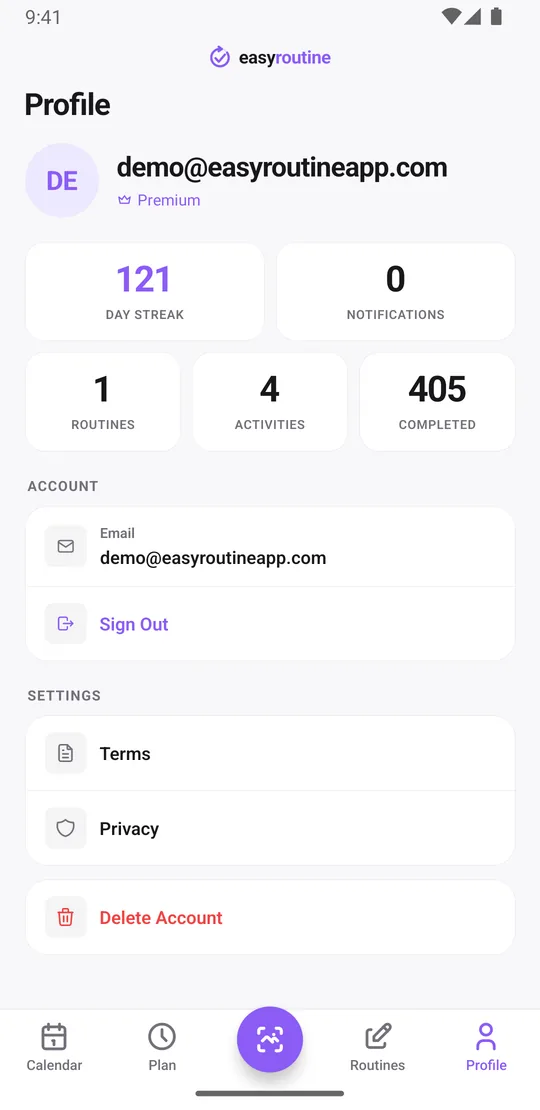
The Day streak on the Profile tab is not a number your phone keeps. It is counted from your logs: the days in a row, back from today, on which you logged at least one activity. If you have not logged anything yet today, it counts back from yesterday, so your morning does not start with a broken streak.
Those logs live on EasyRoutine's servers, in your account. Your old phone only shows them. A new phone signed in to the same account shows the same logs, so it counts the same streak. There is no streak file to copy and no backup to restore. How sign-in and sync work.
Switch phones without losing a day
- On the old phone, open the Profile tab and note the email address of your account, and remember how you signed in: Apple, Google or an email code.
- Log today's activities as usual. One log is enough to count the day.
- Install EasyRoutine on the new phone from the App Store or Google Play.
- Sign in with the same method and the same email address. With an email code you type the 6-digit code sent to your inbox; there is no password.
- Open the Profile tab on the new phone and check that the Day streak matches.
What comes along, and what the new phone sets up again
Everything you logged is part of the account: routines, activities and their photos, schedules, and every log with its note and its red, amber or green flag. Scroll back on the calendar and the weeks look exactly as they did on the old phone.
Two things belong to the phone itself:
- Reminders. They are scheduled locally on each phone. After you sign in, EasyRoutine schedules your reminders on the new phone from your saved schedules and asks for permission to send notifications. Allow it, or the reminders stay silent.
- The app store purchase. Premium is linked to your EasyRoutine account and is active once you sign in. If it does not show, open the Premium screen and tap Restore purchases while signed in to the store account you subscribed with.
Before you hand on or reset the old phone, sign out on its Profile tab. Signing out also clears its reminders, so you do not get every alert twice.
If the old phone is lost or broken first
Nothing needs to be rescued from the lost phone, because nothing important was only on it. Install EasyRoutine on the replacement, sign in with the same account, and your routines and logs are back.
If you spent a day or two without a phone, the streak will show that gap. When you really did your routine on those days, log it afterwards: open the past day on the calendar, tap + Log, pick the activities you did, then tap each new entry and set the time you did it (past days start at 12:00). Because the streak counts days that have a log, the filled-in days close the gap. Only add what you actually did; a streak is only useful when it is honest.
The same applies if switching day is spent without internet. EasyRoutine needs a connection to log, so add the day's entries once you are back online, with the time you did them.
A streak that rewards showing up
The streak counts any activity, not one in particular, and it ignores schedules. Logging your morning vitamin on switch day keeps it alive even if the evening walk waits until tomorrow. There is no grace day: a day without a single log resets it.
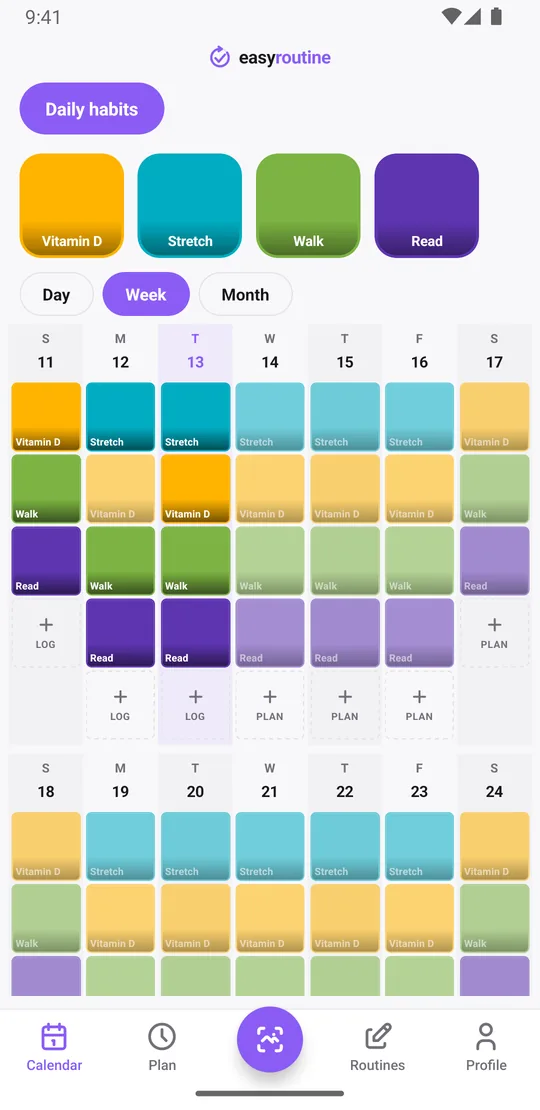
For the detail behind the number, use the calendar. The week view shows which activity happened on which day, and the month view shows the longer run. More about the calendar and streaks.
Common questions
Will I lose my streak if I get a new phone?
No. The streak is counted from the logs in your EasyRoutine account. Sign in on the new phone with the same account and it shows the same streak. It only resets if a whole day passes with nothing logged.
How do I move my routines to a new phone?
You do not move them yourself. Install EasyRoutine on the new phone and sign in with the same method and email address as before. Routines, activities, photos, schedules and logs load from your account.
Do I need to sign in again on the new phone?
Yes, once. Use Apple, Google or an email code, the same way you signed in on the old phone. Sign in with Apple is only available on iPhone.
What if I lose my phone before I get to switch?
Your data is in your account, not on the lost phone. Sign in on any new phone to get it back. If you missed logging for a day or two while you had no phone, you can add those logs afterwards for the days you really did your routine.
Is syncing to a new phone a Premium feature?
No. Sign-in and sync are free. Premium adds schedules, reminders and removes ads, and it follows your account to the new phone.
Keep reading
Free on iPhone and Android. Sign in with Apple, Google or your email to start.