Plant watering app: know when you last watered each plant
When did I last water the fern? EasyRoutine works as a plant watering tracker: you log each plant when you water it, for free, and the calendar answers that question at a glance. With Premium you can also set when each plant should be watered and get a reminder on its days.
Set up the plant watering app: one activity per plant
Create a routine called Plants and add each plant as its own activity. A photo of the plant makes the tile easy to spot, and EasyRoutine can suggest a name from it. Give each plant a color so the calendar reads at a glance.
Keeping one activity per plant matters because plants do not share a schedule. The fern dries out twice a week, the monstera once, and the snake plant barely ever. A single "Water plants" task cannot tell you which of them you actually watered.
Free: log every watering
After watering, open the day on the calendar, tap + Log and pick the plant, or tick several plants at once after one watering round. Today's waterings get the current time. Forgot yesterday? Logs can be added for any earlier day and time, so the record stays honest.
If you gave your plants photos, you can also open the Scan tab and point the camera at the pot. The scan matches what it sees against your own activities that have a photo and logs the one it recognizes. It does not identify plant species and only knows the plants you added. Plants that look alike, like two pothos, are easier to log by hand. How the photo scan works.
All of this is free, with no limit on plants or logs.
Free: see when you last watered each plant
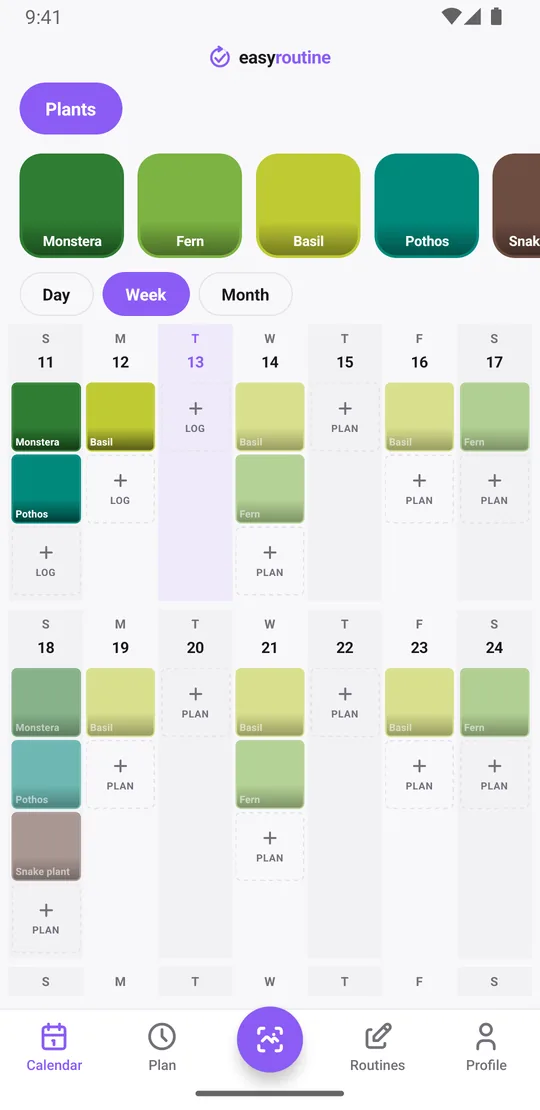
The week view shows a colored tile for every plant on the day you watered it, so "did I water it?" takes one look. Tap a plant's tile at the top to show only that plant, and the calendar becomes its watering history: the last tile is the last time it got water. The month view shows the longer pattern, which helps when a plant starts drooping and you wonder whether it gets too much water or too little.
Free: notes on what each plant got
Every watering can carry a note and a green, amber or red flag. Things worth writing down for plants:
- fertilizer, and which one you used
- repotting, with the new pot size or soil
- a move to a brighter or shadier spot
- yellow leaves, brown tips, pests or new growth
Flag green when a plant thrives, amber when it droops, red when something is clearly wrong. When you open the log sheet for a plant, it shows your last few notes for it, so before watering the fern you can see that you fed it two weeks ago and spotted brown tips last Saturday. Notes are not shown on the calendar itself; they live with each log.
If fertilizing or misting has its own rhythm, give it its own activity, like Fertilize or Mist fern, so its last date is one tap away instead of buried in notes. Balcony or office plants can live in a second routine, so the windowsill at home stays easy to read.
Premium: set when to water each plant
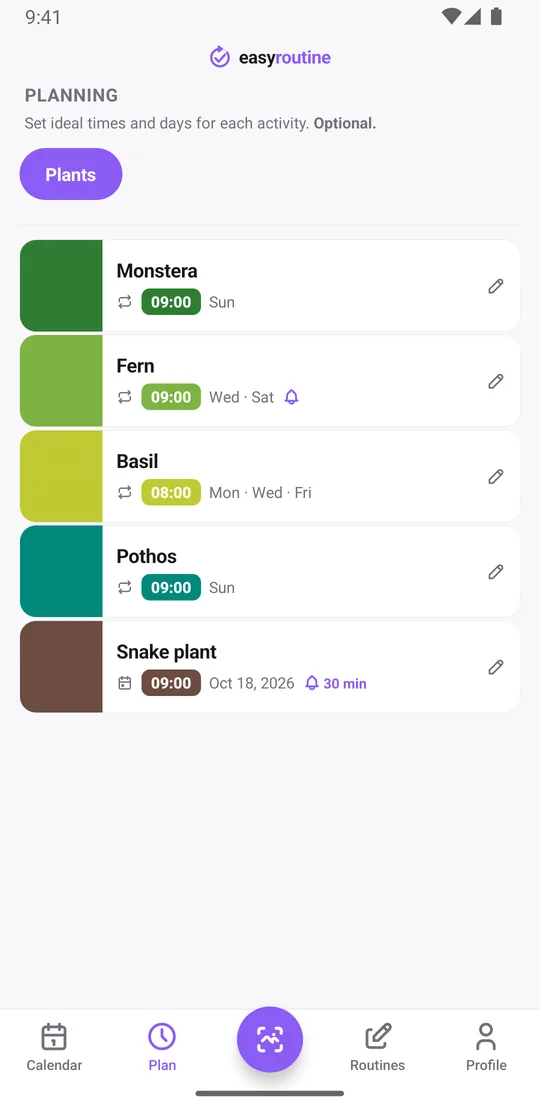
With Premium, open the Plan tab and pick the weekdays and the time for each plant:
- Fern: Wednesday and Saturday at 9:00
- Monstera and pothos: Sunday at 9:00
- Basil on the windowsill: Monday, Wednesday and Friday at 8:00
Planned waterings show as faded entries on the calendar until you log them, so a faded fern on Saturday means it still waits. Tap the faded entry after watering and save: the planned time is already filled in.
Schedules repeat on weekdays, not on a count of days. For a plant you water every three weeks or so, add a single-day plan for the next watering date instead, then plan the following one when you water it. Each activity can hold up to 20 of those dates. More about scheduling.
Premium: get reminded only on the days a plant needs water
Each scheduled time can carry a reminder, on time or 5, 10, 15 or 30 minutes before. Because the reminder belongs to the plant's schedule, Saturday morning reminds you about the fern and nothing else. No daily nagging for plants that do not need it. Premium also removes ads. How reminders work.
What it does not do
EasyRoutine is a log and a reminder. It does not know your plant species, measure soil moisture or tell you how often to water. Those decisions stay with you, or with the label that came with the plant. What it does well is remember what you did, so you can stop guessing.
Common questions
Can I track when I last watered each plant for free?
Yes. Add each plant as its own activity and log it when you water it. The calendar shows every watering, and tapping a plant's tile shows only that plant's history. Logging and the calendar are free with no limit on plants.
How do I set different watering days for each plant?
With Premium, open the Plan tab and give each plant its own weekdays and time. Plants on longer cycles can use single-day plans for their next watering date.
Does the app tell me how often to water each plant?
No. It does not know plant species or measure soil moisture. You decide the watering days, from the plant label or your own experience, and the app remembers what you did and, with Premium, reminds you.
Can I get a reminder only on the days a plant needs water?
Yes, with Premium. Reminders are attached to each plant's schedule, so you only hear about the fern on fern days.
Can I note fertilizer, repotting or pests?
Yes, for free. Add a note and a green, amber or red flag to any watering log. The log sheet shows your last few notes for that plant. If fertilizing has its own rhythm, give it its own activity.
Can I log a watering with a photo?
Yes, if the plant has a photo in the app. Point the camera at it in the Scan tab and EasyRoutine logs the matching plant. It recognizes your own plants, not plant species in general. The scan is free.
Keep reading
Free on iPhone and Android. Sign in with Apple, Google or your email to start.