Plant watering reminder: an app that tells you when each plant is due
A plant rarely dies from one missed watering. It dies from three, because nothing told you it was due. EasyRoutine keeps a free record of every watering, so you can see when each plant last got water, and with Premium it sends a plant watering reminder at the time each plant is due, on that plant's days only.
Why a single daily alarm does not work for plants
A phone alarm that says "water the plants" every evening goes off on days when nothing needs water, so you learn to swipe it away. Then, on the day the fern really is dry, you swipe it away too.
Plants need different things on different days. A calathea wants water twice a week, a fiddle leaf fig once, an orchid every ten days or so, and a cactus about once a month. A reminder only helps if it fires for the right plant on the right day, and stays quiet the rest of the time.
Add each plant as its own activity
In EasyRoutine, create a routine called Plants and add every plant as a separate activity. A photo and a color make each plant easy to find on the calendar. There is no limit on how many plants you add, on the free plan or on Premium.
One activity per plant is what makes the reminders precise. The reminder belongs to the plant, so it can name the plant: the notification tells you that Calathea is coming up in Plants. Tapping it opens the routine, ready to log.
Log each watering and see when it last happened
Logging is free. Watered the calathea? Tap + Log on the day and pick it, or tick every plant from one watering round at once. If a plant has a photo, you can also point the camera at it in the Scan tab and EasyRoutine logs the matching plant. Forgot to log? Add the watering to an earlier day and time afterwards, so the record stays accurate.
To answer "when did I last water the fig?", tap the fig's tile at the top of the calendar. The calendar then shows only that plant, so the last tile is the last watering. Switch to the month view to see the longer rhythm, like whether the cactus really got water only once in the past few weeks.
Note the fertilizer, repotting and how the plant looks
Every log can carry a comment and a green, amber or red flag. Write down what you will want to know next time:
- "Fertilizer, half strength" or "repotted into a 20 cm pot"
- "Watered from below" or "moved to the east window"
- An amber flag for yellow leaves, a red one for pests
When you log the next watering, the Log Entry sheet shows the last few comments for that plant, so you see when you last fed it before you reach for the fertilizer again. Comments stay with the log; they do not show on the calendar itself.
Premium: set up a plant watering reminder for each plant
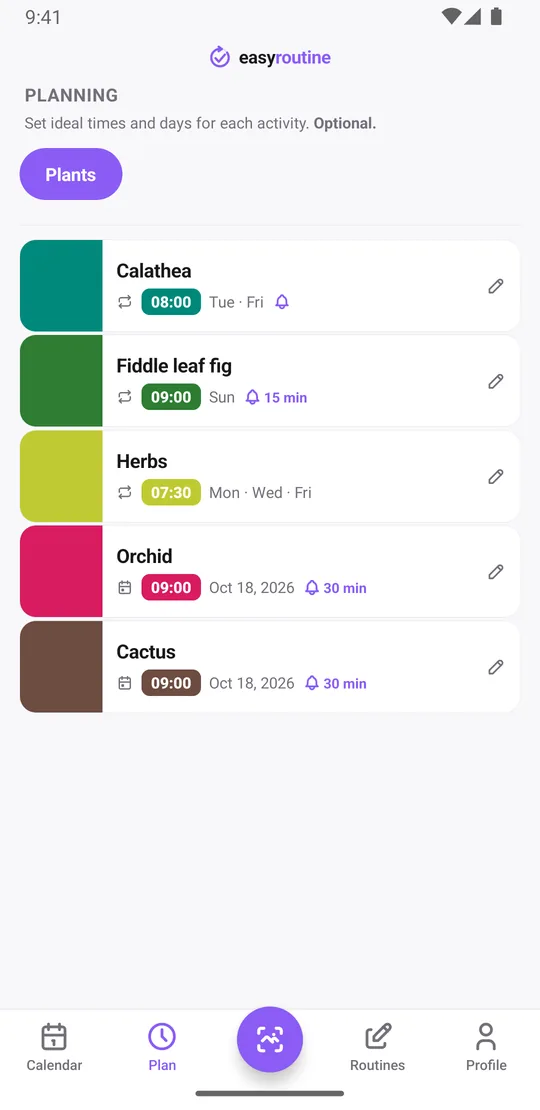
With Premium, open the Plan tab, tap a plant and add a time with the weekdays it should repeat on. Then choose when the reminder goes off: on time, or 5, 10, 15 or 30 minutes before.
- Calathea: Tuesday and Friday at 8:00, reminder on time
- Fiddle leaf fig: Sunday at 9:00, reminder 15 minutes before
- Herbs on the windowsill: Monday, Wednesday and Friday at 7:30
A reminder needs a time. If you leave a schedule on "Any time", the plant still appears on those days, but no notification is sent.
Schedules repeat on weekdays, not on a number of days, so there is no "every 3 days" setting. For a plant on a longer or uneven cycle, like the orchid or the cactus, add a single day plan for the next watering date with a time and a reminder. Each plant can hold up to 20 of those dates, so you can plan the next few waterings at once and adjust them as the seasons change. More about scheduling.
Log from the reminder and spot what you missed
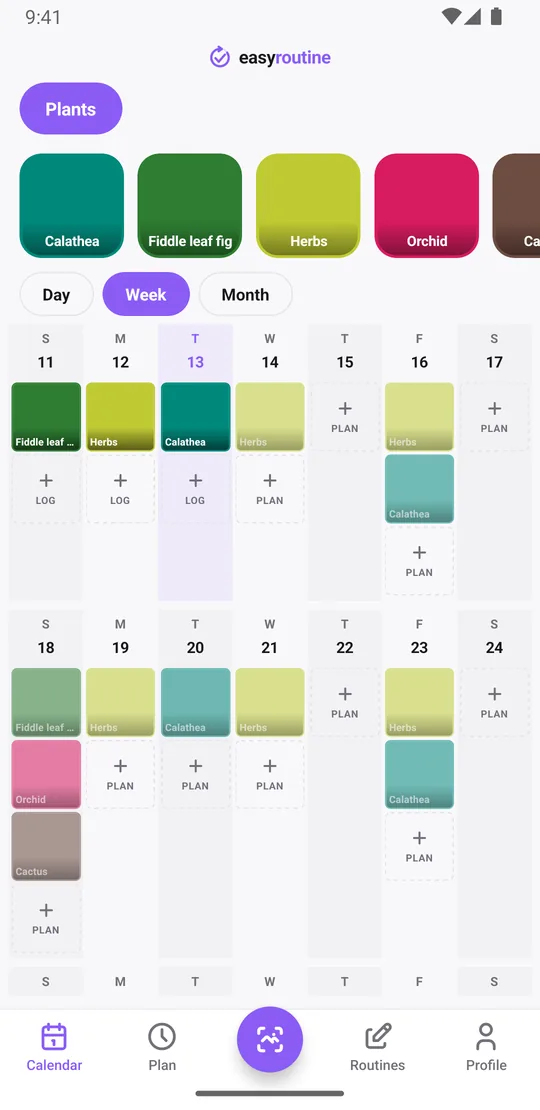
When the reminder goes off and you have watered, tap the plant's faded planned entry on the calendar. The Log Entry sheet opens with the planned time filled in; save it, or adjust the time first.
A planned watering shows on the calendar as a faded entry until you log it. Once you log it, it becomes a solid tile in the plant's color. So if Friday comes and goes and the calathea entry is still faded, that is your missed watering, visible at a glance in the week view.
The app does not send a second reminder or a separate "missed" alert. The faded entry simply stays there, which is usually enough: when you open the app the next morning, you see what still waits.
Good to know about plant watering reminders
- Reminders are local notifications on your phone. The app asks for notification permission the first time it has a reminder to schedule.
- Reminders that are already scheduled still go off without an internet connection. Changing a schedule needs a connection.
- Scheduling and reminders are part of Premium. Logging, the calendar and the photo scan are free.
- EasyRoutine does not know plant species or soil moisture and does not tell you how often to water. You pick the days; the app remembers them for you.
If what you mostly want is a record of which plant got water when, read the plant watering tracker guide. It covers the logging side in more detail.
Common questions
How do I get reminded to water my plants on the right days?
Add each plant as its own activity, then give it weekdays, a time and a reminder in the Plan tab. The reminder only fires on that plant's days. Scheduling and reminders are part of Premium.
Can I track watering for more than one plant?
Yes. Add as many plants as you like, each with its own schedule and reminder. There is no limit on activities on either plan. Tap a plant's tile at the top of the calendar to see only its waterings: the last tile is the last time it got water.
Can I set a reminder every 3 days?
Not as a repeating rule. Recurring schedules use weekdays, such as Monday and Thursday. For other gaps, add single-day plans for the next watering dates, up to 20 per plant, each with its own reminder.
Will it show me if I forgot to water a plant?
Yes. A planned watering stays faded on the calendar until you log it, so a missed watering is easy to spot. The app does not send an extra alert about it.
Do I need Premium for plant reminders?
Yes. Reminders are set inside a schedule, and scheduling is part of Premium. Logging waterings, adding comments and flags, and seeing them on the calendar are free.
Do I need a sensor or device in the pot?
No. Reminders come from the app on your phone, based on the days and times you set. EasyRoutine does not connect to sensors or smart pots.
Keep reading
Free on iPhone and Android. Sign in with Apple, Google or your email to start.