Tracking habits in a spreadsheet vs an app
A spreadsheet can track anything, as long as you open it, find the right row and type the date every time. EasyRoutine replaces that upkeep with a few taps on your phone, but a spreadsheet still wins if you need numbers, charts or a shared file.
What a spreadsheet does better
A spreadsheet is a fine habit tracker for some people, and it is fair to say where it beats an app:
- Numbers: weights, reps, milligrams, minutes. EasyRoutine records that and when you did something, plus a note. It does not store amounts.
- Charts and formulas: a spreadsheet can graph your progress and compute averages. EasyRoutine has no charts or completion percentages.
- Sharing: a shared sheet lets a coach, partner or family member see and edit the same data. EasyRoutine has no sharing; your data is visible only to you.
- Export and control: you can download, copy or move a spreadsheet any time. EasyRoutine has no export in the app.
- A big screen: if you track at your desk, a spreadsheet on a computer is comfortable. EasyRoutine is a phone app only, with no web version.
If you need any of these, keep the spreadsheet, or use it next to the app.
Where the upkeep adds up
The problem with a spreadsheet habit tracker is rarely the first week. It is the third month. Every entry means opening the file, scrolling to today, finding the right column and typing. On a phone, tapping into tiny cells is fiddly, so entries pile up until the evening or get skipped. Over time you add tabs, fix formulas and copy last month's layout forward.
And a spreadsheet does not tell you anything on its own. It will not remind you at 8:00, and it will not show you at a glance what is still missing today.
Log with a few taps instead of typing in a cell
In EasyRoutine you set things up once: a routine (like Supplements) with an activity for each thing you track (Vitamin D, Magnesium, Omega-3). After that, you log with the Log button on a day: pick the activity, and the date and time are filled in for you (the current time today, 12:00 on a past day). Tap the logged entry to change the time or add a comment or a red, amber or green flag. With a Premium schedule, you can also tap a faded planned entry and save it. How it works.
A note can hold what you would have typed into an extra column, as text: "20 min, easy pace" or "new brand". The log sheet shows the last few notes for that activity, but the app does not add them up or chart them.
A few things that are faster than a spreadsheet:
- Several at once: the log button on a day lets you tick your morning supplements together.
- Back-dating: forgot yesterday? Add the log to yesterday at the right time.
- Photo scan: give an activity a photo, like your vitamin bottle, and you can log it by pointing the camera at it in the Scan tab. The scan only knows your own activities that have a photo, and it runs when you start it, not in the background. How the photo scan works.
A calendar instead of rows and columns
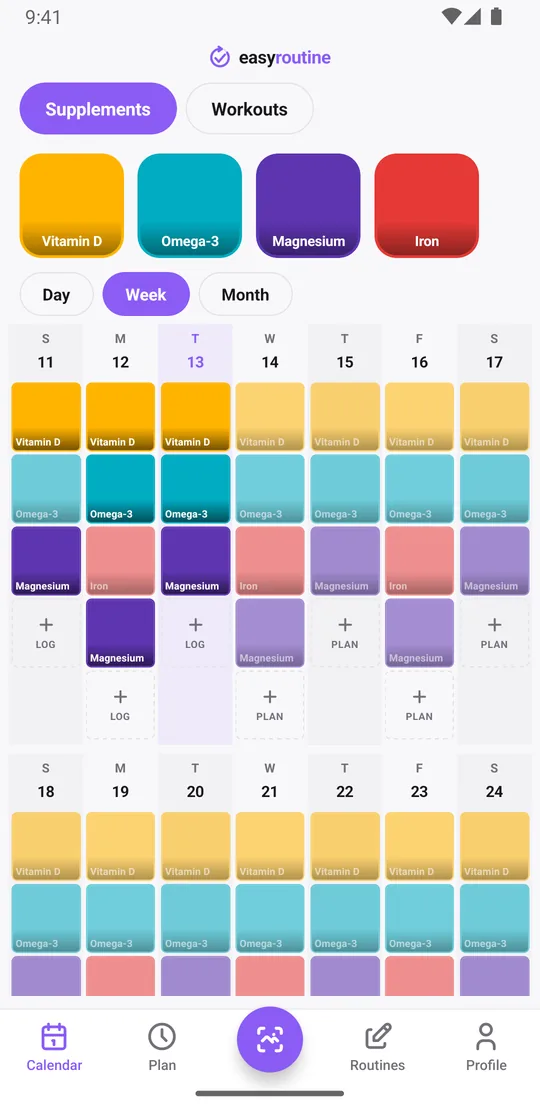
Instead of a grid of cells, the Calendar tab shows Day, Week and Month views. Each logged activity appears as a colored tile on its day, so a gap is easy to spot. The calendar shows one routine at a time, and you can switch between routines with a tap, for example from Supplements to Workouts. You can track as many routines as you like on either plan. More about the calendar.
Where a spreadsheet needs a filter to find the last date, tap an activity tile at the top of the calendar: the calendar then shows only that activity, and the last tile is the last time you did it.
Reminders and schedules a spreadsheet cannot do
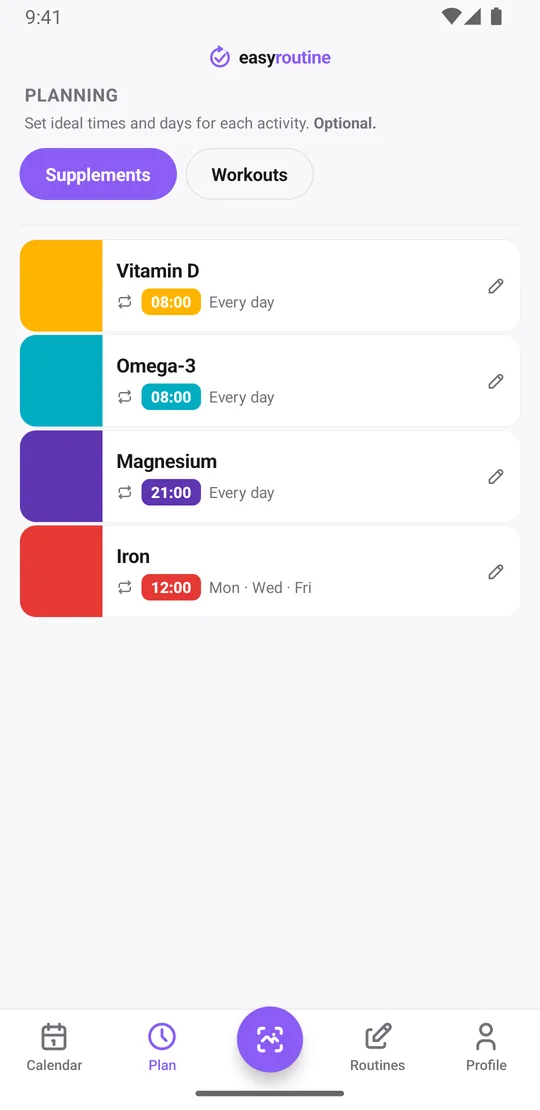
With Premium, the Plan tab lets you give each activity its own weekdays and time: Vitamin D every day at 8:00, Magnesium at 21:00, strength training on Monday and Thursday at 18:00. You can also plan single dates and set an active period with a start and end date. Each timed slot can send a reminder on your phone, on time or 5, 10, 15 or 30 minutes before. Planned entries you have not logged yet show faded on the calendar. Scheduling and reminders.
Scheduling and reminders are part of Premium. Logging, the calendar and the photo scan are free.
Does it sync like a shared spreadsheet?
It syncs across your own devices, not with other people. Your routines and logs are stored in your EasyRoutine account, so the same data shows up on every phone where you sign in, iPhone and Android alike. You sign in with a one-time code sent to your email, with Google, or with Apple on iPhone. Sign-in and sync.
Because everything lives in your account, switching devices does not lose your history: sign in on the new phone and it is there. The app does need an internet connection to work.
What about my existing spreadsheet?
There is no import. If you want some history in the app, you can add logs to earlier dates by hand, but most people start fresh and keep the old file as an archive.
Who should choose which
Stay with a spreadsheet if you track amounts, want charts, or share the data with someone. Choose EasyRoutine if what you really want to know is "did I take it today?" and you are tired of maintaining the file. Some people use both: the spreadsheet for the numbers, EasyRoutine for the daily check-off.
Common questions
Why use an app instead of a spreadsheet I already have?
Less upkeep. Logging takes a few taps with the date and time filled in, the calendar shows gaps at a glance, and with Premium you get schedules and reminders that a spreadsheet cannot send.
Can I log from my phone as easily as typing in a cell?
Easier. You tap Log on the day and pick the activity instead of finding a row and typing. You can also log several activities at once or log by scanning an activity's photo.
Does it sync like a shared spreadsheet would?
It syncs between your own iPhone and Android devices through your account. It does not share data with other people.
Will I lose my data if I switch devices?
No. Your data is stored in your account, so signing in on a new phone brings everything back.
Can I import my spreadsheet history?
No, there is no import. You can add earlier logs by hand if you want some history in the app.
Keep reading
Free on iPhone and Android. Sign in with Apple, Google or your email to start.